2. Description of the U46MK2
2.1. Front Panel
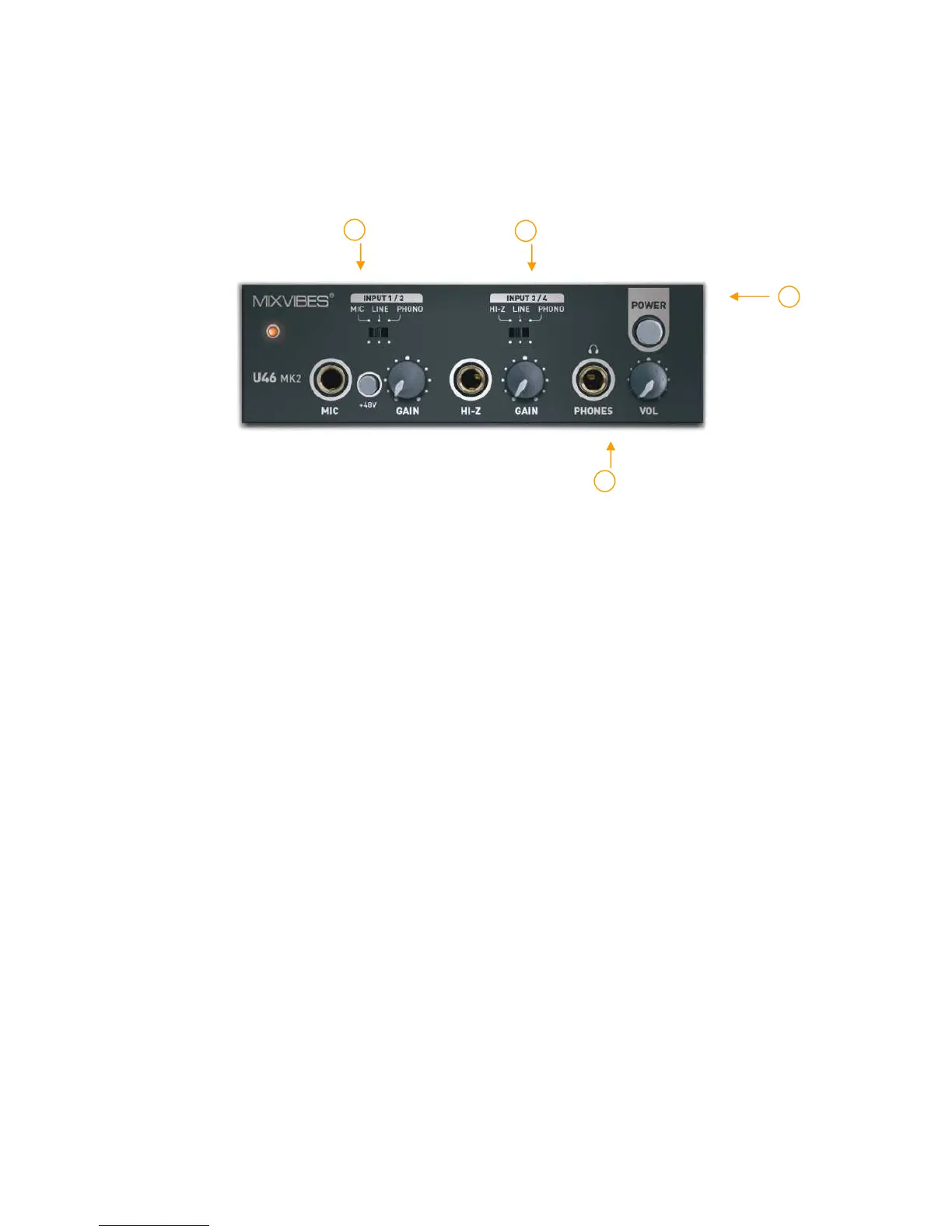
(1) Channel 1/2 input connector
- Input source (MIC/LINE/PHONO) selector: This is where you select input sources of
channel 1/2.
- MIC input connector: Connect your Microphone to this Balanced 1/4” connector.
- +48V Phantom power switch: Supply +48V DC phantom power to input channels 1/2
simultaneously by pressing the button
- Gain control for MIC input: Control input level of microphone
(2) Channel 3/4 input connector
- Input source (Hi-Z/LINE/PHONO) selector: This is where you select input sources of
channel 3/4.
- Hi-Z input connector: Connect an electric guitar or bass guitar to this unbalanced 1/4”
connector. Only unbalanced 1/4” phone jack connection is available for this setting.
- Gain control for Hi-Z input: Control the input level of the E.guitar input
(3) Headphone output with Headphone volume control: Monitor all input sources and
output sources through the headphone output. Output level can be adjusted with the
control knob.
(4) Power Switch
1


 To Next Page