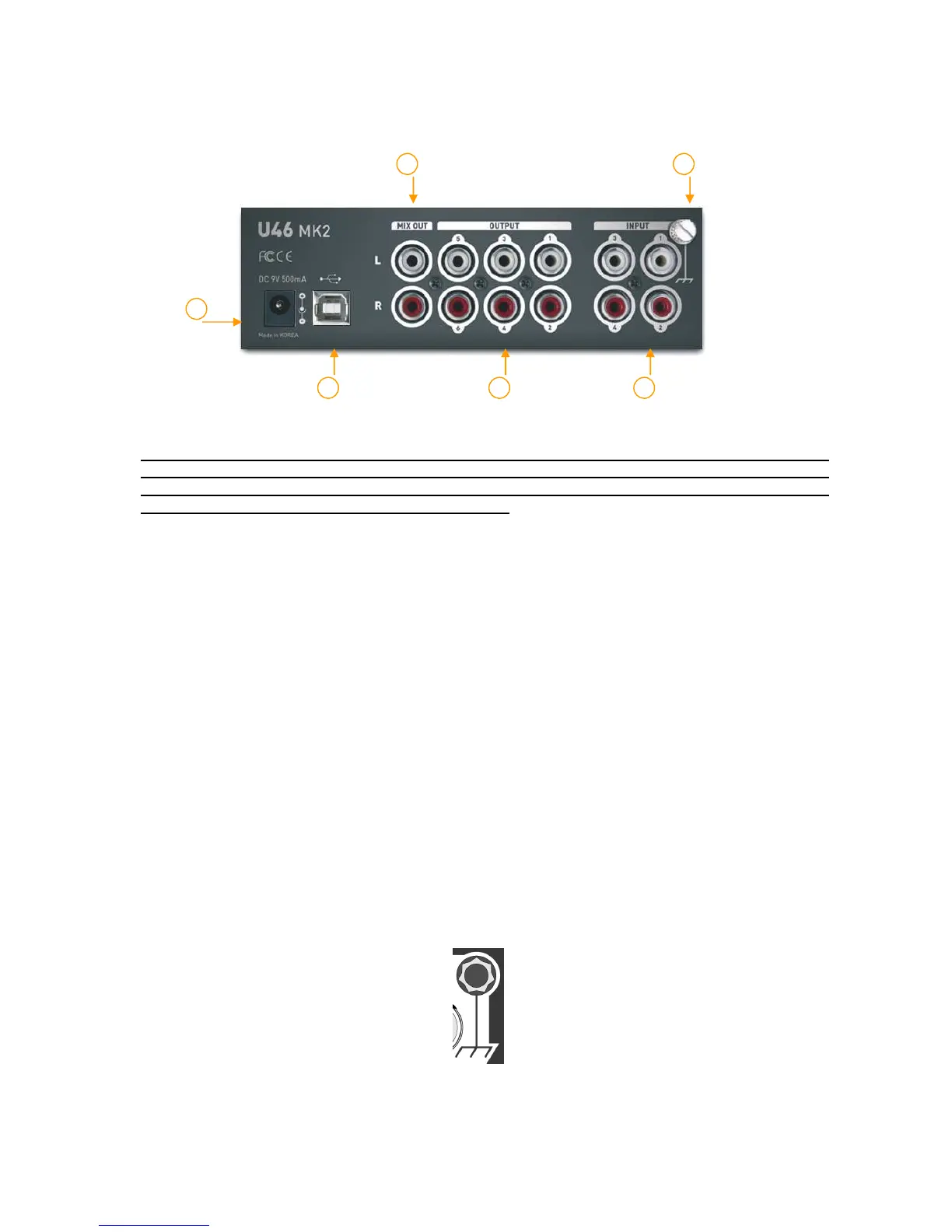
2.2. Rear Panel
(1) External Power supply connector:
If you use a microphone that requires phantom power, especially with a laptop
computer, it’s strongly recommended to use a DC +9V/500mA adapter (not
included). When you turn on the U46MK2 or when you turn on/off phantom power,
the current peak level might go over 500mA.
(2) USB connector: Connects the USB cable to the computer.
(3) Input 1~4: The turntable inputs and line level inputs share the same connectors. The
RCA turntable inputs feed an RIAA equalized preamp designed to accept moving magnet
type phono cartridges.
(4) Output 1~6: You can use these outputs to connect to various external devices or to a 5.1
surround system.
(5) Mix output: You can monitor all input sources and output sources through the Mix output.
Usually, you can use Mix out to connect to powered monitor speakers.
(6) Ground plug: When you use a turntable, connect the ground lead from your turntable to
the ground plug to help preventing hum.
1


 To Next Page