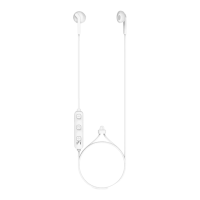
The MIXX StreamBuds LX are true wireless earbuds designed for a seamless audio experience. This quick start guide outlines how to set up, use, and maintain your earbuds.
Function Description
The StreamBuds LX are a pair of true wireless earbuds that connect to your audio device via Bluetooth. They come with a portable charging case that not only stores the earbuds but also recharges them on the go. The earbuds feature multi-function buttons on both the left and right units, allowing for various controls such as playing/pausing music, answering/ending calls, and activating voice assistants. An LED light on each earbud indicates its status, particularly during pairing and charging. The charging case also has an LED light to indicate its charging status.
Usage Features
Checking the Contents:
Upon unboxing, you should find the following items:
- A portable charging case
- A pair of StreamBuds LX earbuds
- Three pairs of ear cushions (small, medium, and large) to ensure a comfortable fit
- A Micro USB charging cable
Getting Started and Pairing:
- Initial Pairing: To begin, remove both StreamBuds LX earbuds from the portable charging case. They will automatically attempt to pair with each other, confirming with a 'Pairing' announcement and a 'beep' sound.
- Bluetooth Connection: Navigate to the Bluetooth settings on your audio device (e.g., smartphone, tablet, computer).
- Select Device: Look for 'MIXX StreamBuds LX' in the list of available Bluetooth devices and select it to connect.
- Confirmation: Once successfully paired, you will hear 'Connected', and the Earbud LED Light (1) on both earbuds will flash blue.
- Automatic Reconnection: After the initial pairing, the earbuds will automatically reconnect to the last Bluetooth audio device they were paired with when removed from the case, confirming with 'Connected'.
- Troubleshooting Pairing: If you see two 'MIXX StreamBuds LX' entries in your Bluetooth menu, wait 4 seconds for the earbuds to connect to each other before attempting to pair with your phone. If connection issues persist, 'forget' both earbuds in your Bluetooth settings, place them back in the portable charging case (4), and restart the pairing process.
Voice Assistant Activation:
- To activate your device's voice assistant (Siri or Google Assistant), press and hold either multi-function button (XX) for 2 seconds. You will hear a familiar 'beep' sound, confirming the connection. You can then ask questions or state commands to your voice assistant.
Control Functions:
- First Time Pairing: Remove both earbuds from the portable charging case; they will automatically pair with each other. Go to your audio device's Bluetooth settings, select 'MIXX StreamBuds LX', and once paired, you will hear 'Connected'.
- Play / Pause: Short press either multi-function button (XX).
- Answer / End a Call: Short press either multi-function button (XX).
- Voice Assist Activation: Press and hold either multi-function button (XX) for 2 seconds to activate Siri or Google Assistant.
- Power ON: Remove both earbuds from the charging case; they will power on automatically.
- Power OFF: Place both earbuds back into the charging case.
Maintenance Features
Charging the Earbuds:
- Placement: Place the StreamBuds LX earbuds into the portable charging case (4).
- Charging Indicator: While charging, each Earbud LED Light (1) will glow RED.
- Full Charge Indicator: Once fully charged, the Earbud LED Lights (1) will turn off.
- Securing: Close the lid of the charging case to secure the earbuds.
Charging the Portable Charging Case:
- Low Battery Indicator: When the Charging Case LED Light (6) flashes BLUE, it indicates that the portable charging case (4) needs to be recharged.
- Charging Connection: Always charge the case using the provided Micro USB cable and a suitable USB wall charger.
- Charging Indicator: While the case is charging, the Charging Case LED Light (6) will flash RED.
- Full Charge Indicator: Once fully charged, the Charging Case LED Light (6) will remain a solid RED.
- General Safety: It is crucial to read the 'Warnings, Caution and Safe Usage' instructions thoroughly.
- Product Connection: Ensure the product is connected correctly using only the manufacturer's original accessories.
- Child and Animal Safety: Keep the product out of reach of children and animals.
- Volume Control: Avoid listening to loud music for extended periods. Adjust the volume to a comfortable level before listening.
- Operating Machinery: Do not use the earbuds while operating machinery, including cars.
- Situational Awareness: Do not use the earbuds in areas where hearing is required for safety.
- Damage Prevention: Do not drop, short circuit, disassemble, or continue to use the product or the portable charging case if damaged.
- Water Resistance: The protective charging case (4), earbuds, and micro USB charging connector cable are NOT water resistant. Avoid exposure to rain, moisture, splashing, or liquid spills, as this can cause excessive heat, melting, fire damage, or personal injury.
- Lithium Battery Caution: This product contains a lithium battery. Incorrect disposal may result in an explosion.
Recycling:
- Environmental Responsibility: This product can be recycled. Products bearing the 'crossed-out wheeled bin' symbol must NOT be disposed of with normal household waste.
- Disposal: Take the product to a designated collection point for recycling electronic devices.
- Local Authority: For more information on return and collection points, contact your local authority.
Support:
- For feedback or further information, email support@mixx-io.com or visit mixxaudio.com.

 Need help?
 General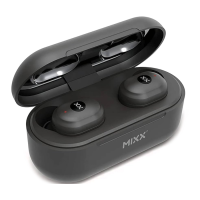

 To Next Page