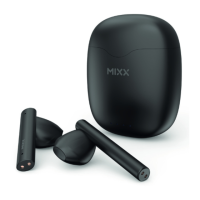
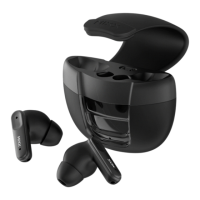
The MIXX StreamBuds Air 5 are true wireless earbuds designed for audio playback and hands-free calling, offering a blend of convenience, portability, and essential features for everyday use. They come with a portable charging case and a USB-C charging cable.
Function Description:
The StreamBuds Air 5 are true wireless earbuds that connect to audio devices via Bluetooth. They allow users to listen to music, watch videos, and make/receive calls hands-free. The earbuds feature touch sensors for controlling playback, volume, and activating voice assistants like Siri or Google Assistant. The accompanying portable charging case not only stores the earbuds but also recharges them on the go, extending their usage time.
Important Technical Specifications:
- Play time on a single charge: Up to 4.5 hours
- Play time with charging case: Up to 18 hours
- Bluetooth: Version 5.1
- Resistance: IPX5, water and dust resistant
- Supported profiles: HSP, HFP, A2DP, AVRCP
- Wireless range: 10m
- Earbud capacity: 30mAh each side
- Charge case capacity: 300mAh
- Dynamic driver: 10mm
- Frequency response: 20Hz – 20KHz
- Weight including case: Total 43.4g (earbuds 3g each)
- Portable case dimensions: 59 x 52 x 24mm
- Compatibility: Suitable for most Bluetooth audio supported smartphones, tablets, notebooks, laptops, and computers.
- Operating temperature range: 5° - 40° Celsius.
Usage Features:
Getting Started:
The package includes a pair of earbuds (Left and Right), a portable charging case, and a USB-C charging cable.
- Left Earbud Components: Left Touch Sensor (1), Earbud LED Lights (2), Microphones (4).
- Right Earbud Components: Right Touch Sensor (3), Earbud LED Lights (2), Microphones (4).
- Portable Charging Case Components: Portable Charging Case (5), USB C Charging Port (Base) (6), LED Charge Indicator (7).
- Charging Cable: USB C Charging Cable (8).
First Time Pairing:
- Remove both earbuds from the Portable Charging Case (5).
- They will automatically dual pair together. A voice prompt will say 'Power on, pairing' and a 'Beep' will sound.
- One of the Earbud LED Lights (2) will flash WHITE to indicate pairing mode.
- If the earbuds do not automatically dual pair, tap each earbud 4 times to power off, then place them back in the case. Remove them again, and they should dual pair.
- Go to the Bluetooth settings on your audio device and select 'MIXX StreamBuds Air 5' from the list.
- Once successfully paired, you will hear 'Connected', and the Earbud LED Light (2) will turn off.
- The earbuds will automatically reconnect to the last paired device, confirming 'Connected'.
- Placing both earbuds back in the Portable Charging Case (5) will power them off.
Power On/Off:
- Power On: Remove both earbuds from the case. They will automatically turn on and dual pair. A voice prompt will state 'Connected'. To manually turn on, long press each Touch Sensor (1 or 3) for 3 seconds.
- Power Off: Place both earbuds in the case and close the lid. This will automatically turn off the earbuds and Bluetooth.
Controlling Playback and Calls:
- Play / Pause: Double tap either Touch Sensor (1 or 3).
- Decrease Volume: Single tap LEFT Touch Sensor (1).
- Increase Volume: Single tap RIGHT Touch Sensor (3).
- Previous Track: Tap and hold LEFT Touch Sensor (1).
- Skip Track: Tap and hold RIGHT Touch Sensor (3).
- Answer / End Call: Double tap either Touch Sensor (1 or 3).
Voice Assistant (Siri / Google Assistant):
- Activate: Triple tap either Touch Sensor (1 or 3) to activate Siri or Google Assistant.
- A 'Beep' will sound to confirm connection. You can then ask a question or state a command.
Individual Earbud Use:
- Yes, you can use one earbud while leaving the other in the case to charge. Swap them over when the earbud in use loses its charge.
Maintenance Features:
Charging the Earbuds:
- When the earbuds' battery is low, a voice prompt 'Battery low' will provide 2 minutes of play time before they power down with 'Battery low, power off'.
- The Earbuds LED Light (2) will flash WHITE once and then switch off.
- Charge the earbuds by placing them in the Portable Charging Case (5).
- While charging, each Earbud LED Light (2) will be WHITE. Once fully charged, the LED Lights (2) will turn off.
- Secure the earbuds by closing the lid of the charging case.
Minute Quick Charge:
- If low on power, charge earbuds for 15 minutes to get 2 hours of extra play time.
Charging the Portable Charging Case:
- When the LED Indicator (7) flashes WHITE after closing the charge case lid, it's time to recharge.
- Always connect the case to a suitable USB wall charger, computer USB port, or power bank using the supplied USB C charging cable (8).
- The charge light indicator (7) will flash RED during charging.
- It will light up solid RED once the charge case is fully charged.
Troubleshooting (Common Solutions):
- Ensure earbuds are powered on.
- Check the status of the LED Lights.
- Charge the earbuds and case.
- Move your device closer to the earbuds, away from obstructions or interference.
- Try connecting to another device.
- If two 'MIXX StreamBuds Air 5' appear in Bluetooth settings, one earbud's LED Light (2) will flash WHITE. Wait approximately 4 seconds for the earbuds to connect to each other before pairing. If no connection, 'forget' or 'unpair' both earbuds in Bluetooth settings, place them back in the case, and start again.
- Do NOT crush, puncture, or incinerate the charging case or earbuds.
- Only use certified or device manufacturer's charging cable.
- Do NOT use a non-certified PD or QC3 wall charger, as this may damage the product.
- The product contains small parts and is NOT suitable for children under age 6 (choking hazard).
- Do NOT listen to loud music for prolonged periods.
- Turn down volume before placing devices in/on ears and adjust to a comfortable level to avoid hearing damage.
- Do NOT use the product while operating machinery, including cars, trucks, or other vehicles.
- Do NOT use noise-cancelling mode or your device in areas where hearing is required for safety (e.g., cycling, construction sites, railroads).
- Do NOT drop, short circuit, disassemble, or continue to use if damaged.
- CAUTION: Remove device immediately if it emits loud unusual noise, you experience a warming sensation, or there is loss of audio. Turn off the device and contact MIXX Limited.
- Avoid exposing the product, charging case, and cable connectors to prolonged rain, moisture, splashing, or liquid spills.
- This product contains a Lithium battery. Incorrect disposal may result in an explosion.
- Refer all servicing to qualified persons if the product is damaged or not operating normally.
Recycling:
- This product can be recycled. Products bearing the crossed-out wheelie bin symbol must NOT be thrown away with normal household waste.
- Take the product to a collection point designated for recycling electronic devices.
- Contact your local authority for more information on return and collection points.
- For feedback, comments, or queries, email support@mixx-io.com.
- Visit mixxaudio.com for more information.
- For a wide range of power banks, chargers, cables, and in-car products, visit mixxcharge.com.

 Need help?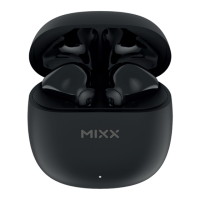

 To Next Page
 General