Page 12
Output Meter
On the main display window there is a series of LED’s
which light-up as power output is increased. This is in-
tended as a guide only and provides an indication of how
hard the system is working.
Reference 150 MkII User’s Manual
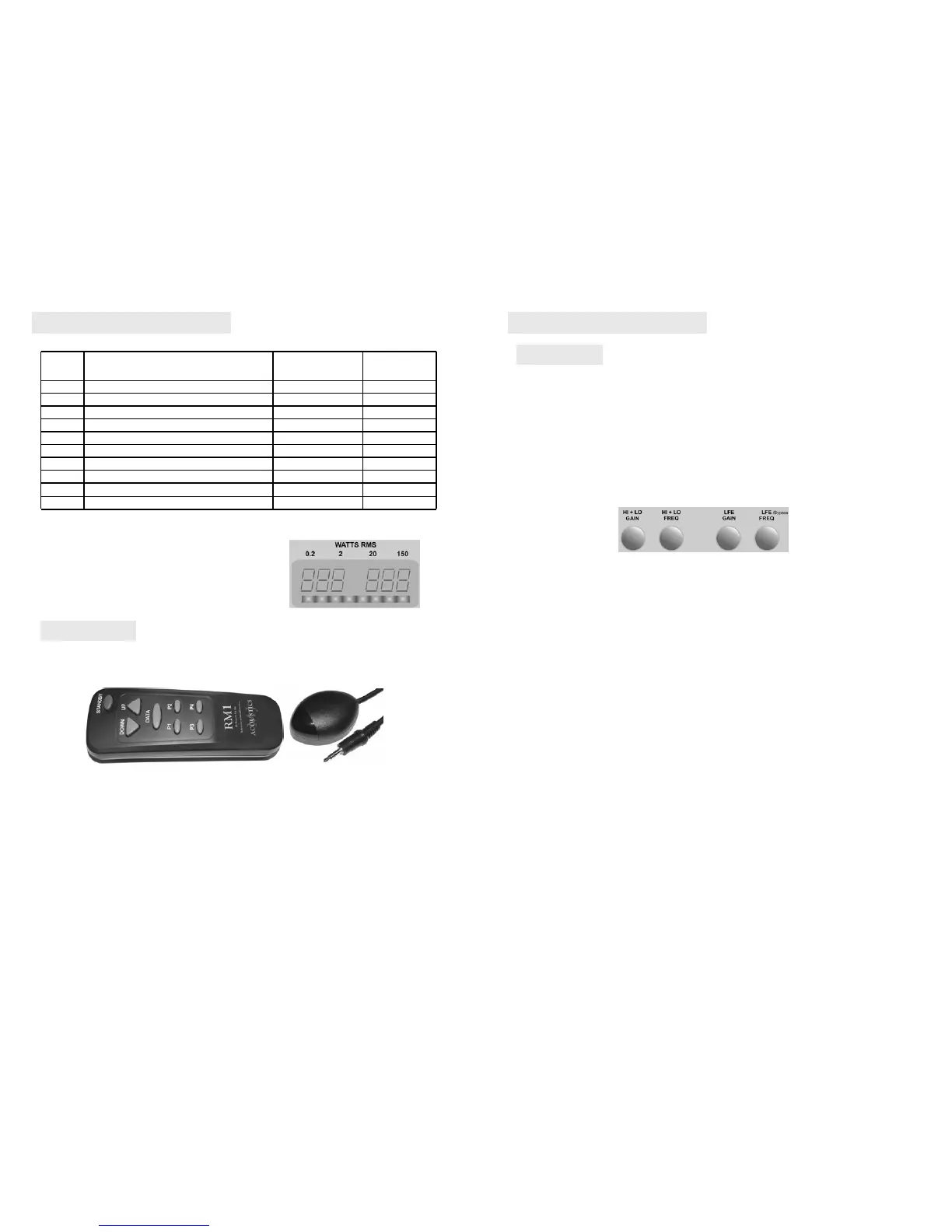
Remote Eye
The Infrared Eye in the shape of a small mouse is placed at a location desirable for line of sight
and the jack plug inserted into the panel marked as “Remote”.
RM1
Provides for full remote control of all functions and enables the user to setup the entire listening
sound stage without moving from the listening position. Once settings are stored, and assuming
it is then desirable to turn the
Reference 150 so that only the cabinet is visible, then this can be
achieved without compromising the remote function. The remote eye feature enables the
Ref-
erence
150 to be placed out of sight once setup is complete with user presets easily selectable
by pressing one of the P1 - 4 buttons.
REMOTE RM1
The remote RM1 system comes in two parts to provide optimum flexibility.
Display Description Factory Range
Menu Default
Hi
Gain adjustment for RCA & Speakon inputs –99 –99 to 0
Hro
Frequency adjustment for RCA & Speakon inputs 120hz 20 to120hz
Lo Gain adjustment for LFE input (via RCA) –99 –99 to 0
Lro Frequency adjustment for LFE input (via RCA) 120hz 20 to120hz
Pha
Phase adjustment 0° 0° to 180°
Bri Display Brightness 5 1 to 5
APO Auto Power Off function in minutes OFF OFF, 10-60
Etr
External 12v Trigger input polarity setting Positive Positive or Negative
Aon Auto Power on sensitivity 002 000 to 009
dto
Display Timeout OFF Off / On
14/12/2005 (Ref – 150)
Page 5
Reference 150 MkII User’s Manual
Hi High Level Gain from Speakon and Line Level Gain from RCA.
Hro Roll off (crossover) frequency for High Level Speakon and Line Level RCA.
Lo LFE Gain from RCA line level input.
Lro Roll off (crossover) frequency for Line Level RCA LFE input.
Pha Phase adjustment.
Bri Brightness setting.
Apo Auto Power off time setting.
Etr External trigger input polarity setting.
Aon Auto Power on sensitivity setting.
Dto Display timeout.
Display Menu
Lro This function parameter setting allows adjustment of the roll off (crossover) from the LFE
input received via the RCA line level connector. This parameter enables high frequencies to be
filtered out above the displayed setting with a 24dB slope from sources connected to this input.
Most but not all AV decoders offer an adjustable pre filtered output for the LFE content. Offering
this fully adjustable setting for the LFE crossover gives a more flexible use for this input and
enables the user to make adjustments over a wider frequency band and result in better
integration possibilities. Selecting above 120hz results in the “LFE bypass” circuit option. The
LFE bypass circuit sets the crossover to 200hz and only gain is adjustable. The adjustment
range is from 20hz to 120hz & bypass, incremented in single digit steps. This highly accurate roll
off adjustment enables precise matching of crossovers when using a multiple subwoofer set-up.
Hi This function parameter setting allows adjustment of the gain from the inputs received via the
Speakon and RCA line level left and right connectors. This parameter enables adjustment of gain
and thus sound pressure output produced in relation to the input from sources connected to
these inputs. The adjustment range is from –99 to 0 incremented in single dB digit steps. This
highly accurate gain adjustment enables precise matching of gains when using a multiple
subwoofer set-up.
Hro This function parameter setting allows adjustment of the roll off (crossover) from the inputs
received via the Speakon and RCA line level left and right connectors. This parameter enables
high frequencies to be filtered out above the displayed setting with a 24dB slope from sources
connected to these inputs. The adjustment range is from 20hz to 120hz incremented in single hz
digit steps. This highly accurate roll off adjustment enables precise matching of crossovers when
using a multiple subwoofer set-up.
Lo This function parameter setting allows adjustment of the gain from the LFE input received
via the RCA line level LFE connector. This parameter enables adjustment of gain and thus sound
pressure output produced in relation to the input from the LFE output of your AV amplifier. The
adjustment range is from –99 to 0 incremented in single dB digit steps. This highly accurate gain
adjustment enables precise matching of gains when using a multiple subwoofer set-up.
Menu Item
Adjusted
Hi Hro Lo Lro
14/12/2005 (Ref – 150)


 To Next Page
 Loading...