Battery installation
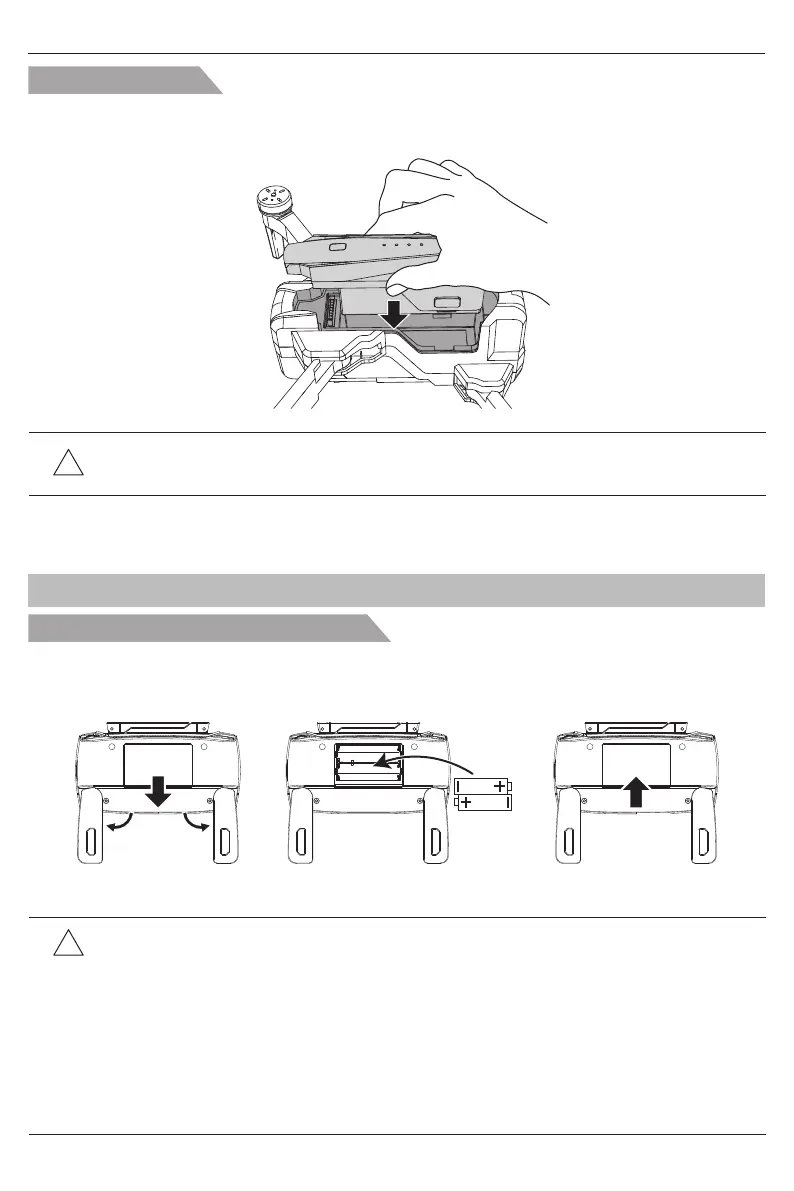
Insert the fully charged battery into the aircraft battery box (see as the picture), ensure the battery install
correctly.
Install the battery of remote controller
Step 1: Unfold the hand sticks and open the battery door (Pic. 1);
Step 2: Install 2*AA batteries into the battery compartment according to the given polarity (Pic. 2);
Step 3: Close the battery compartment (Pic. 3).
!
Attention: The battery should be installed firmly, failure to do so may affect the flight safety
of your aircraft. The aircraft may crash due to power-cut during the flight.
Pic. 1 Pic. 2 Pic. 3
Prepare the Remote Controller
!
● Insert batteries with correct polarity.
● Non rechargeable batteries are not to be charged; the transmitter need 2*AA batteries for
work.
● Do not mix old and new batteries.
● Do not mix alkaline, standard (carbon-zinc), or rechargeable (nickel-cadmium) batteries.
● Rechargeable batteries are to be removed from the aircraft before being charged.
● Rechargeable batteries are only to be charged under adult supervision.
● Exhausted batteries are to be removed from the aircraft.
● The supply terminals are not to be short-circuited.
Bugs 12EIS User Manual
-2-


 To Next Page