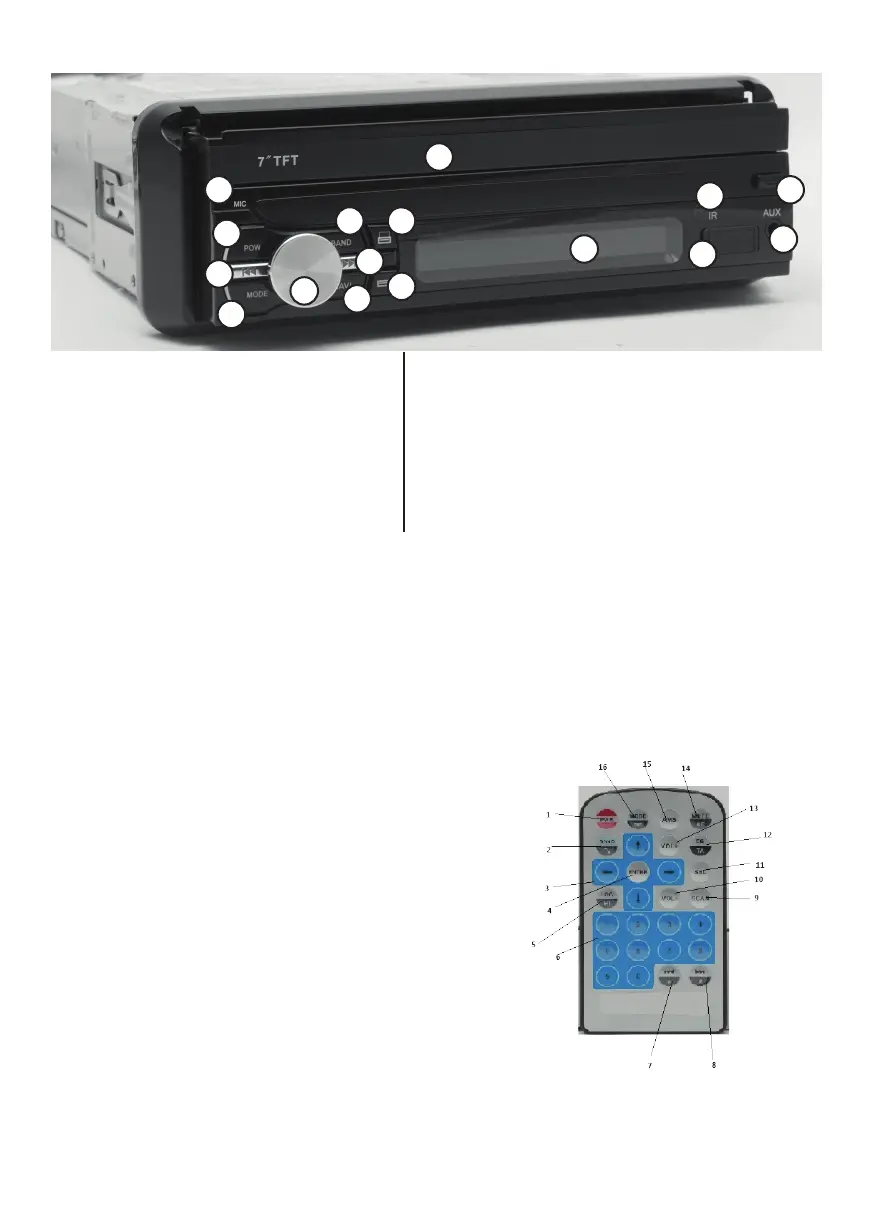
1. Microphone
2. Power on / o
3. Fast rewind/last le button
4. Mode button
5. Volume increase / decrease, Audio menu
6. Navigation button
7. Fast forward / next le button
8. FM 1-2-3 / AM band switching
9. LCD primary display on / angle
10. LCD primary display o / angle
11. LCD secondary display
12. Remote controller infra receiver
13. USB input
14. AUX input 3,5mm jack
15. Front panel removing button
16. Primary 7” LCD TFT display
Inputs behind the front panel:
SD: MicroSD Card input
GPS: GPS software storage MicroSD Card input
RES: reset button behind the front panel
REMOTE CONTROLLER:
1. Power on/o
2. FM 1-2-3/AM band
switching, accept call
3. Navigating arrows
4. ENTER
5. LOC (in radio mode)
6. Numerical buttons
7. Fast rewind / Last le
button / Frequency search
backwards
8. Fast forward / Next le
button / Frequency search
backwards
9. Radio station automatic
search
10. Volume down
11. Audio settings menu
12. EQ: Equalizer settings,
default sounding presets
TA: (press and hold) Search
for trac information on/
o. While on the player
will automatically change
to radio mode when
trac news are on.
13. Volume up
14. MUTE: mute sounds
AF: (press and hold) When
on while the radio signal
is weak will search for
the same station on a
stronger frequency.
15. Automatic radio station
search and storage
16. Mode changer:
Radio / Dialer / Music
player / Navigation /
Audio le manager /
Video le manager
Call reject
1
2
3
4
5
6
7
8
9
10
11
12
13
14
15
16


 To Next Page