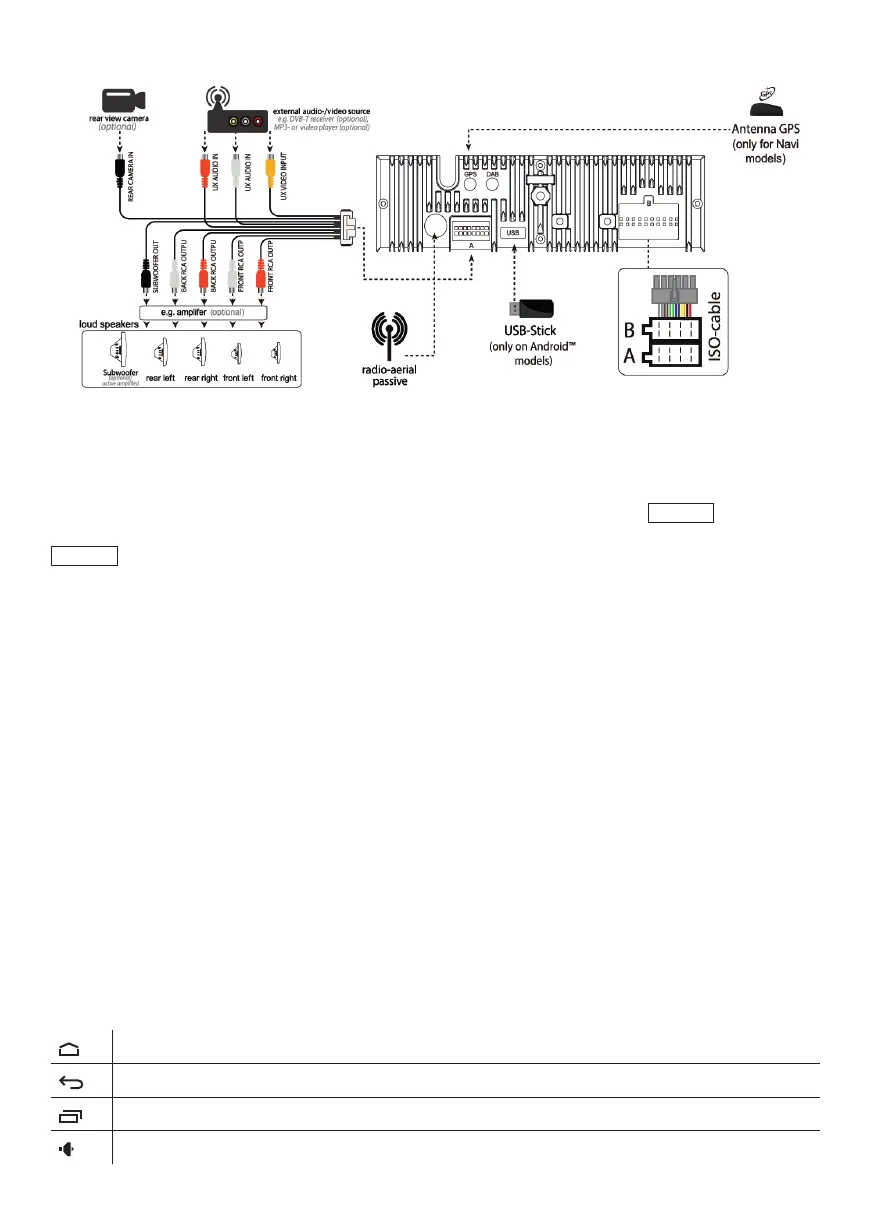
WIRING DIAGRAM
HOW TO USE
First startup
After changing the cars batteries or before the rst startup of the device press
RESET
button, to set
the device to default options. Important note: If any error comes up while using the device also press
RESET
to set the device to default options. This function deletes all settings.
Power on/o
Press the POW button to turn the device on.
If turned on: pressing the button mutes sounds, pressing again unmutes sounds.
Pressing and holding turns o the device.
Volume control
You can adjust the volume by turning the volume control button.
Pressing the button opens the audio menu.
Mode button
By pressing the MODE button you can change between modes. Radio/Dialer/Music player/Navigation/
Audio le manager/Video le manager/Call reject
MENU USAGE
The best way to nd out about the functions of the program is to check all of the screens. The starting
point is the main menu. This is the rst starting menu in the system, simply touch the desired menu icon
you want to enter.
Main menu: icons on the top of the display are available in most modes, by swiping from top to bottom
you can access the notication, as well as the Android systems settings and icons.
Always opens the mode menu
Step back to the last screen
It is to access applications running in the back, touching lists all running applications.
Adjusting volume up/down



 To Next Page