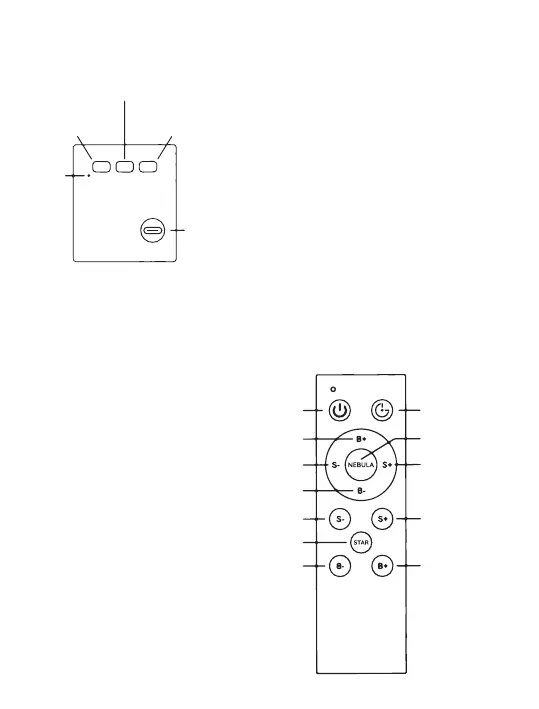
USB-C
Power
Star switch
Power switch
Nebula
switch
Timer
indicator
Switch ON/OFF
Nebula Brightness+
Timer switch
Nebula color switching
Nebula Speed+
Star Breathing Rate+
Star Brightness+
Nebula Brightness-
Star Breathing Rate-
Star Switch
Star Brightness-
Nebula Speed-
Power switch : Short press the power switch to
turn on, and the stars and mixed color nebula
are turned on by default after turning on.
Nebula Switch : Short press the Nebula button
to switch the color of the nebula, each time you
press to switch a color, and so on; long press to
turn off the Nebula function, and then short
press to turn on the Nebula function again.
Star switch : Short press the key to switch the
respiratory rate of a star each time. Long press
to turn off the star function. After turning off,
short press again to turn on the star function.
Timer indicator : After pressing any timing
button on the remote control, the timing
indicator light will be on, and the indicator
light will be off when the timing is turned off.
BUTTONS ON THE ASTRONAUT
Switch ON/OFF : Press the
switch briefly to turn on. The
nebula and stars light up by
default after switching on; press
the button again after switching
on to switch off.
Timer switch: The timer function
is divided into two levels, a
45-minute timer and a
90-minute timer. Press once, the
timer indicator lights up in blue
(45 minutes); press a second
time, the timer indicator lights
up in red (90 minutes); in the
timer state, the timer indicator is
lit for a long time; press and hold
to cancel the timer, and the
timer indicator goes off after
cancellation.
BUTTONS ON THE REMOTE
PRODUCT DESCRIPTION


 To Next Page