Switch off: Press and hold the button on i-Tag for 3 seconds until
the long "Beep" sound.
Connection:
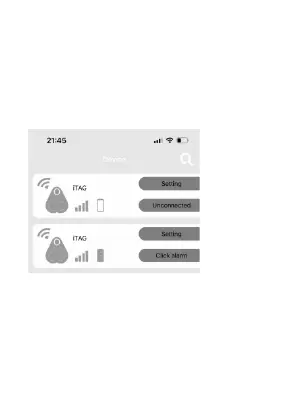
1. Open the ‘I searching’ APP. Tap the ‘+’ icon at the upper right
corner of the screen to add the device, please click the
‘Unconnected’ to connect the device.
2. Tap the ‘+’ icon in the upper left corner of the APP to find
additional connectable I-Tag devices.
Note:
Click the ‘Setting’ icon and go to submenu, such as add a photo for
i-Tag, rename, set Alarm when the i-Tag is disconnected and
select the ringtone.
Sliding to the left will show delete icon. Click to delete the device.


 To Next Page