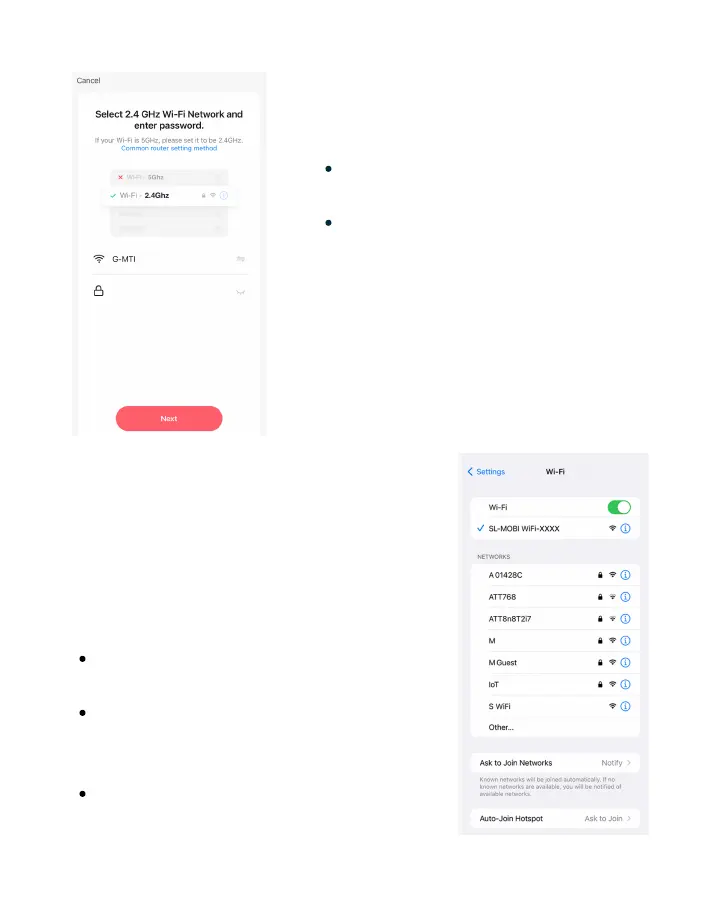
Setup 2.4 GHz Wi-Fi
17
Enter your 2.4 GHz Wi-Fi name &
password.
Tap "Next" to confirm.
If you cannot identify your 2.4 GHz
Wi-Fi Network, please contact your
Internet Service Provider.
After confirming, you'll be prompted
to reset your device.
Connect to Hotspot
Tap "Connect" to be redirected to
your Wi-Fi settings.
Once on your Wi-Fi settings, tap on
the available signal appearing as:
"SL-MOBI WiFi-XXXX."
After connecting, return to the
MOBI Smart App to continue.
Once you've reset your device and
tapped "Next," you'll need to connect
your mobile device to the Smart Pill
Medication Dispenser Hotspot.


 To Next Page