1
EN
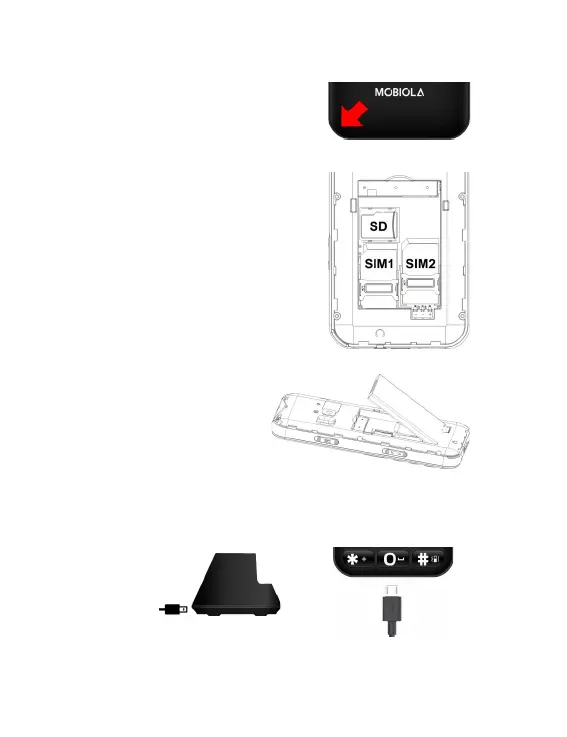
Remove the back cover by nail or plec-
trum. Do not bend or twist the back
cover excessively. Doing so may damage the cover. Be careful not
to damage your ngernails when you remove the back cover. If
the baery is in the phone, li it out.
Follow the signs for SIM1 and SIM2 on
the phone to install SIM1 and SIM2
cards. Only miniSIM cards work with this
device! Using SIM cards reducons is
not recommended. Make sure that the
golden contacts of the card face into the
phone and the notched corner has the
same direcon with the card slot.
Insert a memory card (max. 16 GB) with
the gold-coloured contacts facing down-
wards and lock it by metal holder.
Insert the baery with its
golden contact part facing the
set phone baery contact
piece, and then insert the
baery cover.
Use included charger or you may use any micro USB compable
charger. When you want to charge baery, connect charger with
phone by boom charging connector (7) or plug cable to desk
stand and place phone to the stand.


 To Next Page