DISTRIBUTOR INFORMATION:
Brainlab AG
Olof-Palme-Str. 9, 81829 Munich, Germany
Europe, Africa, Asia, Australia: +49 89 99 15 68 44
USA and Canada: +1 800 597 5911
Japan: +81 3 3769 6900
Latin America: +55 11 33 55 33 70
France: +33-800-67-60-30
E-mail: support@brainlab.com
MANUFACTURER INFORMATION:
Mobius Imaging, LLC
Phoenix Park, 2 Shaker Road, Bldg F, Suite 100,
Shirley, MA 01464, USA
USA: +1 (978) 796-5068
www.mobiusimaging.com
Email: info@mobiusimaging.com
COPYRIGHT:
This guide contains proprietary information
protected by copyright.
No part of this guide may be reproduced or
translated without the express written
permission of Brainlab.
LIABILITY:
This guide is subject to change without
notice and does not represent a
commitment on the part of Brainlab.
For further information, please refer to
the “Limitations of Liability” section in
the Brainlab Standard Terms and
Conditions of Sale.
Page 16-16
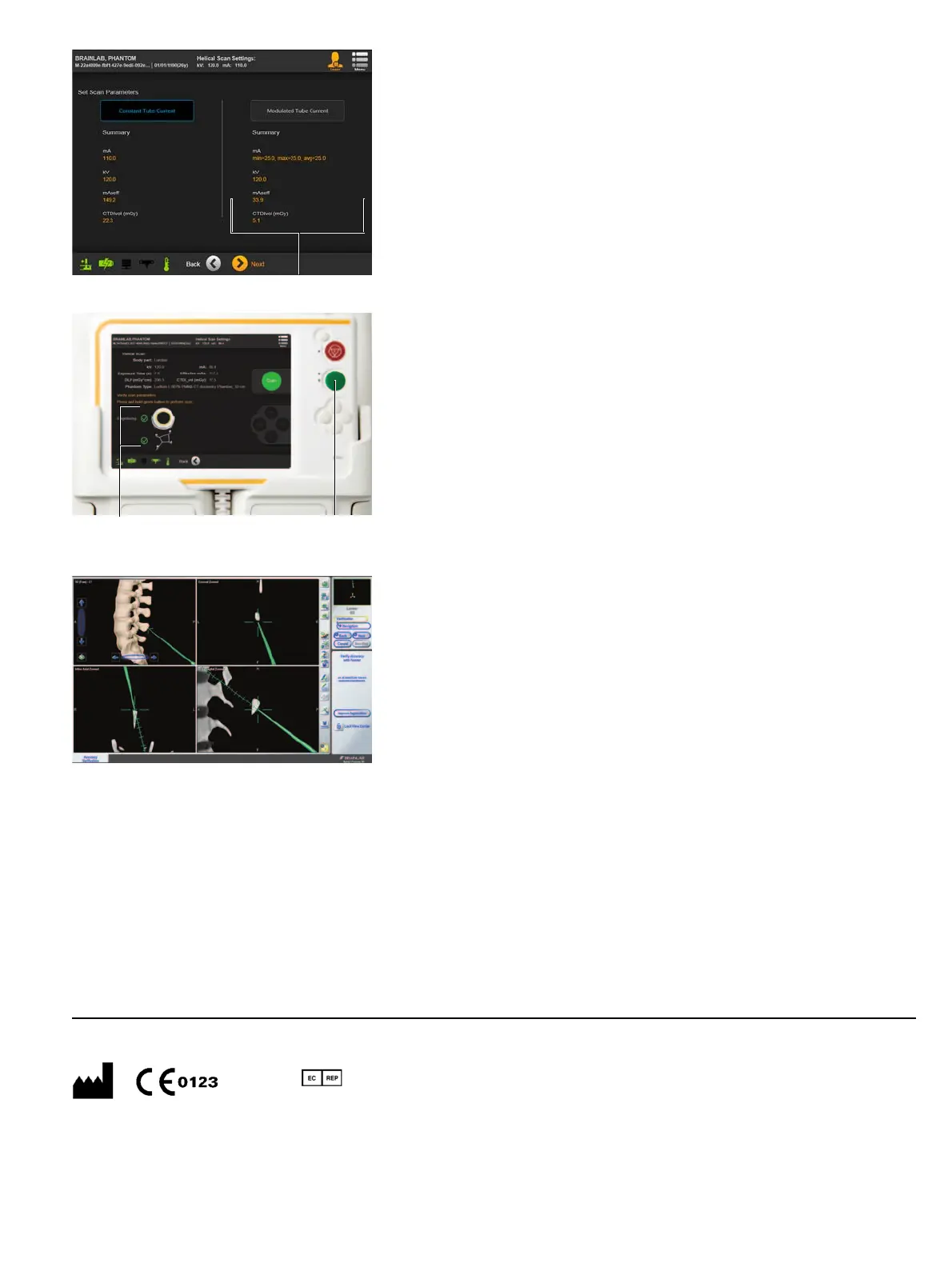
TUBE CURRENT MODULATION (IF REQUIRED)
NOTE: This is only applicable if helical scan mode is
chosen and an A-P scout has been performed.
NOTE: The minimum, maximum and average tube
current values, based on the previous A-P scout is
displayed below
Modulated Tube Current
a.
• Select your desired scan mode:
- Constant Tube Current
- Modulated Tube Current
• Select
Next
.
FINAL SCANNING
• Wait for both marker arrays to be visible a
(indicated by check marks).
• Remove the pendant and go to a safe area.
•Press and hold
Scan
s for approx. 15 secs. until
scanning starts and keep pressed for the scan
duration. Follow the display prompts.
Performing 3D Scan
dialog opens when complete.
*60917-32EN*
Document Revision: 1.3
Article Number: 60917-32EN
VERIFY REGISTRATION
Data is sent automatically from
Airo
to
Curve
. Data
can also be sent manually from DICOM Viewer on
the pendant.
• Verify registration accuracy by holding the pointer tip
to at least three known anatomical landmarks and
verifying their positions on the screen.
NOTE: Verify registration accuracy in all anatomical
directions (cranial/caudal, medial/lateral, anterior/
posterior).
as


 To Previous Page
 Loading...
