AE Lock (Auto Exposure Lock) / AWB Lock (Auto White Balance Lock)
AE Lock (AEL) and AWB Lock (AWBL) are advanced functions available for both video modes.
It is not available for photo-mode. Their functionality is disabled by default.
AEL and/or AWBL functionality must be explicitly enabled in the settings parameters. AWBL
functionality requires the White Balance parameter to be set to 'Auto'.
AE/AWB can be locked while the camera is either in standby mode or recording mode.
To turn on AEL/AWBL point the camera at the object you want to correctly exposure and then
set the lock as follows:
•
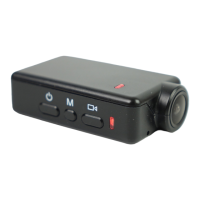
If the camera is in Standby mode or recording, briefly press the Shutter button until the
red LED turns on in the background. The background LED will turn off when the button is
released. AEL and/or AWBL is now turned on.
•
AEL/AWBL will remain turned on until another Mode is selected, or the camera is turned
off.


 To Next Page