EN
The HiRes Video Company
9LGHR3KRQH*UDQGVWUHDP*;9
Hands-free mode
Arrow keys
Sub menu
Main menu
Display of status
$FFHVVODWHVWPHVVDJH
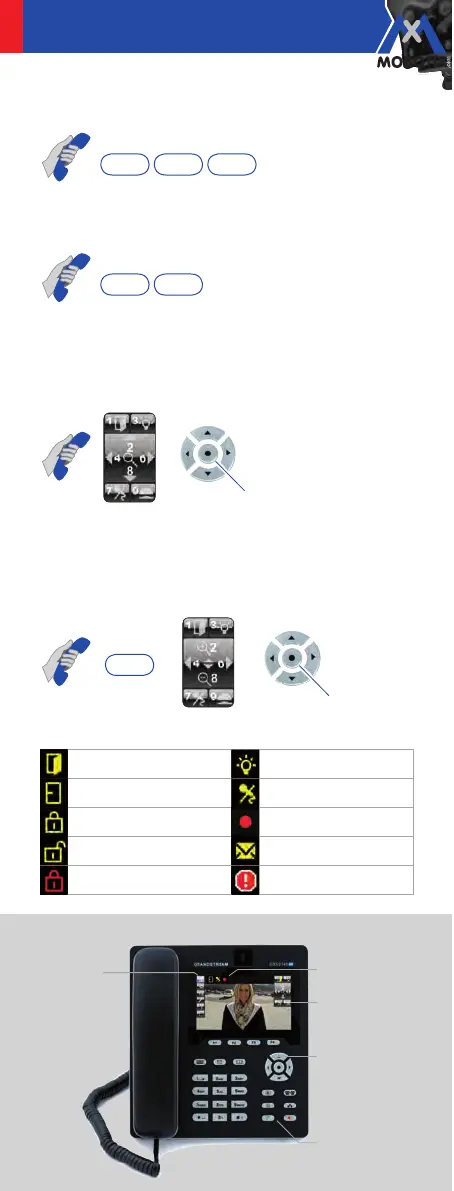
Pick up receiver > key * > key 1 > key 2
9LHZYLGHRUHFRUGLQJV
Pick up receiver > 2x key * > player mode is activated
0RYHFDPHUDLPDJH
Pick up receiver
>
key
2 (up),
key
8 (down),
key
6 (right),
key
4 (left);
key
0 (default view); alternatively, arrow keys
can be used
=RRPFDPHUDLPDJH
Pick up receiver > key 5 (zoom mode is activated),
key 2 (zoom in), key 8 (zoom out), key 0 (default view);
alternatively, arrow keys can be used
6WDWXVLFRQV
Door open Light on
Door closed Microphone mute
Door locked Recording on
Door unlocked Latest message
Error/Manipulation Camera error



 To Next Page