EN
The HiRes Video Company
6HFXULW\'RRU2SHQHU
2SHQGRRUDOVRRQSRZHUIDLOXUH
Keep door opener key pressed for VHFRQGV
&RQıUPPHVVDJHGLVSOD\JUHHQ/('EOLQNVHYHU\VHF
Press door opener key briefly
6ZLWFKGRRUEHOORQRij
Press doorbell key (left) briefly > doorbell is switched on or o
&KDQJHYROXPH
Keep doorbell key (left) pressed for VHFRQGV (until double
sound signal)
/RZHU Press doorbell key (left) briefly
+LJKHU Press door opener key (right) briefly
&KDQJHULQJWRQH
Keep doorbell key (left) pressed for VHFRQGV (until
double sound signal) > press both keys at the same time
briefly > press door opener key (right) repeatedly (until
desired ring tone is found)
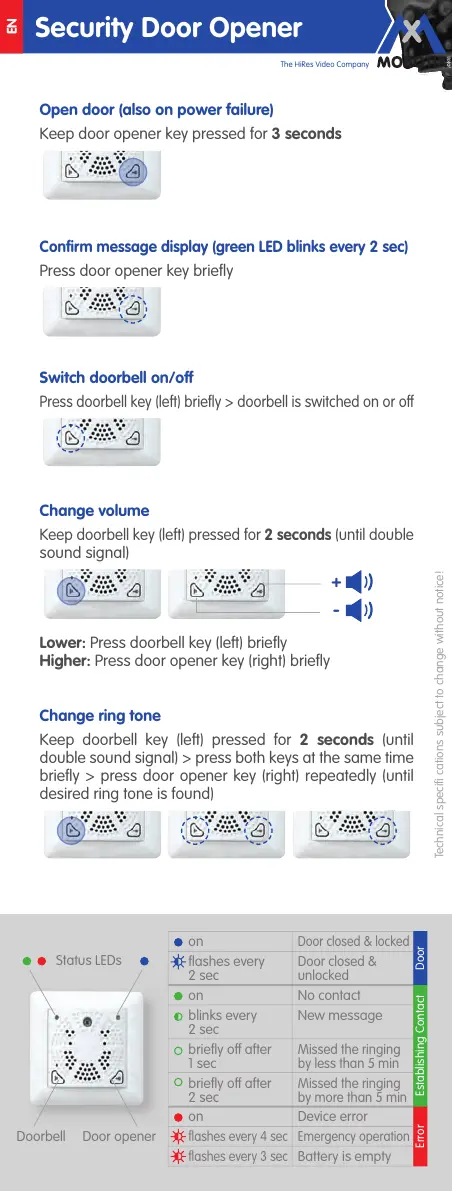
Doorbell Door opener
Status LEDs
on
Door closed & locked
flashes every
2 sec
Door closed &
unlocked
on No contact
blinks every
2 sec
New message
briefly o after
1 sec
Missed the ringing
by less than 5 min
briefly o after
2 sec
Missed the ringing
by more than 5 min
on Device error
flashes every 4 sec Emergency operation
flashes every 3 sec
Battery is empty
Door
Error Establishing Contact
Technical specifi cations subject to change without notice!



 To Previous Page