4
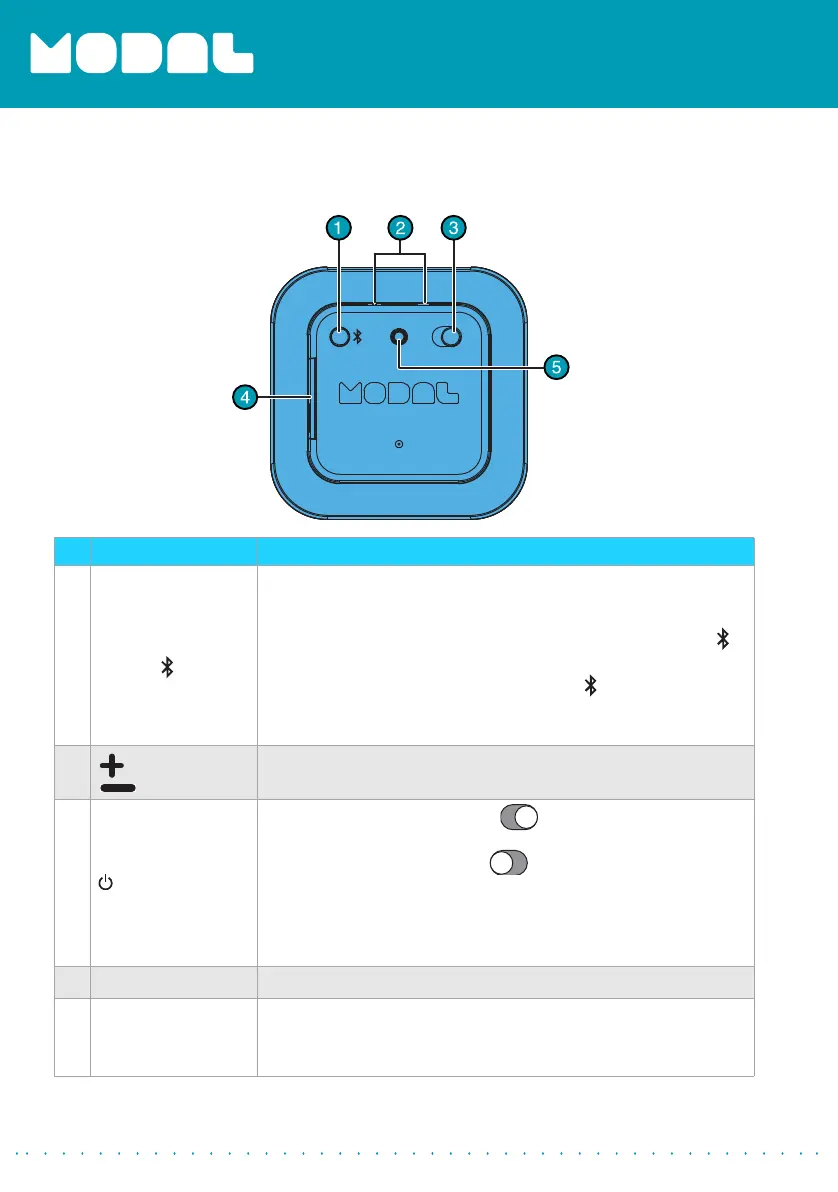
Back view
# Item Description
1
Multi-function
button ( )
In power-on state, press and hold the button for more than two
seconds to enter into pairing mode. The LED alternates blinking
red and white.
• When the phone rings, quickly press the multi-function ( )
button to answer the phone call.
• To end a call, press the multi-function ( ) button twice.
Note: For Android users: make sure that the “Phone Audio” function is active in the
Bluetooth settings. For more information see “Pairing your speaker with a Bluetooth
device (Android, iOS, and PC)” on page 9.
2
(volume up)
(volume down)
Press + or – to increase or decrease the volume.
3
(power) button
• Slide the switch to the right to power on the speaker –
The LED lights white.
• Slide the switch to the left to turn the speaker off – The
LED turns off.
When power is on, the unit automatically connects to the last
Bluetooth device that was connected, within six seconds. If the
last paired Bluetooth device is not in range, the unit automatically
searches for another device to pair to.
4
USB port Plug the USB cable into this port.
5
AUX IN jack
Plug an external audio device into this jack. If a cable is inserted
into this AUX IN jack, the source is automatically switched to AUX
IN. Unplug the cable and the source automatically switches back
to Bluetooth.
MD-SPBT01_13-0842_MAN_V1_ENG.fm Page 4 Friday, November 22, 2013 10:09 AM



 To Next Page