7
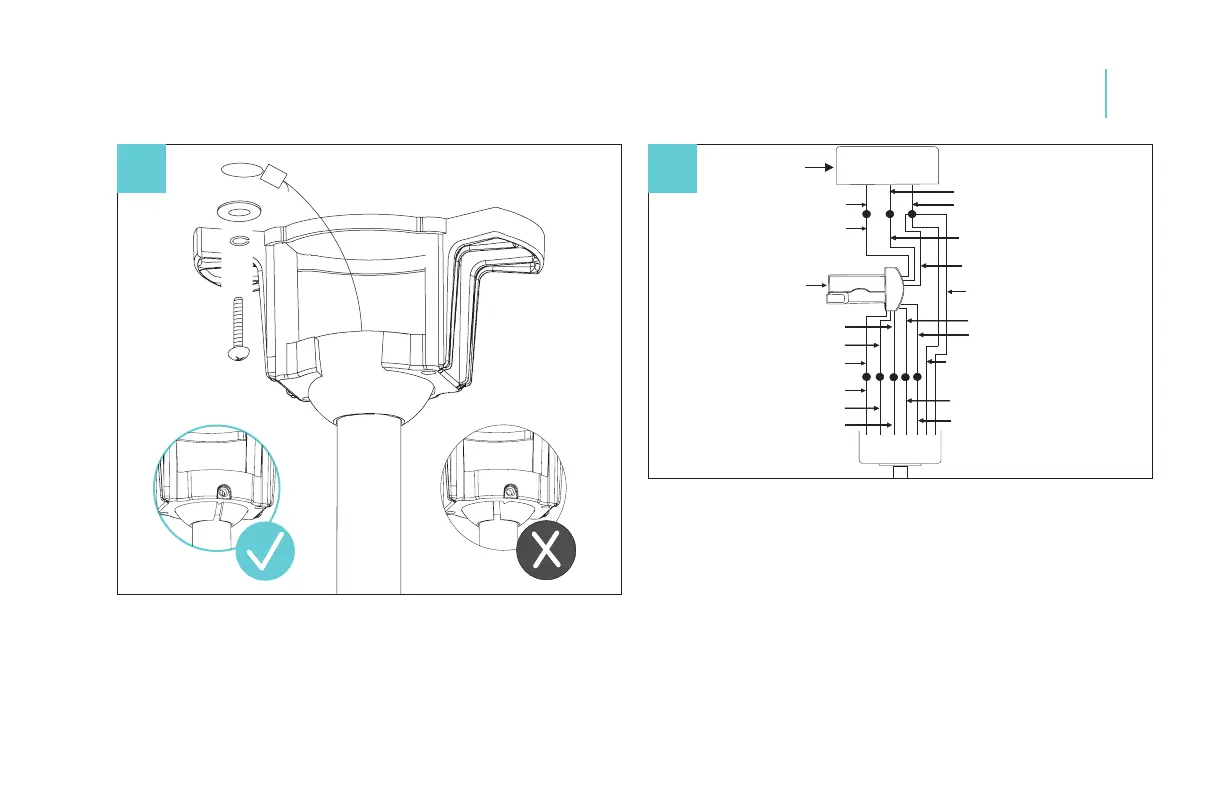
WHITE (NEUTRAL)
OUTLET BOX
BLACK (HOT)
BLACK (“AC IN L”)
RED (TO MOTOR)
GRAY (TO MOTOR)
YELLOW (TO MOTOR)
YELLOW (MOTOR)
GRAY (MOTOR)
RED (MOTOR)
RECEIVER
GREEN (GROUND)
TO HANGER BALL
GREEN (GROUND)
TO HANGER BRACKET
GREEN (GROUND)
WHITE (FOR LIGHT)
WHITE (FOR LIGHT)
BLUE (FOR LIGHT)
BLACK (FOR LIGHT)
WHITE (“AC IN N”)
GREEN (GROUND)
8
13
1. Seat all into the mounting bracket. Rotate until ball drops and
locks into hanger bracket screw.
2. Secure safety cable to structure.
1. Connect the wires from fan to the corresponding wires on
the receiver.
2. Connect the wires from the outlet box to the corresponding
wires on the receiver.
NOTE: Follow wiring diagram found on the receiver hardware.
After making electrical connections, spliced connectors should be
turned upward and pushed carefully up into the outlet box. The
wires should be spread apart with the grounded conductor and the
equipment-grounding conductor on one side of the outlet box and
ungrounded connector on the other side of the outlet box.
Hanging the Fan
Making the Electrical Connections
08


 To Next Page