EasyManua.ls Logo

MODSTER Breezy - User Manual

Default Icon
22 pages
Go to English
Print Icon
To Next Page IconTo Next Page
Loading...
Breezy
BETRIEBSANLEITUNG/ MANUAL
Question and Answer IconNeed help?

Do you have a question about the MODSTER Breezy and is the answer not in the manual?

Overview

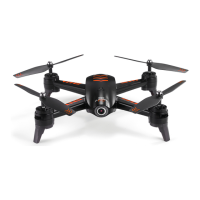
The MODSTER Breezy is a compact drone designed for both indoor and outdoor operation, suitable for individuals aged 14 and above. It offers a range of features for easy control and stable flight, along with built-in safety mechanisms.

Function Description:

The MODSTER Breezy is a quadcopter drone controlled via a dedicated remote. Its primary functions include:

  • Flight Control: Ascend, descend, move forward, backward, left, and right, as well as rotate left and right.
  • Altitude Hold (Hover): The drone can maintain its current flight height when the left control stick is released, allowing for stable hovering.
  • 360° Flip: Capable of performing 360-degree flips in various directions (forward, backward, left, right) once it reaches a height of over 2 meters.
  • Headless Mode: This mode simplifies flight by allowing the drone to follow the direction of the right control stick regardless of its orientation (head or tail position). It is activated by a long press of the right upper button on the remote and indicated by a blinking LED on the drone.
  • One-Key Reverse Function: Allows the drone to fly in reverse with a single button press.
  • Speed Switch: The drone has multiple speed settings (low, medium) to accommodate different flying conditions and skill levels.
  • Obstacle Avoidance: Equipped with four sensing points that detect obstacles during flight, helping to prevent collisions.
  • One-Key Take-off/Landing: Simplifies the start and end of flights with a single button press.
  • Emergency Stop: A safety feature that allows for an immediate shutdown of the drone by pressing and holding the One Key Take-off/Landing button for 3 seconds.

Important Technical Specifications:

  • Age Recommendation: Suitable for individuals with a minimum age of 14 years.
  • Power Source (Remote): 3 x 1.5V AAA batteries (not included).
  • Charging: The drone battery is charged via a USB adapter (5V/1-2A). A red LED indicates charging, and the LED turns off when fully charged.
  • Wind Resistance: Suitable for outdoor operation with a maximum wind force of 3.
  • Safety Features: Includes warnings against overcharging, improper battery use, and exposure to extreme temperatures or mechanical damage. It also advises against direct eye contact with the bright LEDs.

Usage Features:

  • Pre-Flight Preparation:
    • Install 3 AAA batteries into the remote control.
    • Charge the drone battery using the provided USB cable and adapter. Ensure the battery is fully charged before use.
    • Insert the fully charged battery into the drone, connecting it to the interface and sliding it in until secure.
    • Turn on the drone (LED light flashes rapidly).
    • Turn on the controller.
    • Place the drone on a flat surface with its head facing forward.
    • Pair the drone and remote by pushing the left control stick forward to the top and then pulling it backward to the bottom. Pairing is successful when the drone's LED is solid on.
    • Calibrate the drone by moving both the left and right control sticks inward and downward (left stick at 5 o'clock, right stick at 7 o'clock) for 3 seconds. The LED will flash quickly and then turn solid upon successful calibration. This step should be repeated before every flight.
  • Take-off: Either press the one-key take-off button or manually take off by moving the left control stick to the lower left at 45° and the right control stick to the lower right at 45° simultaneously until the rotor blades start rotating, then slowly push the left control stick forward.
  • Landing: Either press the one-key landing button or manually land by pulling the left control stick backward to the bottom and holding it for at least 3 seconds until all rotor blades stop rotating.
  • Flight Trimming: If the drone drifts forward, backward, left, or right, press down the right stick once and then adjust the right stick in the opposite direction of the drift to correct its flight path.
  • Headless Mode Activation/Deactivation: Long press the right upper button to activate (2 beeps, drone LED blinks) or deactivate (long press again) Headless Mode.
  • Speed Adjustment: Press the left upper button once for medium speed (2 beeps) and a second time to return to low speed (1 beep).
  • Beginner Tip: Practice flying at low altitude for 3 days and seek assistance from an experienced pilot for initial flights.

Maintenance Features:

  • Post-Crash Inspection: Thoroughly check the drone for damage after any crash or violent impact.
  • Battery Cooling: Allow the battery to cool down for at least 20 minutes after each flight before recharging to prevent overloading.
  • Long-Term Storage: Remove batteries from the remote if the product will not be used for a long time. For the drone battery, recharge it at least once every three months to extend its lifespan.
  • Charging Safety:
    • Do not overcharge the battery; unplug the charger once it's fully charged.
    • Do not charge the battery near flammable materials (e.g., carpet, wooden floors) or on electrically conductive surfaces.
    • Never charge the battery unsupervised.
    • Always use the original battery and USB cable.
  • Storage Conditions: Store the drone and remote in a cool, dry place away from direct sunlight.
  • Battery Handling:
    • Do not dispose of batteries in fire or hot ovens.
    • Do not cut, mechanically crush, or expose batteries to extreme temperatures or low air pressure to avoid explosions or leakage.
    • Keep the battery away from sharp objects that could puncture it.
  • Rotor and Motor Care: Keep hands, face, hair, and loose clothing away from rotating rotors. Do not reach into rotating parts. Allow motors and battery to cool down after each flight.
  • General Inspection: Regularly check all screw connections and structures for tightness and damage. Do not use the model if it shows visual or mechanical damage.
  • Post-Flight Battery Disconnection: Always disconnect the flight battery from the model and/or remove it after each flight. Never store the battery inside the model.

MODSTER Breezy Specifications

General IconGeneral
BrandMODSTER
ModelBreezy
CategoryDrones
LanguageEnglish

Related product manuals