F
Manual MODSTER Breezy
www.modster.at 15
Flight Operation Guide
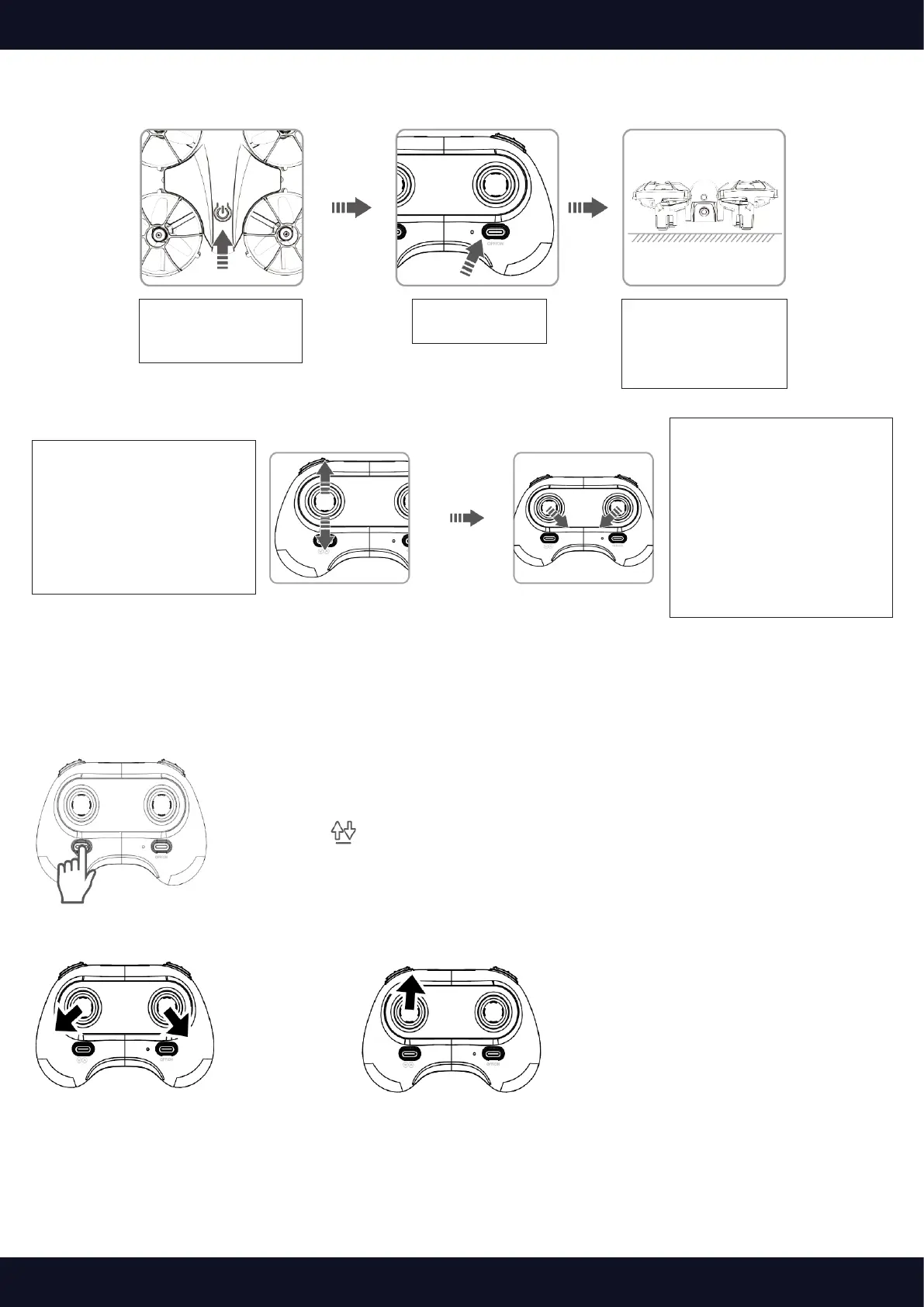
1. Turn on the
drone: LED light
ashes rapidly
4. Push the left control
stick forward to top
and then pull it back-
ward till the bottom.
Pairing is successful
when the LED on the
drone is solid on.
5. Move the left and
right sticks inward &
downward (left stick 5
o’clock and right stick
7 o’clock positions) for
3 seconds. The LED will
ash quickly and then
turns to solid, calibrat-
ion is successfully.
3. Place the drone
at a at
surface with
head forward
2. Turn on the
controller
Note: Please repeat the step 5 before every ight
Take-o
Option 1:
Press the button to take o.
Option 2:
Move the Left Control Stick to lower left in 45° and the Right Control
Stick to lower rightin 45° at the same time until four rotor blades start
totating, then slowly push the Left Control Stick forward to take o.



 To Next Page