Eachrapid fire mode can be programmed to one of50different speed between4 and 50
shots persecond. Youcan also set the burst fire for each mode from 2–10 shots per burst.
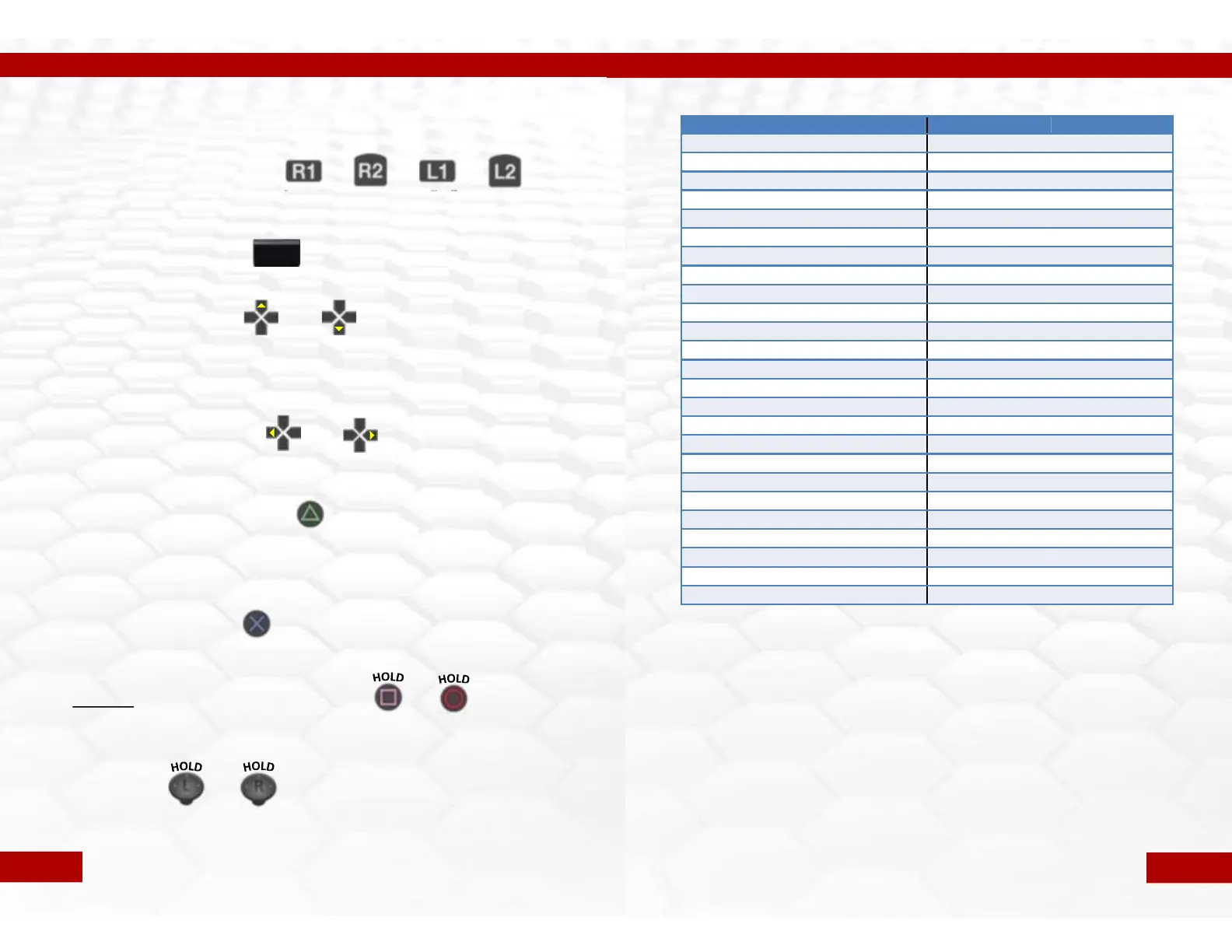
Enter the Programming Mode:
To enter theprogramming mode you must firstHOLD“R1” + “R2” + “L1” + “L2”all at the
same time for5 seconds. You will see themain LED flash White for 2seconds.
Exit Programming Mode:
To exit the programming mode just TAP the“TOUCHPAD”.
Change Rapid Fire Speed:
To change the rapid fire speed youonly need toTAP “UP”or“DOWN” on the D-pad.“UP”to
make the speed faster and“DOWN” to make it slower. Themain LED will flash GREEN when
increasing the speed and RED when decreasing. Onceyou have reached the MIN or MAX
speed the LED will no longer flash.
Change Burst FireQuantity:
To change the number of shots fired with the burst fire youmust TAP “LEFT” or “RIGHT” on
the D-pad. Left for fewer shots and Right for More shots.
Check Rapid Fire Speed Setting:
To check the currently set rapid fire speed you only need toTAP“TRIANGLE”. Themain LED
will flash BLUE for the“tens” positionand then flash GREEN for thesingle digit. (example:
BLUE flashes 3times, followed by GREEN flashing 6 times, you are now at speed setting 36)
Refer to the table on the next page for all of the speedsetting options.
Check Burst FireSetting:
To check the currently set burst fire setting just TAP“X”. The main LED will flash BLUE2-10
times to indicate the number of shots set for the burst fire.
ResetCurrent Mode to Default Settings:
To reset therapid fire mode you are currently editing to the factory default you mustHOLD
“SQUARE”and “CIRCLE”together for 7 seconds. After 7 seconds themain LED will flash
AQUA very fast20 times to indicate the Mode has ben reset.
MASTER RESET:
Resets ALL modes, speeds and sub modes to their default settings. HOLD “BOTH
THUMBSTICK CLICKS”for 7 seconds. The main LED will flash RED , GREEN, BLUE , RED, after
this all settings will be set to default and the programming mode will be exited.
Programming the Adjustable Rapid/Burst FireSettings
+
HOLD
+
HOLD
(5 sec)
TAP
or
TAP
+
(7 sec)
(7 sec)
TAP
or
TAP
TAP
TAP
+
TAP
Pg. 7
+
HOLD
HOLD
Rapid Fire speed settings table
1
50
26
12
2
45
27
11.75
3
40
28
11.5
4
36
29
11.1
5
33.33
30
10.8
6
30
31
10.5
7
28
32
10.25
8
26.67
33
10.00
9
25
34
9.75
10
23
35
9.5
11
22
36
9.3
12
21
37
9
13
20
38
8.7
14
19
39
8.5
15
18.2
40
8.33
16
17.4
41
8.00
17
16.67
42
7.7
18
16
43
7.5
19
15.4
44
7.3
20
14.8
45
7
21
14.3
46
6.67
22
13.8
47
6
23
13.33
48
5.5
24
12.9
49
5
25
12.5
50
4
Important Rapid Fire Speed Information!
The PS4 Razorback - Modchip allows you to set rapid fire speeds up to 50
shots per second, but you must be aware that setting the rapid fire to the
maximum will NOT work for most games. All games have limitations on the rates at
which weapons can fire. Our default mode settings are already optimized to the
fastest possible speeds for the games/weapons listed on page 3.
The possibility to change these settings are available for you to experiment with
and find settings that best compliment your playing style and to be able to create
modes for current and future games which are not part of the default setup.
If you have questions regarding rapid fire or any feature please
contact us at Sales@controllermodz.co.uk
Pg. 8


 To Next Page