All features of the PS4 Razorback Maxfire have an advanced management option that
allows you to disable them. This is especially useful if you find there are features you
do not use and do not want the possibility to accidentally activate the feature.
Enter (AFM)
To enter the advanced feature management you must have the controller ON and
the rapid fire must be turned OFF. Then HOLD “CIRCLE + TRIANGLE + SQUARE + X”
together all at the same time for 7 seconds. After 7 seconds you will see the main
LED flash PURPLE 10 times very fast. After this you can release all of the buttons.
Managing features
Now that you are in the AFM you can enable or disable any of the features listed
below by just tapping the corresponding button or button combination. When you
tap a button the main LED will either flash GREEN for enabled or RED for disabled.
• Jump Shot
• Drop Shot
• Fast Reload
• Sniper Breath
• Quick Scope
• TRIGGER MODE Changes trigger functions from default to flipped
layout. The LED will flash ORANGE 1 time for default and 2 times for Flipped.
• LED MODE The LED will flash ORANGE when changing the LED mode
1. The LED flashing is disabled for ALL feature activation.
2. The LED is flashing while Rapid fire is on.
3. The LED is on Solid while Rapid fire is on.
• FEATURE ACTIVATION This option changes which button(s) will be
used to activate features. There are 3 options, left only, both or mod button
only. The default is both. When changing the LED flash ORANGE 1, 2 or 3 times.
1. Only Left On D-pad. 2. Left and Mod button used. 3. Only Mod Button.
Exit Advanced Feature Management
To exit AFM TAP “UP” on the D-pad. The LED will flash PURPLE 10 times.
Advanced Feature Management
+
+
+
(7 sec)
• Auto Run
• Auto Aim
• Mimic
• Battlefield Spotting
• Competition Mode
• Rapid Fire
Pg. 9
+
+
+
+
www.CONSOLECUSTOMS.com
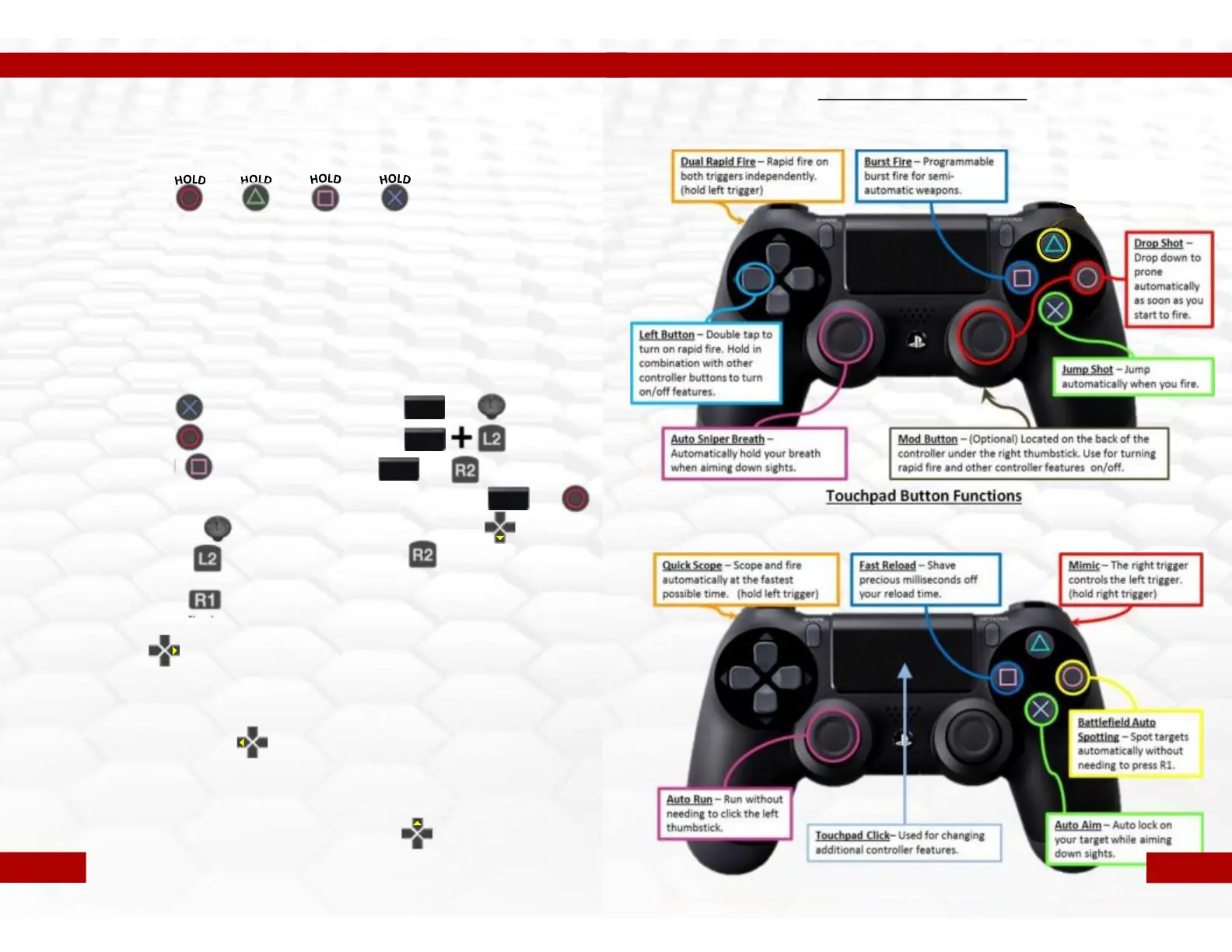
Left or Mod Button Functions
The following functions are controlled by holding the indicated controller button
and then tapping the mod button on the back of the controller.
Touchpad Button Functions
The following functions are controlled by holding in the Touchpad click, then
tapping the indicated controller button
Pg. 10


 To Previous Page