EasyManua.ls Logo

Moen GEC9 - User Manual

Moen GEC9
8 pages
Print Icon
To Next Page IconTo Next Page
Loading...
Be sure to read this manual before using the product in order to ensure safe operation.
1
GUITAR EFFECT COMMANDER
Owners manual
Question and Answer IconNeed help?

Do you have a question about the Moen GEC9 and is the answer not in the manual?

Summary

1- Overview

Presets

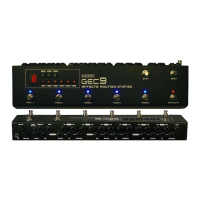
Recalls stored settings for PRESET 1-5. Presets are stored in nonvolatile memory and will not be erased.

Mute;Clean Function

Shuts off LOOP OUT and switches input to CLEAN jack. Pressing again returns to normal operation.

Bank Up;Down Control

Scrolls up/down through 20 banks. Bank number is displayed on the bank display.

Program Buttons

Turns loop1 to loop9 on/off separately. Status changes are stored automatically.

Program Lock Switch

Disables program buttons when in 'lock' position to prevent mis-programming.

DC Jack

Power input for the unit. Requires DC 9V with a negative center.

3- Recall Presets and Bypass Whole Loop

4- Mute the Switcher

5- Bank UP;DOWN

6- Program a Preset

7- Separate Loops and Footswitch

Summary

1- Overview

Presets

Recalls stored settings for PRESET 1-5. Presets are stored in nonvolatile memory and will not be erased.

Mute;Clean Function

Shuts off LOOP OUT and switches input to CLEAN jack. Pressing again returns to normal operation.

Bank Up;Down Control

Scrolls up/down through 20 banks. Bank number is displayed on the bank display.

Program Buttons

Turns loop1 to loop9 on/off separately. Status changes are stored automatically.

Program Lock Switch

Disables program buttons when in 'lock' position to prevent mis-programming.

DC Jack

Power input for the unit. Requires DC 9V with a negative center.

3- Recall Presets and Bypass Whole Loop

4- Mute the Switcher

5- Bank UP;DOWN

6- Program a Preset

7- Separate Loops and Footswitch

Moen GEC9 Specifications

General IconGeneral
BrandMoen
ModelGEC9
CategoryMusical Instrument Amplifier
LanguageEnglish