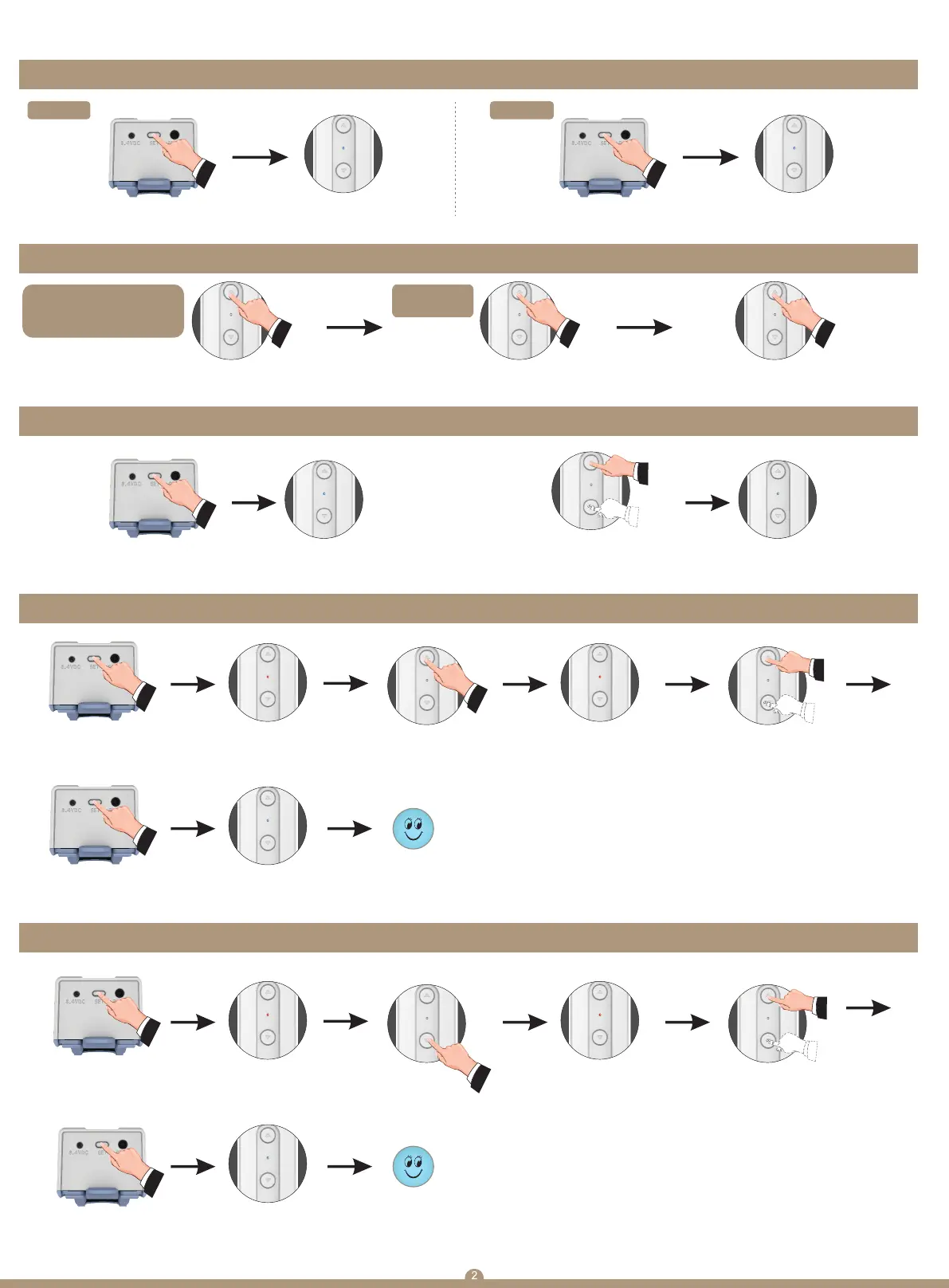
1. Power On/Off
5. Upper limit setting
(Motor will automatically exit setting mode after 30'' if motor without receiving any order)
5. Bottom limit setting
(Motor will automatically exit setting mode after 30'' if motor without receiving any order)
2. Motor working modes
3. Dot mode/continuous mode switch 4. Change direction
Dot move mode
(apply to venetian blinds,
dual shades,triple shades)
Press the setting button for 7'
Blue indicator slowly
flash for 3 times
(1'1on,1'off)
Continuous
driving mode
Power on
Press the setting button for 1' Blue indicator flash for 2'
Hit the button <1.5",motor
stop whenever you release your hand
keep hitting the button >1.5",motor move straightly
Hit the setting button 5 times
(each hit less then 1s,and every
hit not more than 1s)
Indicator flash blue 3 times.
Now motor working mode switch
Hit the setting button
for 3",motor enter into
setting mode
Hit the setting button
for 3'
Indicator turn red
Indicator turn red
Indicator flash blue 3 times
Now motor save
the upper limit
Please UP button enter
into limit setting mode
Indicator flash
red quickly
Move the motor to
plaesed position
Hit the setting button
for 3",motor enter into
setting mode
Hit the setting button
for 3'
Indicator flash blue 3 times
Now motor save
the upper limit
Please Down button enter
into limit setting mode
Indicator flash
red quickly
Move the motor to
plaesed position
Hit the up and down button
at the same for 3'
Indicator flash blue 3 times.
Now motor dorection change
Hit the button for 1",
motor move directly
Power off
5.Setting Instruction


 To Next Page
 Loading...