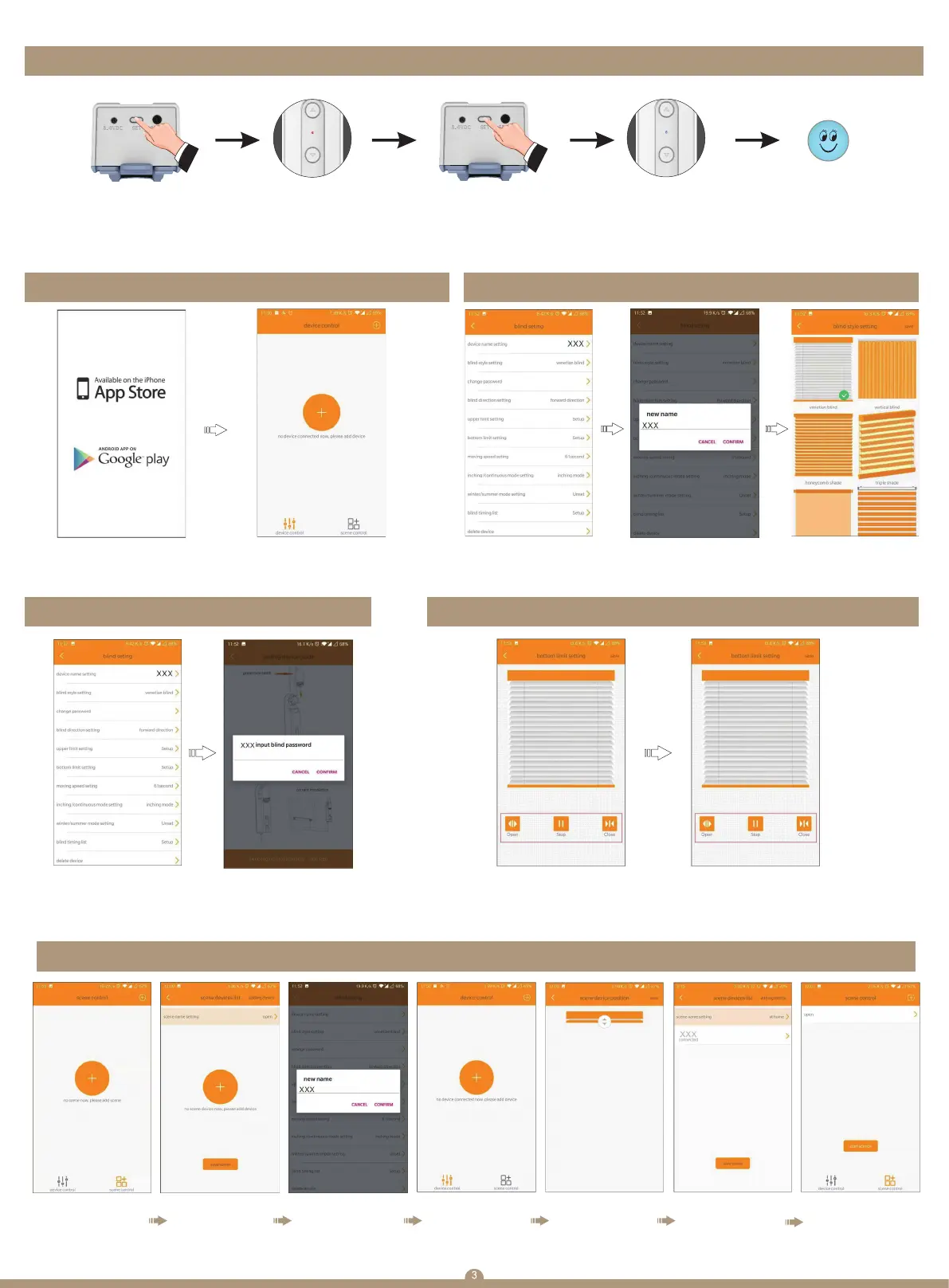
(Motor will automatically exit programming mode after 30" if motor receiving any order Motor restore
to factory setting will delete all setting you done before)
TIpswich:Motor run in dot move before and after limit set,please
go to dot and confirm(tips:Max 18 letter space limites filling new name)
7. Restore factory setting
Ⅰ. Download APP II. Shades setting
Ⅲ. Change password on APP
Ⅴ. Scenes setting
Ⅳ. Limits setting
Search:Blind engine Tap “+", the APP start to
search devices Tips:the APP
can add maximum 7 devices
You can do various settings
after device connection
Fill a new name on your
device and confirm
(tips:Max 18 letter space
limited filling new name)
Choose the type of your
shade and finish the shades
setting
Indicator turn red Hit the setting
button for 7'
Hit the setting button
for 3",motor enter into
setting mode
Indicator flash blue 3 times
Now motor save
the upper limit
Enter shades setting
interface and choose
“change password”
item
Input the new password,
factory default password
is “8888”
Enter shades setting interface,
choose “upper limit setting”.
Make the shade go to upper
limit position then save the limit
Tip:when you do the limit setting,
motor run in dot move mode.
Enter shades setting interface,
choose “bottom limit setting”.
Make the shade go to upper
limit position then save the limit
Tip:when you do the limit setting,
motor run in dot move mode.
1) Choose “scenes setting”
menu(Tips:Max 6 scenes
can be added)
2) Tap “scene name
setting”
3) Name the scene and
save it
4) Tap “+” on top right
corner to add device
5) Set the favorable
positions and save
6) When you finish adding
devices,tap “save scene”
finish the scene setting
(Tips:Keep holding the
“device”menu can do
other setting operation)
7) Choose the scene and tap
“start scene”. Devices added
to scene will start to run


 To Next Page
 Loading...