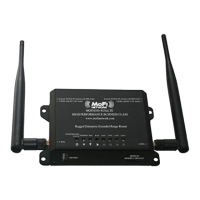
The MOFI6500-5GXELTE-RM520 is an advanced high-performance 5G cellular router designed for robust and reliable internet connectivity. It supports 4G/LTE and 5G networks, offering a comprehensive solution for various connectivity needs.
Function Description:
The MOFI6500-5GXELTE-RM520 functions as a versatile cellular router, providing high-speed internet access through 4G/LTE and 5G networks. It is designed for both residential and enterprise use, offering features like failover, load balancing, and remote management to ensure continuous and optimized connectivity. The router can be used with a 4G/LTE/5G USB modem stick or connected to a DSL/Cable modem, providing flexible deployment options. It also supports Wi-Fi 6 for high-speed wireless connections.
Important Technical Specifications:
- CPU: 1.3GHz
- RAM: 1GB DDR4 2400MT/s
- ROM: 128GB (System Memory)
- Cellular Connectivity:
- 5G NR: Refarmed: LB TX0/PRX & MHB TX0/PRX & UHB TX1/DRX, n41 TX0/PRX, n77/n78/n79 TX1/DRX
- LTE: LB TX1/DRX & MHB TX0/PRX & UHB TX1/DRX & LAA PRX
- WCDMA: LMB TRX
- 5G Supported Bands: N1, N2, N3, N5, N7, N8, N12, N13, N14, N18, N20, N25, N26, N28, N29, N30, N38, N40, N41, N48, N66, N70, N71, N75, N76, N77, N78, N79
- LTE Supported Bands: B1, B2, B3, B4, B5, B6, B7, B8, B12, B13, B14, B17, B18, B19, B20, B25, B26, B28, B29, B30, B32, B34, B38, B39, B40, B41, B42, B43, B46, B48, B66, B71
- Wi-Fi: Wi-Fi 6 coverage, supports 2.4GHz and 5GHz wireless signals.
- Ports:
- 4 x RJ45 for WAN port 10/100/1000 GIGABIT (can be used as a LAN port)
- 1 x Read USB 2.0 Port
- 1 x Side USB 3.0 Port
- 2 x External Serial Console Port
- 2 x Power Input (regular barrel connection as well as a 4-pin Molex Connector)
- SIM Slots: 2 x Nano SIM Slots (4FF)
- Antennas: 4 x external cellular antenna input, 5 x WiFi Antennas, 4 x 5 dBi Premium Wide Band External SMA Antennas for 3G/4G/LTE/5G cellular signal.
- Power Input: 12V DC output (10/100V 3.5A AMPS fully UL certified AC Wall Power Adapter)
- Physical Dimension: 260 mm x 140 mm x 33 mm (10in x 5.5in x 1.3in)
- Weight: 340gram or 1.6 lb
- Operating Temperature: -30 Celsius to +75 Celsius (-22 Fahrenheit to +167 Fahrenheit)
- Storage Temperature: -40 Celsius to +90 Celsius (-40 Fahrenheit to +194 Fahrenheit)
Usage Features:
- High Performance Mission Critical Solution: Designed for 4G/LTE/5G solution with full mobility.
- USB Modem Support: Supports (4G/LTE/5G) USB modem connection to offer a network connection with full mobility.
- Amplified Wi-Fi: Built-in amplifiers that boost the Wi-Fi with a strong yet clean signal, allowing the router to reach further than possible with other lower performance routers.
- Gigabit Support: Supports WAN Port and 4-Port 10/100/1000M (Full Gigabit Support).
- Secure Wi-Fi Network: Supports 64/128-bit WEP, WPA, and WPA2 to ensure a secure Wi-Fi network and prevent unauthorized access.
- Detachable Antennas: Allows flexible gain performance antennas for both cellular and Wi-Fi connection and offers the ability to use outdoor external antennas.
- Auto Fail Over: Can have a cellular and Cable/DSL/Satellite connection. If the Cable/DSL/Satellite connection is lost, the cellular connection will take over and as soon as the connection is established again, it will revert back to the Cable/DSL/Satellite connection.
- Load Balancing: If you require the fastest internet possible, the Load Balancing feature will allow you to take two WAN connections and make them work as one. This feature includes failover simultaneously, so if one connection fails, the other will still work.
- IP Passthrough: This feature allows the router to work as a modem, with one device connected via Ethernet Port 1. It can prevent 2 routers from conflicting each other.
- Wireless Bridge/Repeater Mode: Allows the router to extend an existing Wi-Fi network or connect to a wired network.
- Port Forwarding: Enables specific ports to be open for applications like DVRs or other devices, allowing remote access.
- Remote Management: Allows users to manage the router remotely via a web interface, providing control over settings and monitoring.
- MOFI Cloud Link: Provides a static dedicated public IP service, which is beneficial for applications requiring a fixed IP address, such as camera systems or remote access.
- Band Lock: Allows users to select specific LTE bands for optimal performance, especially in areas with varying signal quality.
- Bandwidth Monitoring: Enables monitoring of individual device usage and setting user limits to manage network traffic.
- Parental Control Scheduler: Allows for blocking access to individual devices via MAC address or setting time-based restrictions.
- Wi-Fi Speed Limiter: Enables setting upload and download speeds for individual Wi-Fi networks, useful for managing bandwidth for guests or specific devices.
- Bandwidth Monitoring: Provides detailed usage statistics for individual devices, helping to identify heavy users and manage network resources.
Maintenance Features:
- Firmware Upgrade: The router supports firmware upgrades to ensure optimal performance and access to the latest features. Upgrades can be performed via the web interface.
- MOFI Recovery: Provides steps to recover the router from a wrong firmware update or other problems, including resetting to factory defaults and setting up network connections.
- Factory Default Reset Button: A physical button to reset the router to its factory default settings.
- Troubleshooting Guide: The manual includes a comprehensive troubleshooting section to help users resolve common issues like login problems, signal issues, and network connectivity.
- Remote Login: Allows secure remote access to the router's web interface for management and troubleshooting.
- Static Lease: Enables setting static IP addresses for specific devices on the network.
- Regulatory Compliance: The device complies with FCC and European R&TTE directives, ensuring safe and reliable operation.

 Need help?
 General

 To Next Page