Wireless Transmission
RF Frequency Band
Frequency Response
Working Distance
Sampling Rate
Bit Depth
Sensitivity
SNR
Battery Type
Battery Charging Time
Battery Life
Dimensions
Material
Weight
Wireless Transmission
RF Frequency Band
Working Distance
Sampling Rate
Bit Depth
Connector
Power Input
Dimensions
Material
Weight
Digital 2.4GHz
2400-2483.5MHz
20Hz-20KHz
492ft/150m(LOS area);
164ft/50m(NLOS area)
48KHz
16Bit
-36dB
> 75dB
Built-in Lithium Battery, 120mAh
1.5H
5H
49x19x19 (mm)
ABS
10g
Digital 2.4GHz
2400-2483.5MHz
492ft/150m(LOS area);
164ft/50m(NLOS area)
48KHz
16Bit
Type-C or Lightning Output
Type-C
49x30x9 (mm)
ABS
5g
TX Transmitter
RX Receiver
Moman (UK) Limited
Unit 25 Basepoint Business Centre, Aviation Park, West
Christchurch, United Kingdom BH23 6NX
www.momanpower.com
@MomanGlobal
https://moman.co/youtube
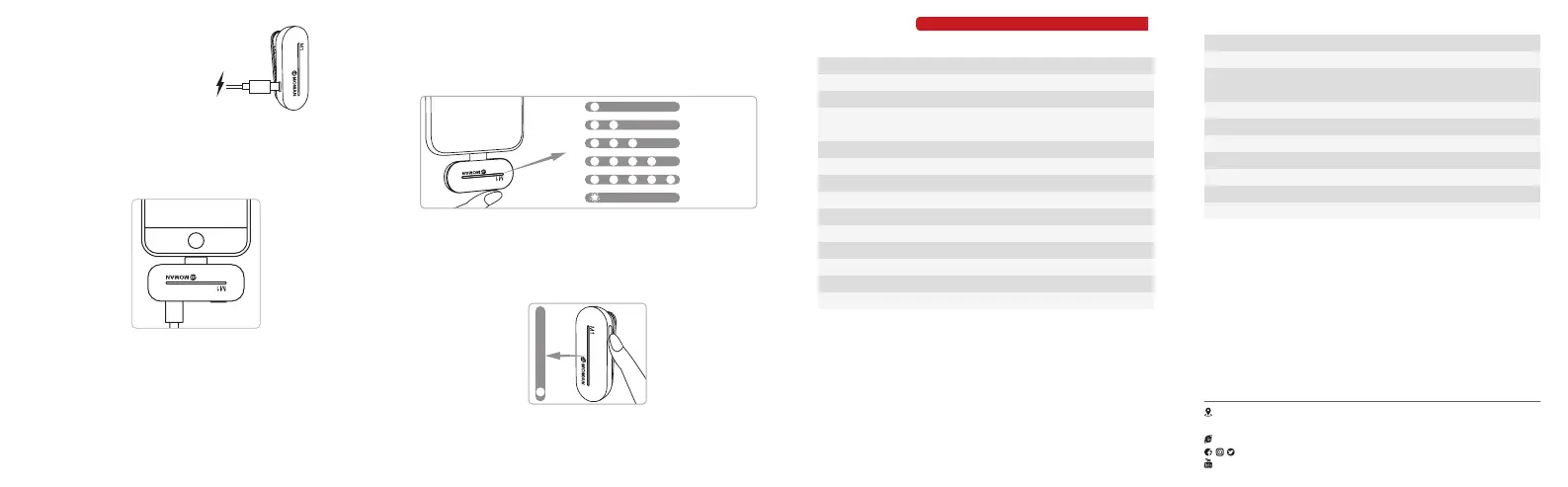
4. Adjust the Volume
Press the receiver volume button to adjust the volume and the
number of indicators shows the current volume level.
Double press the volume button to enable or disable mute and single
indicator keeps on when mute is on.
Lv.1
Lv.2
Lv.3
Lv.4
Lv.5
Mute
5. Noise Reduction
Press the power button of the transmitter to turn on the noise
reduction, the single indicator keeps on.
* Double press the power button of the transmitter to turn o/on the
light eect.
Specications
2. Charge
Transmitter:
Charge the transmitter via the Type-C charging
port and charging cable.
Mobile Phone :
Insert your phone's charging cable into the Type-C port of the
receiver when in use, and the charging current is adjusted according
to the phone's battery max up to 800mA.
*Note: The receiver does not need to be charged and can be used
directly when plugged in the phone.
3. Paring
The transmitter and receiver will automatically start pairing once
power on.
*Note: For M1L/M1T, each transmitter can only pair with a receiver.


 To Previous Page
 Loading...