3. HOW TO USE THE E-BIKE
3.1 DISPLAY AND ERROR CODES
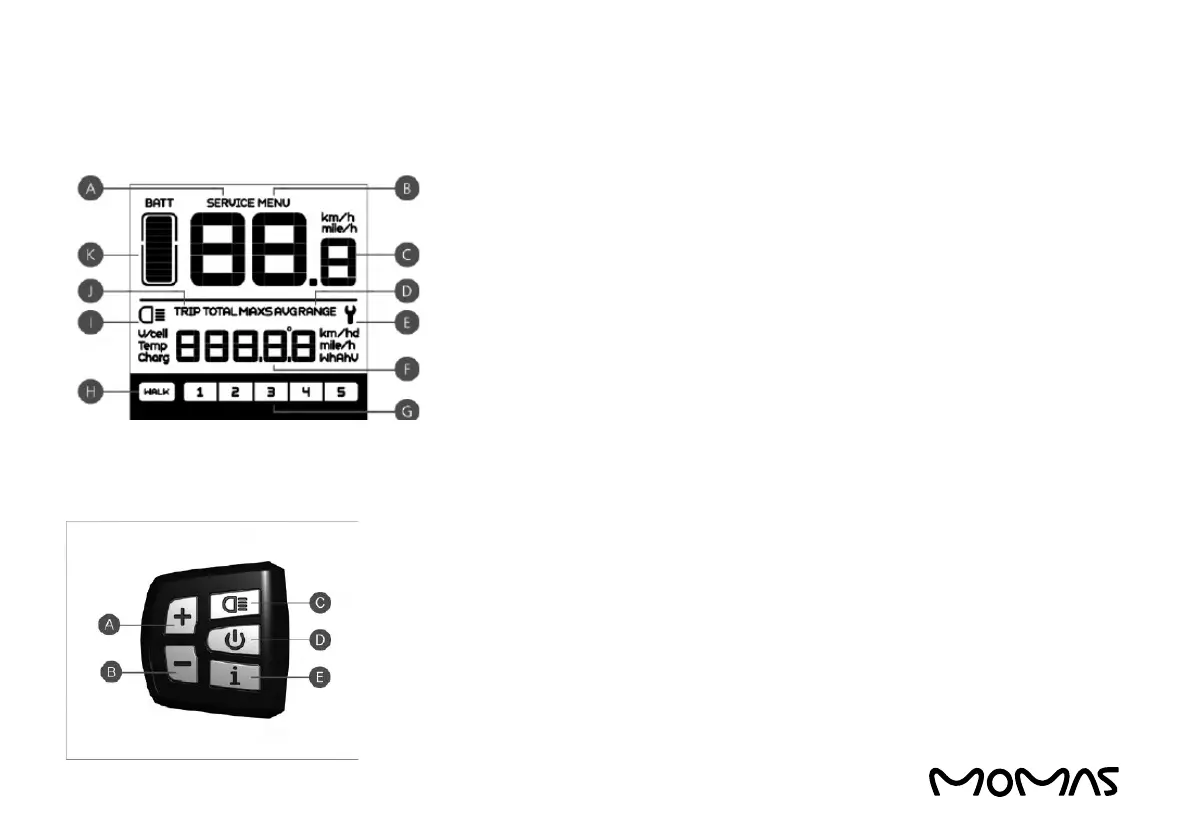
A - NOTE: When maintenance is required, the SERVICE symbol will be displayed (if
mileage or the number of battery charge cycles exceeds the set value, the function
can be deactivated).
B - Menu
C - Speed display: Display of speed, km/h or mph (miles per hour)
D - Speed mode: Average speed, maximum speed
E - Error code display - When an error occurs, the ”WRENCH” symbol is displayed
F - Distance indication: Shows distances depending on setting
G - Level indication: The selected level 1 – 5 is displayed; if no number is displayed,
the engine will not assist. If the rider walks and rolls the e-bike, the ”WALK” symbol
is displayed
H - Walking mode
I - Headlight indication: Shown only when the headlight is on
J - Distance mode: Shows one way trip, trip and the total distance
K - Battery level - 10-step battery indication; the current that each of the steps
represents can be adjusted
A - Up
B - Down
C - Headlight
D - On/Off
E - Mode



 To Next Page