To replay the tracks in a random order,
press the button RAN (36). “SHUFFLE” is
inserted on the display. To switch off the
shuffle function, press the button again.
An activated repeat function is deactivated
when activating the shuffle function and
vice versa.
7.3.9 Playing a loop
A section within a track can be continu-
ously repeated as a loop.
1) If the starting point of the section is
reached in the track currently playing,
press the button A – B (39). The display
shows “A
”.
2) If the end point of the section to be
repeated is reached, press the button
again. The display shows “A B”. The
section is repeated permanently.
3) To finish the loop, press the button a
third time. “A B” will be extinguished.
7.3.10 Changing the replay speed and pitch
The PITCH buttons (32) allow to change
the replay speed and thus the pitch.
button HI or HIGH:
to increase the replay speed in 10 steps
button LO or LOW:
to decrease the replay speed in 10 steps
Press the corresponding button repeatedly
until the desired speed is reached. Each
time the button is pressed, the display
shortly shows the selected adjustment,
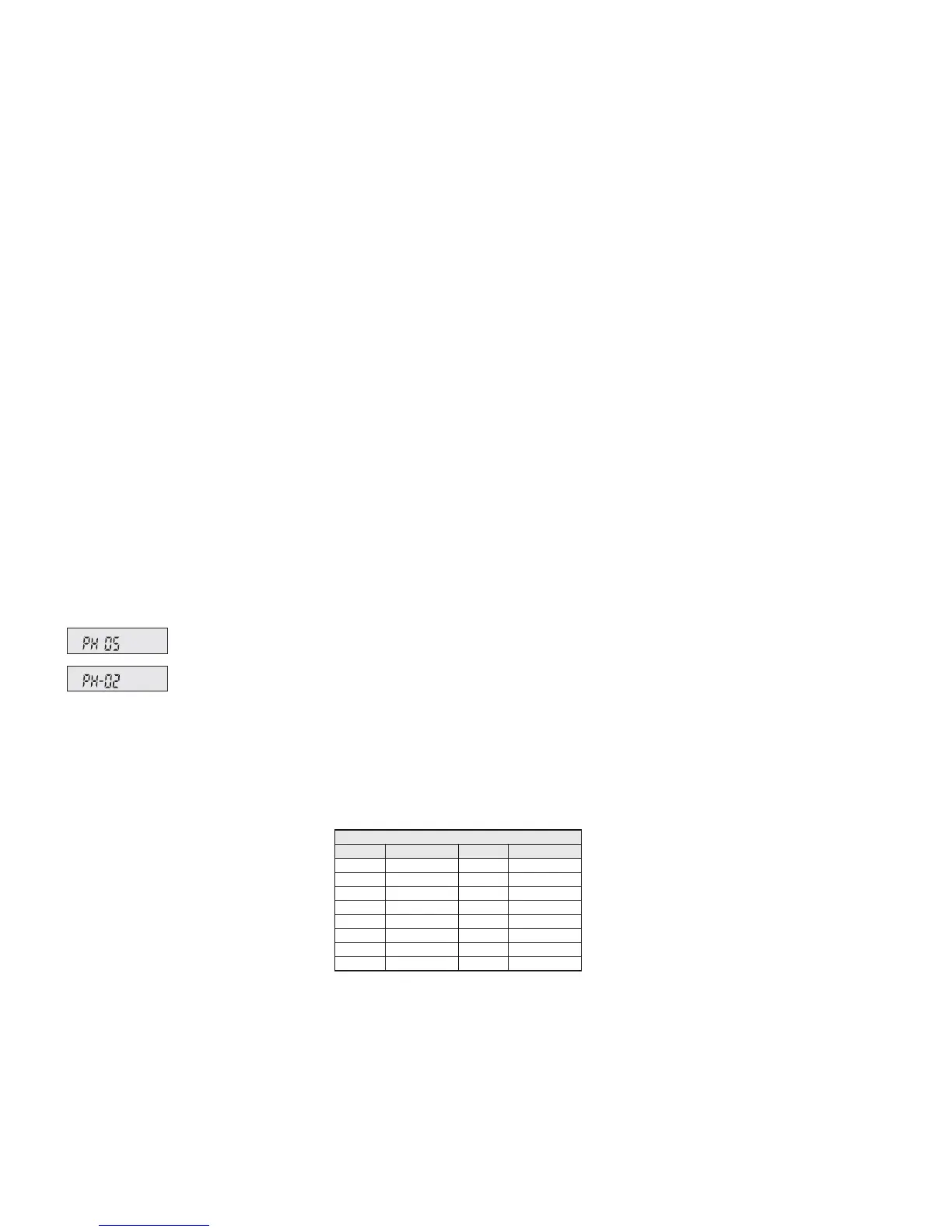
e. g.
To return to standard speed, press the but-
ton NOR once.
7.3.11 Programming a track sequence
1) To switch to the programming mode,
press the button PROG (35). “PRO-
GRAM” is in serted on the display.
2) Select the first track of the track
sequence:
either
– go to the track with the buttons REV/
F.WD or
/
(29); for MP3 oper-
ation, first select the folder with the
button FOLDER (27), if required
or
– enter the track number directly via the
numerical keys (34) [for MP3 opera-
tion: the number of the track on the
playing medium, not in the folder!]
and press the button ENTER (40) to
confirm. The display shows the memory
location number instead of the time indi-
cation.
For all further tracks, proceed in the
same way until the complete track se -
quence (10 tracks max.) has been pro-
grammed.
3) To start the track sequence, press the
button PLAY/ PAUSE or (30), “PRO-
GRAM” will be extinguished and “MEM-
ORY” will be in serted. To return to re -
play in standard order, press the button
PROG: “MEMORY” will be extinguished
and the programming will be deleted.
4) If no repeat function is activated (“RE-
PEAT 1” and “REPEAT ALL” are avail-
able
chapter 7.3.8), the player is set
to stop after playing the track sequence,
thus the track sequence is deleted.
8 Specifications
Amplifier power: . . . . . . . 170 WMAX/120 WRMS
Frequency range: . . . . . 20 – 20 000 Hz
Input sensitivity: . . . . . . . 6 mV (MIC 1 / 2),
300 mV (LINE /AUX IN)
Level LINE /AUX OUT: . . 1 V
Connections
MIC 1: . . . . . . . . . . . . . combined XLR
jack / 6.3 mm jack, bal.
MIC 2: . . . . . . . . . . . . . 6.3 mm jack, bal.
LINE IN / OUT: . . . . . . . . RCA jacks
AUX IN / OUT: . . . . . . . . . 3.5 mm jacks
Tone control: . . . . . . . . . ±10 dB / 100 Hz (BASS)
±10 dB/10 kHz (TREBLE)
Power supply: . . . . . . . . via internal rechargeable
lead gel batteries
(2 × 12 V/4.5 Ah)
or via mains connection
(230 V~/50 Hz/170 VA)
Operating time of
the rech. batteries: . . . . . approx. 4 – 6 hours
Ambient temperature: . . 0 – 40 °C
Dimensions: . . . . . . . . . . 360 × 580 × 320 mm
Weight: . . . . . . . . . . . . . 19.2 kg
Wireless transmission
Range: . . . . . . . . . . . . . approx. 30 m
Transmitting power of
the transmitting module: ≤ 10 mW (EIRP)
Subject to technical modification.
when the standard speed has
been decreased by 2 steps
when the standard speed has
been increased by 5 steps
Radio frequencies
Channel Frequency Channel Frequency
1 863.1 MHz 9 863.2 MHz
2 864.1 MHz 10 864.2 MHz
3 863.6 MHz 11 863.7 MHz
4 864.6 MHz 12 864.7 MHz
5 863.3 MHz 13 863.4 MHz
6 864.3 MHz 14 864.4 MHz
7 863.8 MHz 15 863.9 MHz
8 864.8 MHz 16 864.9 MHz
15
English
All rights reserved by MONACOR
®
INTERNATIONAL GmbH & Co. KG. No part of this instruction
manual may be reproduced in any form or by any means for any commercial use.


 To Next Page