5
Monessen • BLOTMC Installation Manual • 93D0005 • Rev H • 01/2020
Wiring
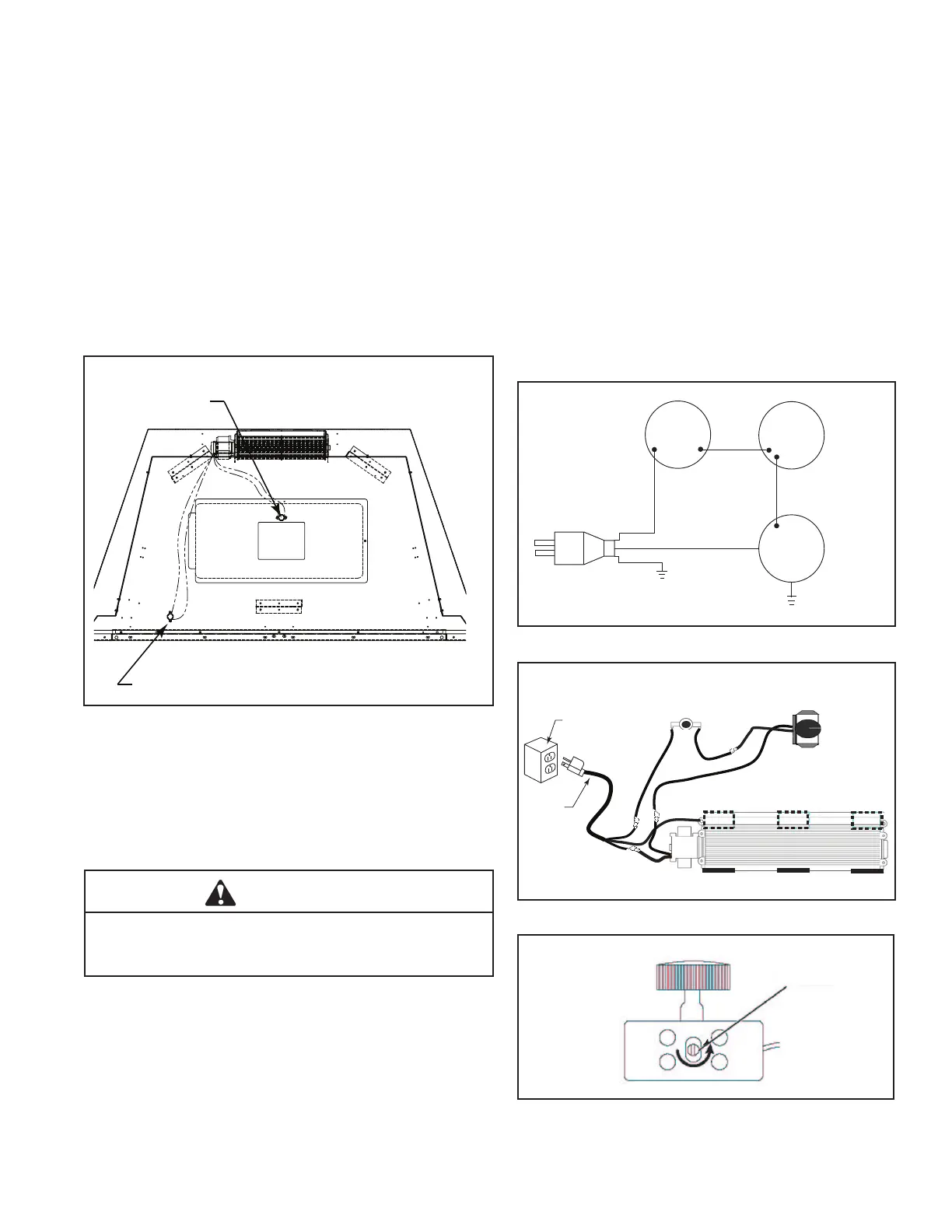
1. Connect the wiring according to the wiring diagram. Fig-
ure 13
2. Plug in power cord to junction box. Figure 14
Install the Thermal Sensor- BUF36,
BUF36-R, BUF42 & BUF 42-R (Natural
Blaze burners only)
1. With access panel in rebox bottom removed, align
sensor with holes in rebox bottom approximately
6 in. from left opening and secure to rebox bottom
with two (2) screws.
White Dial
Figure 15
Blower
Motor
110/115V AC
Blower Plug
Black
White
Green
Variable
Speed
Control
OFF
ON
1
2
(Hi Temp)
(Hi Temp)
Thermal
Sensor
Figure 13
Figure 12
It is important to arrange the blower wire harness so the
wires can not come in contact with the blower fan blades.
WARNING
White
Black
Black
Green
White
Black
Speed Control
Thermo Sensor
Junction Box
Power
Cord
Figure 14
2. With access panel in rebox bottom removed, align
sensor with holes in access panel and secure with
two (2) screws. When installing access panel sen-
sor should be to rear of box.
Finishing
1. Replace oor if removed earlier.
2. Test blower operation. Set the variable speed blower
on the low setting. Turn replace on high. The blower
should turn on within 10 minutes.
3. If blower does not turn on, turn the replace o and allow
to cool. Using a small jeweler’s style screwdriver, turn
the white dial on the side of the speed control 1/8 turn
counterclockwise. Figure 15. This will allow the blower to
start at a lower speed setting as the replace cycles on
and o. Retest blower.
4. To use blower, turn the knob on the speed control to the
desired speed and blower will work automatically when
the replace is turned on and o.
Natural Blaze only
All other Monessen
Burners
(All other Monessen burners)


 To Next Page
 Loading...