4
Monessen • BLOTMC Installation Manual • 93D0005 • Rev H • 01/2020
NOTE: Pertaining to BUF36, BUF36-R, BUF42 &
BUF42-R.
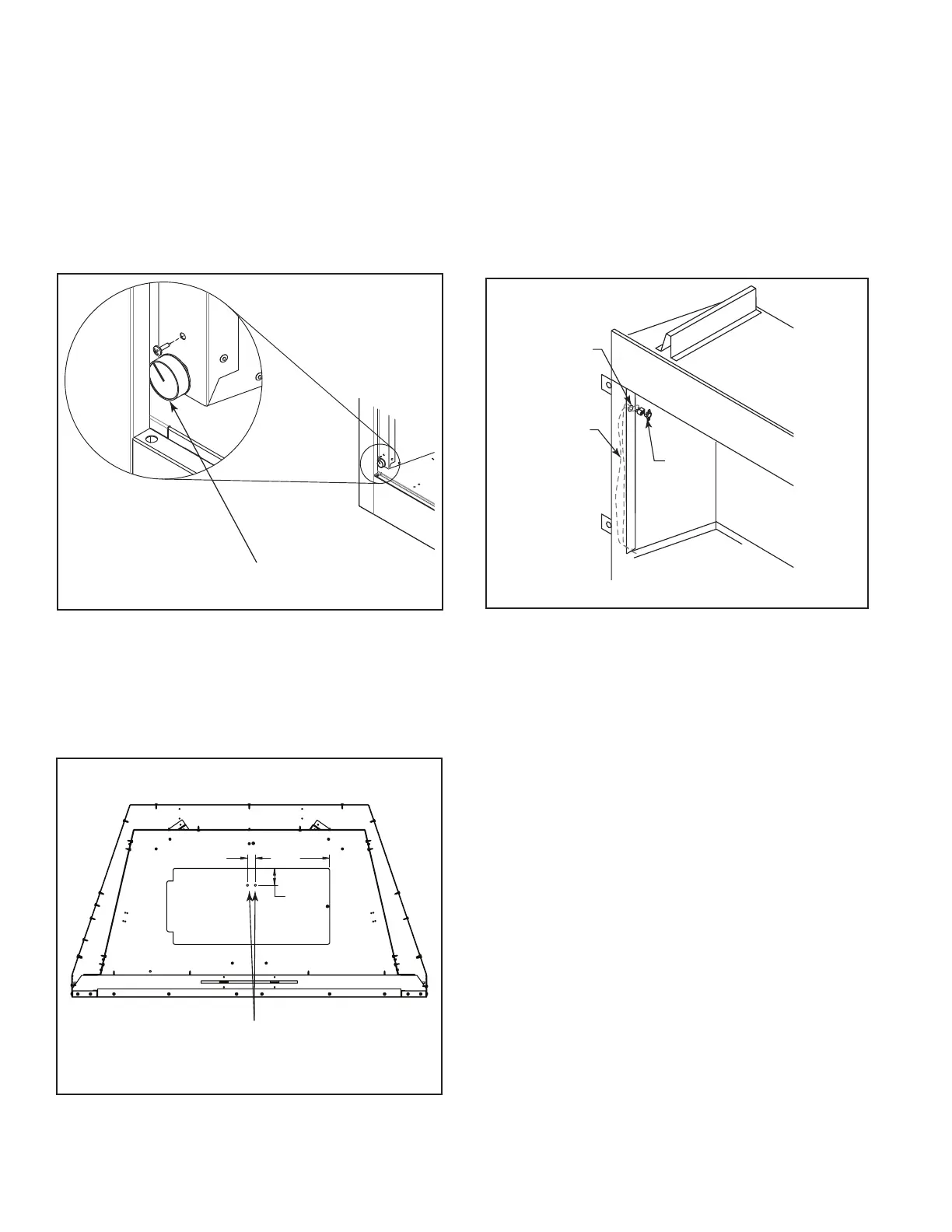
1. Remove speed control knob from switch.
2. Remove the blower switch bracket. (Discarded for
BUF). See Figure 7 on page 3.
3. Position the blower switch assembly in lower left
corner of unit.
4. As you hold switch assembly in place, secure unit
with one (1) screw. See Figure 9.
5. Re-attach knob.
Speed Control Knob
Figure 9
NOTE: Units with serial numbers BUF36/R
VF0048744/ BUF42/R VF0048745 and earlier must
drill two (2) holes to attach the sensor. See Figure
10.
2.00
8.78
0.94
screw holes
Figure 10
Install the Thermal Sensor - GCUF, MCUF
1. Slide wires in hole on inside rebox opening. Figure
11
2. Pop thermal sensor in hole inside rebox opening.
Figure 11
3. Drop the two electrical wires from the thermal sensor
switch down the back or the left side of the rebox
between the outer and inner wrapper. Figure 11
4. Screw sensor to rebox.
KT1111
attach thermal sensor
Firebox
Opening
Thermal
Sensor
Electrical
Wires
KT1111
Figure 11


 To Next Page