31-7000165 Rev.1 7
C
L
Flush Mount Installation Instructions
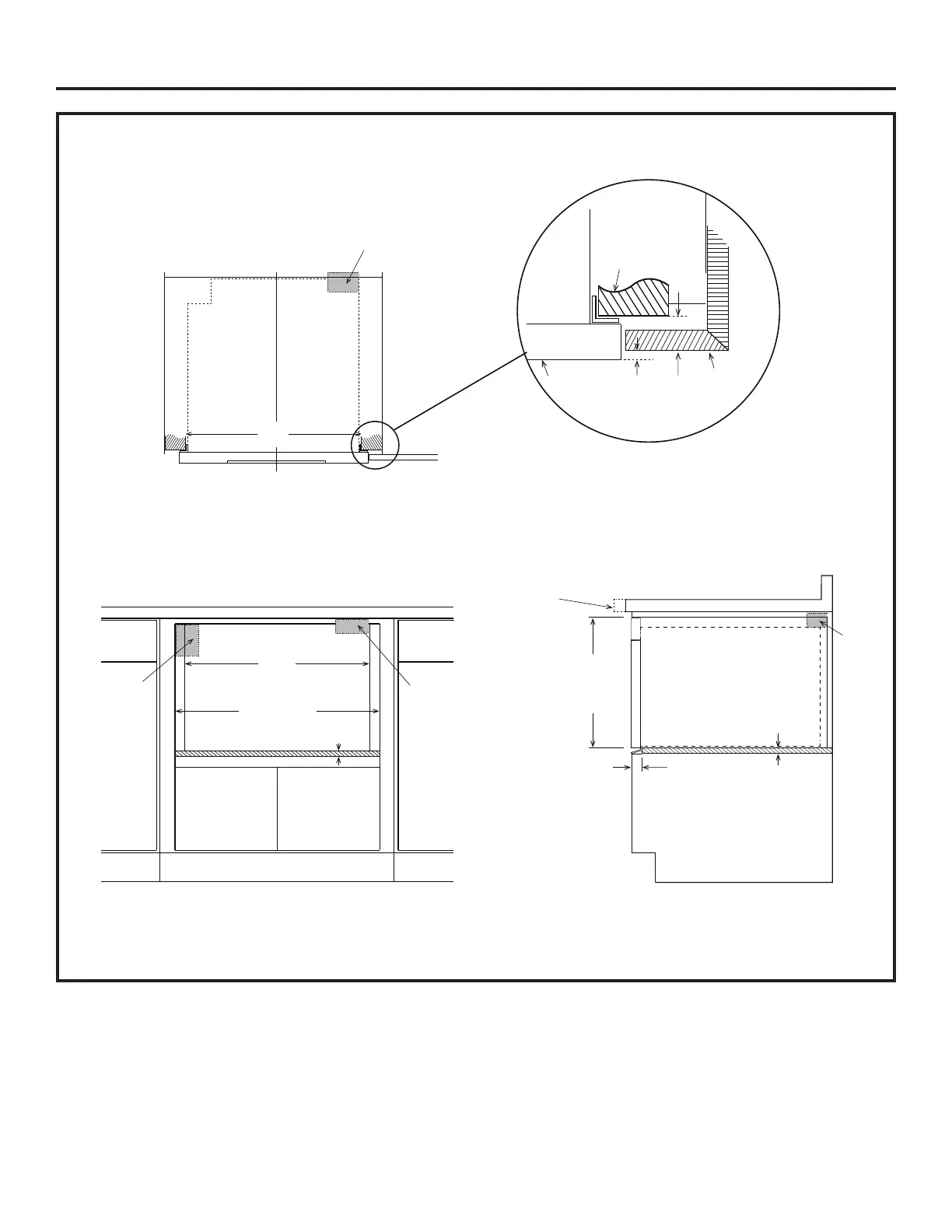
1. Prepare cabinet opening as shown in Figures 6, 7, 8, and 9 (cont).
Anti-Tip
Block
mounting cleat opening width
Top View
22”
NOTE: the mounting surface of the finished cleat must sit
1-9/16” back from the face of the cabinet (pushing the face
of the drawer out 1/8”). For ¼”, the cleat must sit 1-7/16
Mounting Cleat
Preferred
Electrical
Outlet
Location*
Anti-Tip
Block
24
3
/16” min
24
1
/2” max
flush opening width
No Oven
22”
mounting cleat opening width
3
/4” Shelf
Front ViewFront View
Move oven location downward for
extended countertops for better
viewing angle.
Anti-Tip
Block
3
/4” Shelf
1
7
/8”
front face of shelf
Front face of
cabinet
16
7
/8”
flush opening
height
Drawer Face
1
/8”
Cabinet
Face
Figure 7
Figure 8 Figure 9


 To Next Page