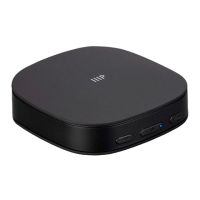
This document is the User's Manual for the Monoprice Bluetooth® Long Range Transmitter and Receiver, P/N 43243.
Function Description:
The Monoprice Bluetooth® Long Range Transmitter and Receiver is a versatile audio device designed to add Bluetooth connectivity to a wide range of audio equipment. It can operate in two primary modes: Transmitter (TX) mode and Receiver (RX) mode. In TX mode, it allows non-Bluetooth audio sources (like TVs, MP3 players, or DVD players) to transmit audio wirelessly to Bluetooth-enabled headphones, speakers, or other receivers. In RX mode, it enables non-Bluetooth audio devices (like wired speakers, amplifiers, or headphones) to receive audio wirelessly from Bluetooth-enabled sources such as smartphones or tablets. The device supports long-range Bluetooth transmission and reception, enhancing flexibility in audio setups. It also features multipoint connection capabilities in both TX and RX modes, allowing it to connect to two receiving devices simultaneously in TX mode or receive audio from two source devices in RX mode (though only one can play at a time).
Important Technical Specifications:
- P/N: 43243
- Bluetooth® Version: 5
- Bluetooth Frequency Range: 2.402 ~ 2.480 MHz
- Bluetooth Chipset: Qualcomm® CSR8675
- Bluetooth Range: Class II, up to 32 feet (10 meters)
- Supported Bluetooth Profiles: A2DP, AVRCP
- Bluetooth Pairing Name: MP43243
- Supported Codecs: aptX™ HD, aptX™ Low Latency, aptX™, SBC, AAC (RX only)
- Battery Type: 3.7V Lithium-polymer
- Battery Capacity: 620mAh
- Charging Time: About 2 hours
- Standby Time:
- RX Mode: About 60 hours
- TX Mode: About 23 hours
- AUX Operating Time:
- RX: About 20 hours
- TX: About 23 hours
- S/PDIF Operating Time:
- RX: About 19 hours
- TX: About 25 hours
- Operating Temperature: +14 ~ +131°F (-10 ~ +55°C)
- Dimensions: 2.8" x 2.0" x 0.8" (70 x 52 x 20 mm)
- Weight: 1.5 oz. (42g)
- Input/Output Ports:
- 3.5mm AUX Audio Jack
- SPDIF Optical Audio RX (Output) Port
- SPDIF Optical Audio TX (Input) Port
- Micro USB Charging Port
Usage Features:
The device is equipped with several buttons and switches for intuitive operation:
- Operating Mode Switch: Allows selection between RX (Receiver) Mode and TX (Transmitter) Mode.
- Audio Mode Switch: Toggles between AUX (3.5mm audio) and Optical (SPDIF) inputs/outputs.
- Multifunction Button (MFB):
- Power On/Off: Press and hold for 3 seconds in TX mode, or 2 seconds in RX mode, to power on. Press and hold for 2 seconds to power off.
- Play/Pause: Momentarily press in RX mode only.
- Delete Pairing Record: Press and hold for 7 seconds (with power on or off) in TX mode to clear all paired receivers.
- Pairing Button:
- Enter Pairing Mode: Momentarily press with power on to enter Bluetooth pairing mode. The Operating Mode Indicator flashes rapidly. This is not functional during a Multipoint Connection.
- aptX™ HD On/Off: Press and hold for 7 seconds with power on.
- LED Indicators: Provide visual feedback on the device's status, including:
- Operating Mode (TX/RX)
- Audio Mode (AUX/OPT)
- Connected Devices (A/B for multipoint)
- Codec in use (SBC, aptX, LL, HD, AAC)
- Pairing status (rapid flashing)
- Disconnected Standby (Blue LED flashes)
- Connected Standby (Solid blue LED)
- Charging status (Charge LED flashes red for low voltage, solid red for charging, off when fully charged)
- Multipoint Connection:
- In TX mode, it can connect to two Bluetooth receiving devices simultaneously.
- In RX mode, it can connect to two Bluetooth source devices, though only one can play audio at a time.
- Codec Priority: When using aptX™ codecs, the device prioritizes aptX™ HD, then aptX™ Low Latency, then aptX™, and finally SBC, selecting the best quality codec supported by both connected devices.
Maintenance Features:
- Battery Charging: The internal Lithium-polymer battery should be charged before first use and at least once every two months to maintain its health and full charge capacity.
- A flashing red Charge LED indicates low battery.
- Charging is done via the Micro USB Charging Port using the included Micro USB Charging Cable and a separate USB power source (wall charger, power bank, computer, etc.).
- The Charge LED illuminates solid red during charging and turns off when fully charged.
- Cleaning: Use a soft, dry cloth for cleaning. Avoid chemical cleaners, solvents, or detergents. For stubborn marks, a cloth moistened with warm water can be used.
- Safety Guidelines:
- Intended for indoor use only.
- Avoid exposure to water, moisture, excessive vibration, extreme force, shock, or temperature/humidity fluctuations.
- Do not expose to excessively high temperatures or direct sunlight.
- Do not place in areas with excessive dust, humidity, oil, smoke, or combustible vapors.
- Contains a Lithium-polymer battery; dispose of in accordance with local, state, or federal regulations.
- No user-serviceable parts; do not attempt to open, service, or modify the device.

 Need help?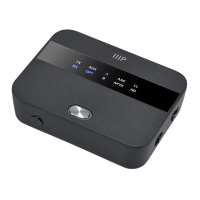

 To Next Page
 General