Need help?
Do you have a question about the Monoprice SW-10 and is the answer not in the manual?
Essential safety warnings and guidelines for device usage and handling.
Details on how to contact Monoprice customer support via website, chat, or email.
Lists the items included in the product package for user verification.
Explains the function of Volume, Low-Pass Filter, Power Mode, and Phase controls.
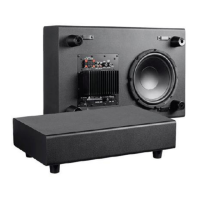
Details Line In/Sub In, Speaker Level In, Power switch, Fuse, and power requirements.
Steps for connecting the subwoofer to a dedicated SUB/LFE output on an amplifier.
Guide for connecting the subwoofer using stereo preamplifier outputs via RCA cable.
Instructions for connecting the subwoofer to speaker level outputs using speaker wire.
Recommendations for placing the subwoofer in a room for best bass performance.
Information on how to get technical assistance via online chat, email, and website.
Detailed technical specifications including model, driver, frequency response, and dimensions.
Details FCC rules, conditions for operation, and measures to correct interference.
States compliance with Canadian ICES-003 for Class B digital apparatus.
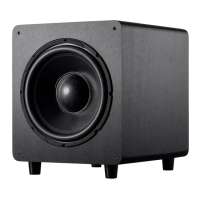
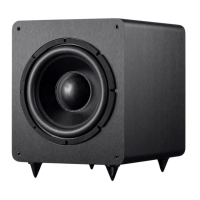
The Monoprice SW-10 10" 150-Watt Powered Subwoofer is designed to enhance your audio system by providing deep, impactful bass. This device is intended for indoor use only and offers a range of features for optimal integration into various home audio setups.
The primary function of the SW-10 subwoofer is to reproduce low-frequency sounds, often referred to as bass, that main speakers may struggle to produce effectively. By adding a dedicated subwoofer, your audio system can achieve a fuller, richer sound experience, particularly beneficial for music, movies, and gaming that feature significant low-frequency content. The subwoofer is powered, meaning it has its own internal amplifier, which allows it to operate independently of your main amplifier's power output for the main speakers.
The SW-10 subwoofer offers several controls and input options to tailor its performance to your specific audio system and listening environment:
Volume Level: This knob allows you to adjust the output volume of the subwoofer, enabling you to balance its bass output with the volume of your main speakers. This ensures a seamless blend between the subwoofer and the rest of your audio system, preventing the bass from being either too overpowering or too subtle.
Low-Pass Filter: This control sets the crossover frequency, determining the point at which the subwoofer takes over from your main speakers. You can adjust this filter between 40 Hz and 150 Hz. The subwoofer will reproduce all frequencies below the selected crossover point. Proper adjustment of the low-pass filter is crucial for achieving a smooth transition between the subwoofer and your main speakers, preventing "boomy" bass or unnatural-sounding male voices if set too high.
Power Mode: The subwoofer features a power mode switch with "On" and "Auto" settings. In the "On" position, the subwoofer's power status is solely controlled by the physical POWER switch. When set to "Auto," the subwoofer will automatically enter a standby mode after approximately two minutes of no audio input. It will then automatically power back on when an audio signal is detected. This auto-standby feature helps conserve energy when the subwoofer is not in active use. For the "Auto" standby function to work, the main POWER switch must be in the "ON" position.
Phase Control: This control allows you to adjust the phase of the subwoofer's output signal between 0° and 180°. Phase adjustment is important for correcting potential mismatches in phase between the subwoofer and your main speakers. A phase mismatch can lead to cancellation of certain bass frequencies, resulting in weaker or less defined bass. By listening for a change in mid-bass output while switching between 0° and 180°, you can find the correct position that yields a higher amount of apparent mid-bass output, ensuring the subwoofer's output aligns acoustically with your main speakers.
Line In/Sub In: This input option is ideal if your amplifier or receiver has a dedicated subwoofer output (often labeled SUB or LFE). You can connect a mono RCA cable (not included) from your amplifier's subwoofer output to the left (L) input on the subwoofer. Alternatively, an RCA splitter cable can be used to connect to both the L and R inputs. If your amplifier lacks a dedicated subwoofer output but has a preamplifier output, a stereo RCA cable (not included) can be used to connect the stereo preamplifier output to both the L and R inputs on the subwoofer.
Speaker Level In: For amplifiers that do not have dedicated subwoofer or preamplifier outputs, the subwoofer can be connected using the speaker level inputs. You would connect the stereo speaker outputs from your amplifier to the SPEAKER LEVEL IN inputs on the subwoofer using two speaker wires (not included). This allows the subwoofer to receive the audio signal directly from the speaker outputs.
Power Switch: This is the main switch to manually turn the subwoofer ON or OFF. If you are utilizing the "Auto" standby feature, this switch should be left in the "ON" position for the auto-standby functionality to operate.
Power Cord Input: The subwoofer requires a nominal 120 VAC, 60Hz power source. The power cord plugs into this input, connecting the unit to a nearby AC power outlet.
Maintaining your Monoprice SW-10 subwoofer involves a few simple practices to ensure its longevity and optimal performance:
General Cleaning: The device should be cleaned using a soft, dry cloth only. Avoid using chemical cleaners, solvents, or detergents, as these can damage the finish or internal components. For stubborn deposits, a cloth lightly moistened with warm water can be used.
Fuse Replacement: The subwoofer is equipped with a replaceable fuse (3A/250V). If the fuse needs replacement, it is crucial to first power off the subwoofer and unplug it from its power source. Always replace the fuse with one of the exact same type and rating to prevent damage to the unit.
Environmental Considerations: To prevent damage and ensure safe operation, avoid exposing the subwoofer to water, moisture, excessive vibration, extreme force, shock, or fluctuations in temperature or humidity. It should also not be placed in direct sunlight or near heat sources like fireplaces, stoves, or radiators. These precautions help protect the internal electronics and the speaker cone from damage.
Ventilation: The subwoofer ventilates excessive heat through slots and openings on its rear panel. It is important not to block or cover these openings to ensure sufficient airflow and prevent overheating. The device should be placed in an open area where it can dissipate heat effectively.
Power Cord Care: Take care to prevent damage to the power cord. Do not allow it to become crimped, pinched, walked on, or tangled with other cables. Always grasp the connector head or adapter body when unplugging the unit, rather than pulling on the cord itself.
User Serviceability: This device contains no user-serviceable parts beyond the fuse. Do not attempt to open, service, or modify the unit yourself, as this could void the warranty and potentially lead to electric shock or damage.
Pre-Operation Check: Before plugging the unit into a power outlet, always check the unit and its power cord for any physical damage. If any damage is observed, do not use the device. Ensure that the power outlet provides the correct type and level of power required by the subwoofer.
By following these guidelines and utilizing the available features, you can effectively integrate the Monoprice SW-10 subwoofer into your audio system and enjoy enhanced bass performance for years to come.
 General
| Driver Size | 10 inches |
|---|---|
| Enclosure Type | Bass Reflex |
| Phase Switch | Yes |
| Inputs | Speaker-level |
| Low Pass Crossover | 50Hz - 150Hz adjustable |


 To Next Page