4
HOOKUP GUIDE
STEP 1 DSS/DVD/Phone line Hookup
The PowerSource
™
has facilities to protect a single phone line.
FOR PAY-PER-VIEW DEVICES (SUCH AS DBS)
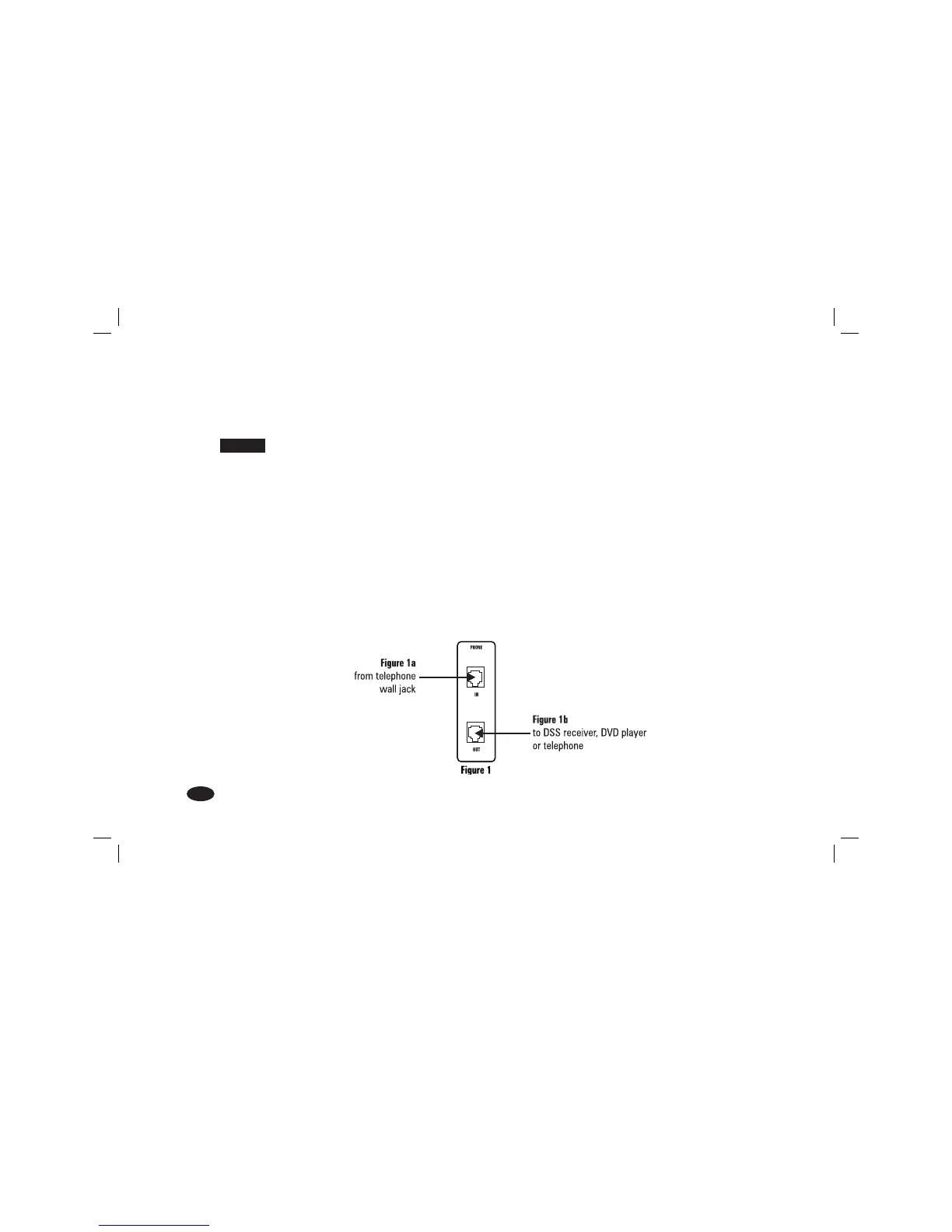
A) Connect one end of a phone cable into a telephone wall jack. Plug the other end into the HTPS 7000 “IN”
jack (Figure 1a).
B) Connect a second phone cable from the HTPS 7000 “OUT” jack to the Pay-Per-View input on your DSS
Receiver or DVD player (Figure 1b).
FOR STANDARD TELEPHONE LINE PROTECTION (NOT A PAY-PER-VIEW DEVICE)
A) Connect a phone cable from a telephone wall jack to the HTPS 7000 “IN” jack (Figure 1a).
B) Connect a second phone cable from the HTPS 7000 “OUT” jack to the telephone (Figure 1b).
MANUL_HTPS_7000_Q3bn.indd Main:12MANUL_HTPS_7000_Q3bn.indd Main:12 4/4/06 3:08:20 PM4/4/06 3:08:20 PM




 To Next Page