15
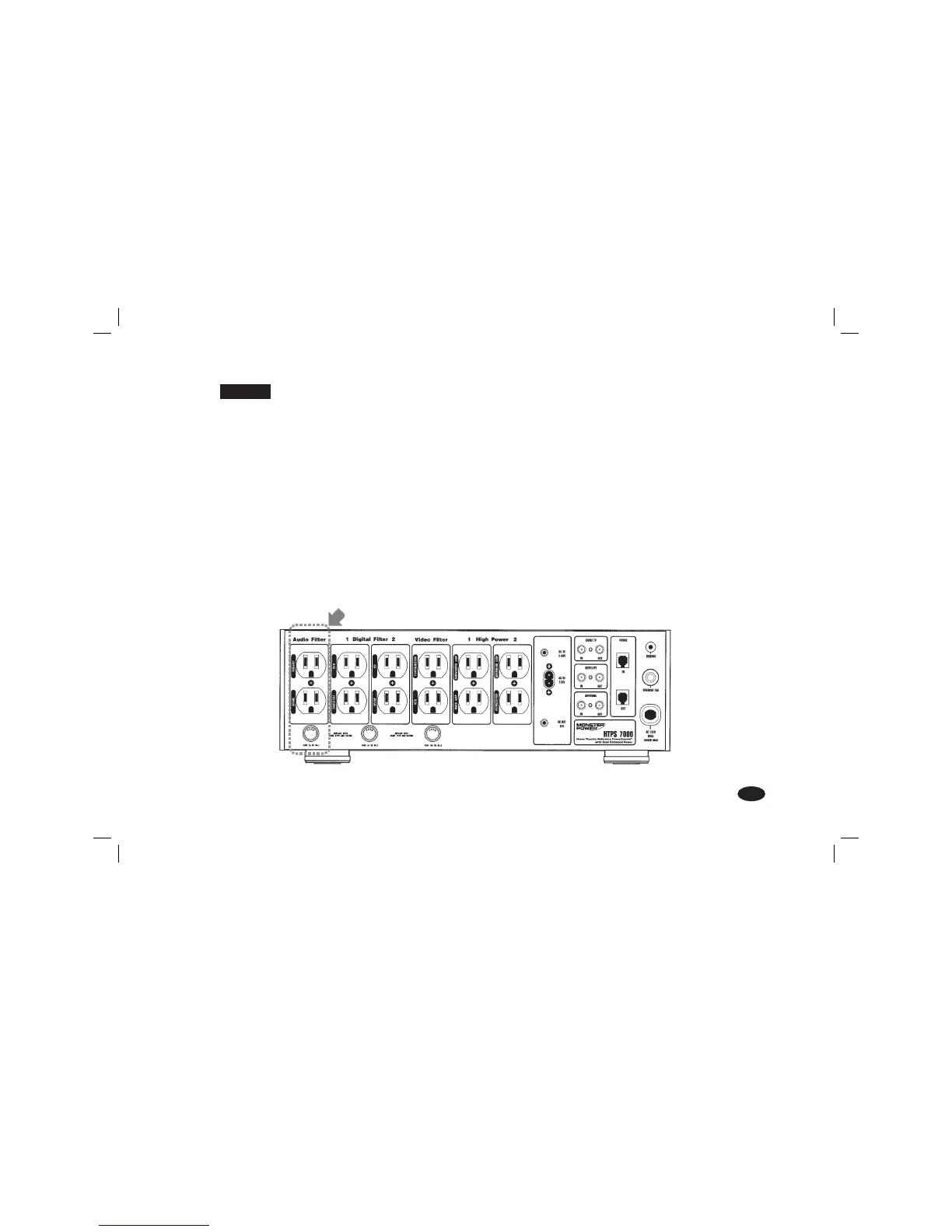
STEP 11 Analog Audio AC Outlet Hookup
Isolated Monster Clean Power
™
Stage 5 Analog Audio Filter: Optimized to provide maximum noise rejection for
sensitive analog audio components.
NOTE: Because certain components shouldn’t be turned on continuously, program these outlets to “Switched On”
(see page 5, Figure 3). These components will receive power when your PowerSource
™
is turned on, and lose it
when the PowerSource is turned off.
Plug any type of low-current analog audio component (preamplifier, tape deck) into the corresponding outlet.
A) Attach a Monster
®
Power ID label to each component’s power cord before plugging it into the color-coded
PowerSource outlet.
B) PREAMP: Plug your preamplifier’s power cord into the corresponding outlet.
C) SPARE: Plug the power cord of an additional analog component into the corresponding outlet.
Illustration of rear panel showing Analog Filter
MANUL_HTPS_7000_Q3bn.indd Main:23MANUL_HTPS_7000_Q3bn.indd Main:23 4/4/06 3:08:22 PM4/4/06 3:08:22 PM




 To Next Page