Monster Tower Phone: 877-778-6937
5714 U.S. Hwy 411 S. www.monstertower.com
Maryville, TN 37801 info@monstertower.com
Copyright 2017 Monster Tower, Inc. Page 1
HS1
Installation Instructions and Owner’s Manual
Your HS1 uses many common parts and design features that make
it affordable, adjustable, and easy to install. There are four main
components: Top section, right leg, left leg, and cast mounting
bases. The top section has a larger inside diameter to allow the
legs to slide inboard and outboard adjusting to different boat
widths. An important part of the installation is drilling holes in the
tower to lock the legs into a position custom fit to your boat.
Quick Release Knobs allow you to fold the tower for storage.
Following all the installation instructions will give you a
professional look.
CAUTION
Important notes for installation, maintenance, and use of your new HS1!
For a High Quality, Trouble Free Installation, read the entire Installation Manual before you begin.
Monster Tower has documented forces on arches exceeding of 300 ft./lbs. under normal wakeboarding
conditions. Dynamic forces can exceed 10 G on “double-ups”. Towing forces are transferred into the deck of the
boat. Monster Tower REQUIRES reinforcement to be installed under the deck by a qualified installer who can
take your boat’s individual mounting situation into account. Every boat, mounting location, and configuration is
unique and needs to be assessed by a fiberglass professional to ensure the forces generated from towing do not
cause damage to the deck and other areas of your boat.
Monster Tower is not responsible for damages due to improper installation or reinforcement.
Leave the protective plastic wrap around the legs to prevent damage during installation.
Do not use power nut drivers to run bolts. Always turn by hand to prevent the bolts from heating up.
After drilling the locking bolts in the top section the width is permanently set and cannot be moved to another
boat unless the mounting width is the same. Be sure to measure twice before drilling!
The tower is silent by design. If you hear any rattling or noise please check all hardware for tightness. Please
call us at 877-778-6937 if rattling or noise persists.
USE PROVIDED ANTI-SEIZE (IN FOIL PACKET) ON ALL BOLTS!
If you are unfamiliar with these instructions please contact one of our many dealers listed under our dealer
locator on our website.

 Need help?
 General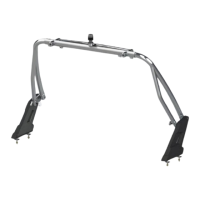

 To Next Page
