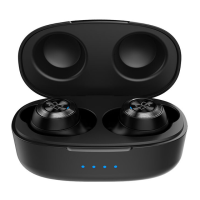
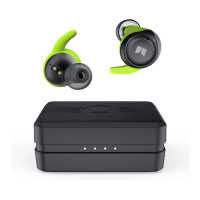
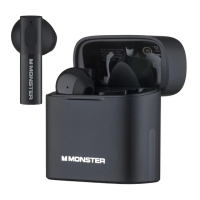
The MONSTER Airmars XKT03 Bluetooth Wireless Headphones are designed to provide a seamless audio experience with a focus on ease of use and reliable connectivity. These headphones are true wireless earbuds that come with a compact charging case, making them highly portable and convenient for daily use.
Function Description
The primary function of the MONSTER Airmars XKT03 is to deliver high-quality wireless audio. They connect to smart devices via Bluetooth, allowing users to listen to music, podcasts, and other audio content without the constraints of cables. Each earbud features a multi-function button (MFB) that controls various operations, including power, playback, call management, and voice assistant activation. The charging case serves as both a protective storage unit and a portable power bank for the earbuds, ensuring they are always ready for use.
Usage Features
- Automatic Power On/Off and Pairing: The headphones are designed for effortless use. Simply opening the charging case will automatically power on the headphones, initiating the pairing process. Once placed back into the charging case and the cover is closed, they will automatically power off and begin charging. This eliminates the need for manual power control in most scenarios.
- Manual Power Off: For situations where the charging case is not immediately available, the headphones can be manually powered off after being disconnected from a Bluetooth device for 3 minutes.
- Bluetooth Pairing: The pairing process is straightforward. Upon opening the charging case, the headphones enter pairing mode. Users can then search for "Monster Airmars XKT03" in their smart device's Bluetooth list and select it to connect. A "Connected" voice prompt confirms a successful connection.
- Automatic Reconnection: If the connection to a device is lost, the headphones will attempt to reconnect to the last paired device within 3 minutes, minimizing interruptions to the audio experience.
- Music Playback Control: The MFB on each earbud provides comprehensive control over music playback. A double click on either the left or right MFB will pause or play the audio. To navigate tracks, a triple click on the left MFB will go to the last song, while a triple click on the right MFB will advance to the next song.
- Volume Control: Volume adjustments are also managed via the MFB. Clicking the right MFB increases the volume, and clicking the left MFB decreases it.
- Call Management: The headphones facilitate hands-free calling. A double click on either MFB will answer or hang up a call. To reject an incoming call, users need to press either MFB for 2 seconds.
- Voice Assistant Activation: For quick access to smart device functionalities, pressing the left MFB for 2 seconds will activate the voice assistant.
- Game/Music Mode Switching: The headphones offer a dedicated feature to switch between game mode and music mode. Pressing the right MFB for 2 seconds will toggle between these two modes, optimizing audio performance for different activities.
- Factory Reset: In cases where pairing issues arise or a fresh start is desired, the headphones can be restored to factory settings. When the headphones are turned on but not connected to a Bluetooth device, clicking the MFB 5 times will clear previous pairing information and power them off, effectively performing a factory reset.
Maintenance Features
- Charging Case Charging: The charging case itself is charged via a Type-C charging cable connected to a 5V power adapter. An indicator light on the charging case provides visual feedback on its charging status. When the ice blue indicator flashes while closing the cover, it signals that the charging case needs to be recharged.
- Battery Life Extension: To prolong battery life, it is recommended to charge the headphones every 15 days when not in frequent use.
- Cleaning Charging Contacts: Maintaining good contact for charging is crucial. Users should clean any dirt on the charging contacts using cotton swabs with alcohol to ensure efficient charging.
- Storage Recommendations: For extended periods of non-use, it is advisable to fully charge the headphones and power them off. The charging cable should be unplugged after charging to prevent overcharging.
- Environmental Precautions: To ensure the longevity and safe operation of the headphones, it is important to keep the battery away from flammable materials or excessive heat, such as direct sunlight. The headphones should also be kept away from dust and water.
- Avoid Disassembly: Users are advised not to disassemble the headphones or their accessories, as doing so will void the warranty.
- Protection from Impact: To prevent damage, the headphones should be protected from any impact or vibration.
- Cleaning Agents: Only use appropriate cleaning agents. Chemical solvents or harsh cleaning agents should not be used on the headphones.

 Need help?
 General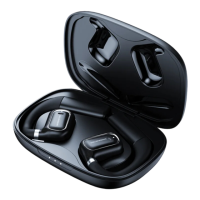




 To Next Page