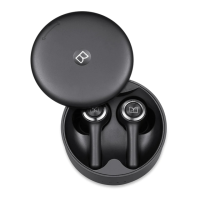
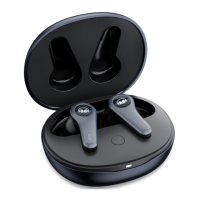
The MONSTER MH22002 Clarity 8.0 ANC Earbuds are in-ear earphones designed for audio playback and calls, featuring Active Noise Cancellation (ANC). The package includes two in-ear earphones (left and right), a charging case, a USB-C charging cable, and three pairs of ear tips (M size pre-installed).
Function Description:
These earbuds provide a wireless audio experience with the added benefit of Active Noise Cancellation. They are designed for ease of use, with automatic power on/off and pairing features. The earbuds support both wired and wireless charging for the charging case, offering flexibility in power management.
Important Technical Specifications:
The model number for these earbuds is MH22002. They are identified as "CLARITY 8.0 ANC" earbuds. The FCC ID is 2AVD2-MH22002, indicating compliance with FCC rules for digital devices. The device operates under part 15 of the FCC rules, meaning it must accept any interference received and may not cause harmful interference. The device has been evaluated for general RF exposure requirements and can be used in portable exposure conditions without restriction.
Usage Features:
- Power On/Off: The earphones automatically turn on when the charging case is opened. To turn them off, place them back in the charging case and close the cover; charging will commence.
- Charging Case: The charging case supports both wired charging via the included USB-C cable and wireless charging with a compatible wireless charging device.
- Noise Cancellation On/Off: Users can switch between different modes by pressing and holding the Multi-Function Button (MFB) on the right earphone for 2 seconds. The modes include [Noise Cancellation Off], [Ambient On], and [Noise Cancellation On].
- Pairing: When the charging case is opened, the left and right earphones automatically turn on and connect to each other, and a "pairing" voice prompt will be heard. For a new device connection, users need to go to their device's Bluetooth settings, search for new devices (specifically "new Monster device"), and a "connected" voice prompt will confirm successful pairing. The earphones will attempt to connect to the last connected device upon turning on. To pair a new device, the currently connected Bluetooth device must be turned off.
- Connecting Other Devices: To connect to a new device, keep the earphones in the charging case with the cover open. Press and hold the Pair/Reset to Factory Settings Button for approximately 5 seconds until the light indicator flashes, indicating pairing mode. Then, activate Bluetooth on the new device and search for new devices.
- Volume Control: The earbuds themselves do not have a volume control function. Volume adjustments must be made on the connected device.
- Call Management:
- Answer/End a call: Single tap the MFB.
- Reject a call: Press and hold the MFB for about 2 seconds.
- Music Playback:
- Play/Pause music: Single tap the MFB.
- Previous song: Double-tap the MFB of the left earphone.
- Next song: Double-tap the MFB of the right earphone.
- Voice Control: When connected to a phone, pressing and holding the MFB of the left earphone activates the voice assistant.
- LED Indicator Guide:
- Power On: "Power On" voice prompt.
- Power Off: "Power Off" voice prompt.
- Pairing: The white LED indicator of the charging case flashes quickly, and a "Pairing" voice prompt is heard.
- Connected: After connection, the indicator light goes off, and a "Connected" voice prompt is heard.
- Earphones Charging: The indicator light of the charging case flashes and turns off when fully charged.
- Charging Case Charging: The indicator light of the charging case is on during charging and turns off when fully charged.
Maintenance Features:
- Reset to Factory Settings: To reset the earphones, open the charging case cover, ensure both left and right earphones are inside, and press and hold the Pair/Reset to Factory Settings Button for 10 seconds. The Pair/Reset Red Indicator Light will flash quickly, confirming that the earphones have been restored to factory settings.
- Cautions:
- Always place the earphones in the correct location (L/R) within the charging case for normal charging.
- Replacement of the battery by the user is not recommended.
- Do not expose the battery (or battery pack) to excessive heat, such as direct sunlight or fire.
- FCC Statement: The device complies with FCC rules. Any changes or modifications not expressly approved by the party responsible for compliance could void the user's authority to operate the equipment. If the equipment causes harmful interference to radio or television reception, users are encouraged to try corrective measures such as reorienting the receiving antenna, increasing separation between equipment and receiver, connecting equipment to a different circuit, or consulting a dealer/radio/TV technician.

 Need help?
 General

 To Next Page