GETTING STARTED
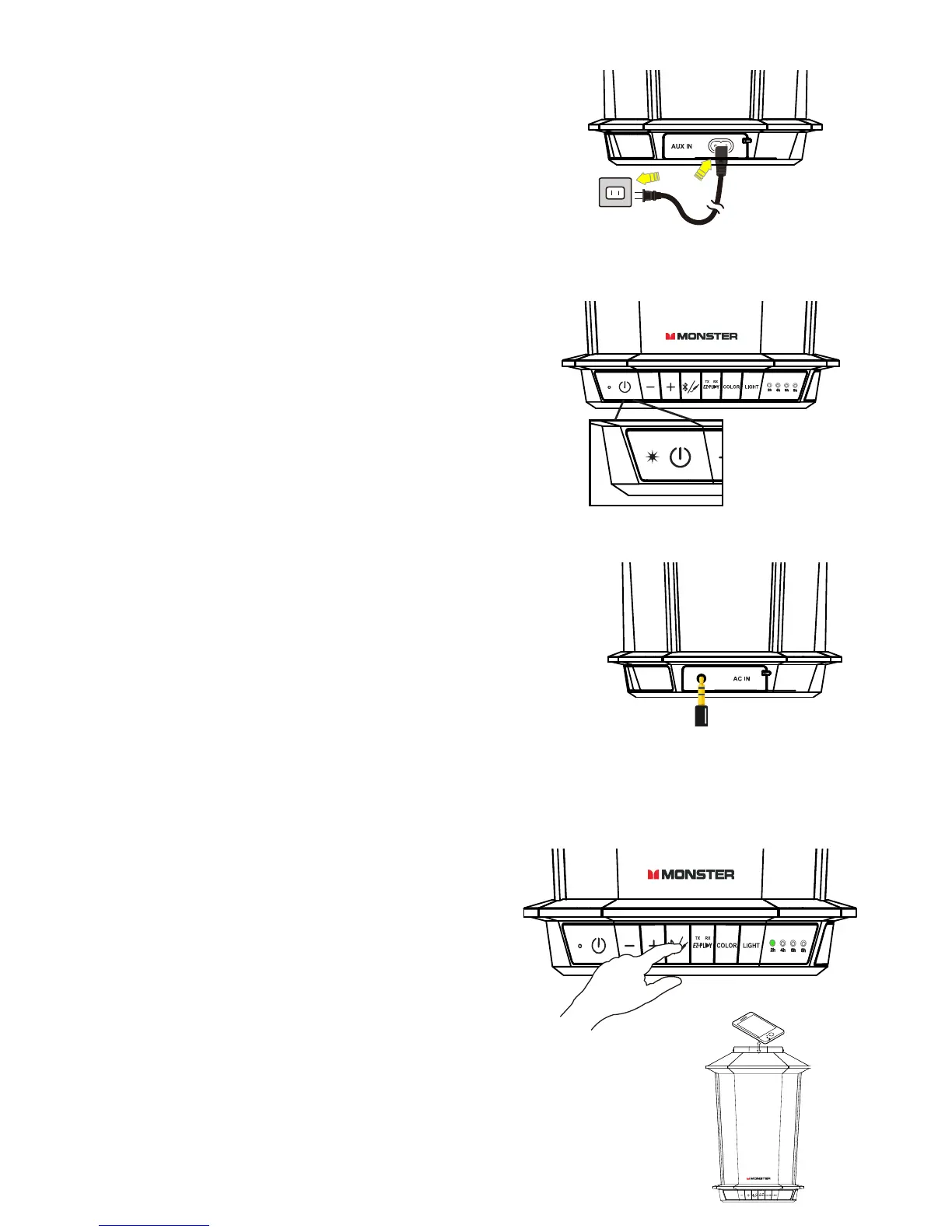
• Connect the AC cable to the speaker.
• Plug the AC cable into a wall outlet.
• Press the Power button to turn the speaker ON
(GREEN LED will turn on, and voice confirmation).
• Speaker will enter Bluetooth pairing mode
(BLUE LED will flash).
• If 3.5mm AUX cable is plugged in, speaker will automatically enter AUX mode.
CHARGING BATTERY
NOTE: Before first use, charge for ~10 hours.
• Connect speaker to AC outlet via AC
power input to charge the battery
(RED LED will turn on).
• When fully charged, RED LED will turn off.
• When low on battery life, RED LED will flash.
• Make sure Bluetooth function is enabled on your device.
• Place Bluetooth device and speaker within pairing distance (~3 ft.).
• Press and hold Bluetooth button for 3
seconds to enter pairing mode
(BLUE LED will flash).
• Search for Bluetooth connections on
your device. Select “TOWER OF MUSIC 2”.
• Speaker will confirm connection with
audible sound (BLUE LED turns solid).
BLUETOOTH CONNECTION
NFC CONNECTION
• Turn on Bluetooth on your NFC-compatible device.
• Tap your NFC-compatible device onto the speaker’s NFC logo.
• When paired, BLUE LED will stop flashing and remain steady.
(SELECTED DEVICE MUST BE ANDROID)
3.5MM AUX INPUT
• Plug a 3.5mm cable into the AUX input. Speaker will
automatically turn off Bluetooth function and switch
to AUX.
• Connect any audio device to the 3.5mm audio jack
to play audio through the speaker.
• Control volume on the speaker or use the
connected device’s playback functions.
6










 To Next Page