OPTICAL-IN OPERATION
4. Power on the connected external player and start playback the music as usual.
Turn on the digital audio output and set it to PCM (Plus Code Modulation) type
similar to the follows figure:
Bass
Treble
Balance
Select
Move
MENU
Exit
Sound Mode Standard
Surround Off
AVL Off
Audio Language English
Picture
Time
Setup
Lock
Off
AudioAudio
Digital Output PCMDigital Output PCM
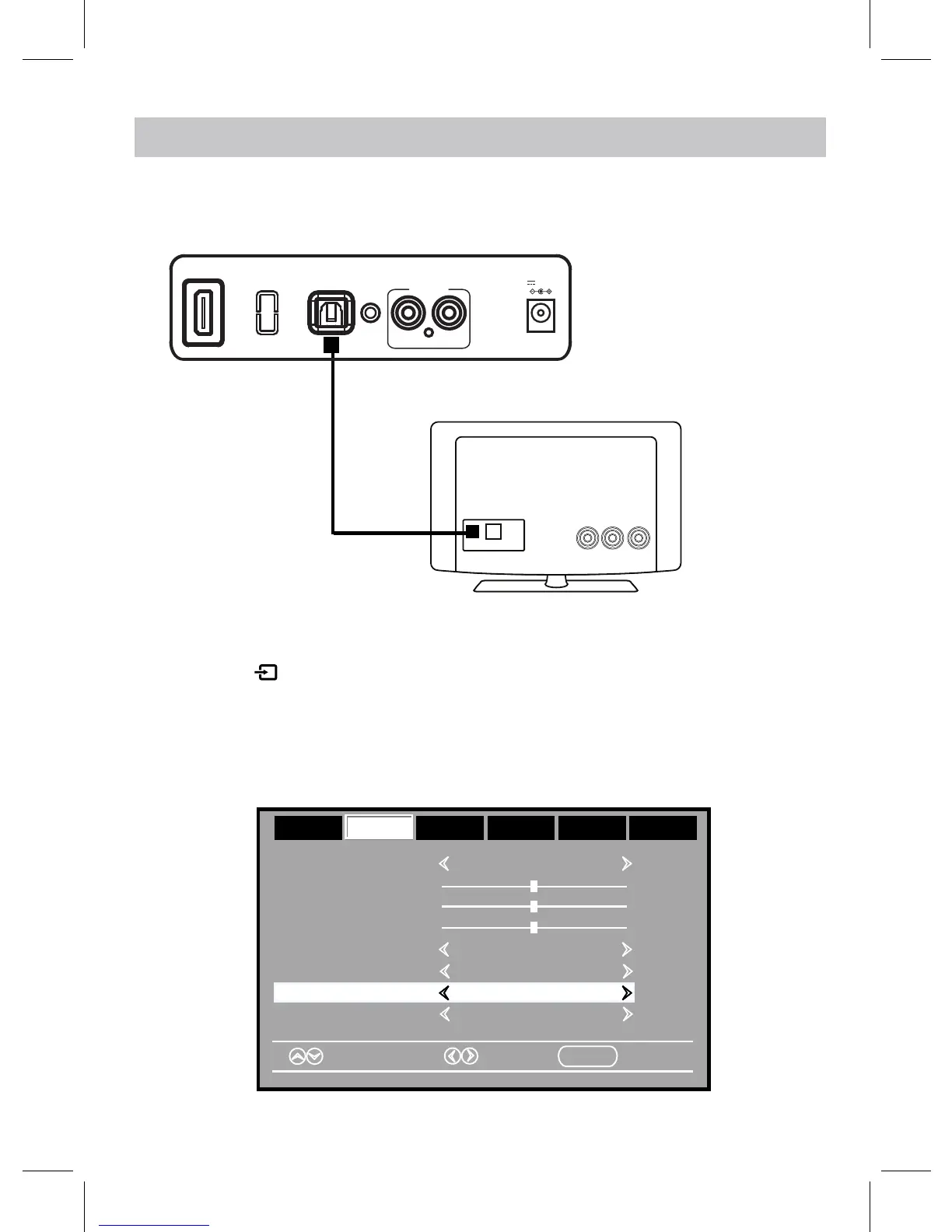
1. Connect the Optical out jack from the external audio player (such as TV, DVD
player etc.) to the OPTICAL IN jack on the rear of the unit with the optical
connection cable as illustated below:(For PCM format only)
OPTICAL OUT
Optical Connection Cable
Rear View
TV or DVD player etc.
16
OPTICAL IN
LINE IN
AUX IN
RL
DC IN
DC 16V, 3.5A
2. Power on the unit as previously explained.
3. Press the button on the unit or remote control repeatedly to switch to the
OPTICAL IN mode, the OPTICAL IN indicator on front of the unit will turn Green.
HDMI IN(ARC)


 To Next Page