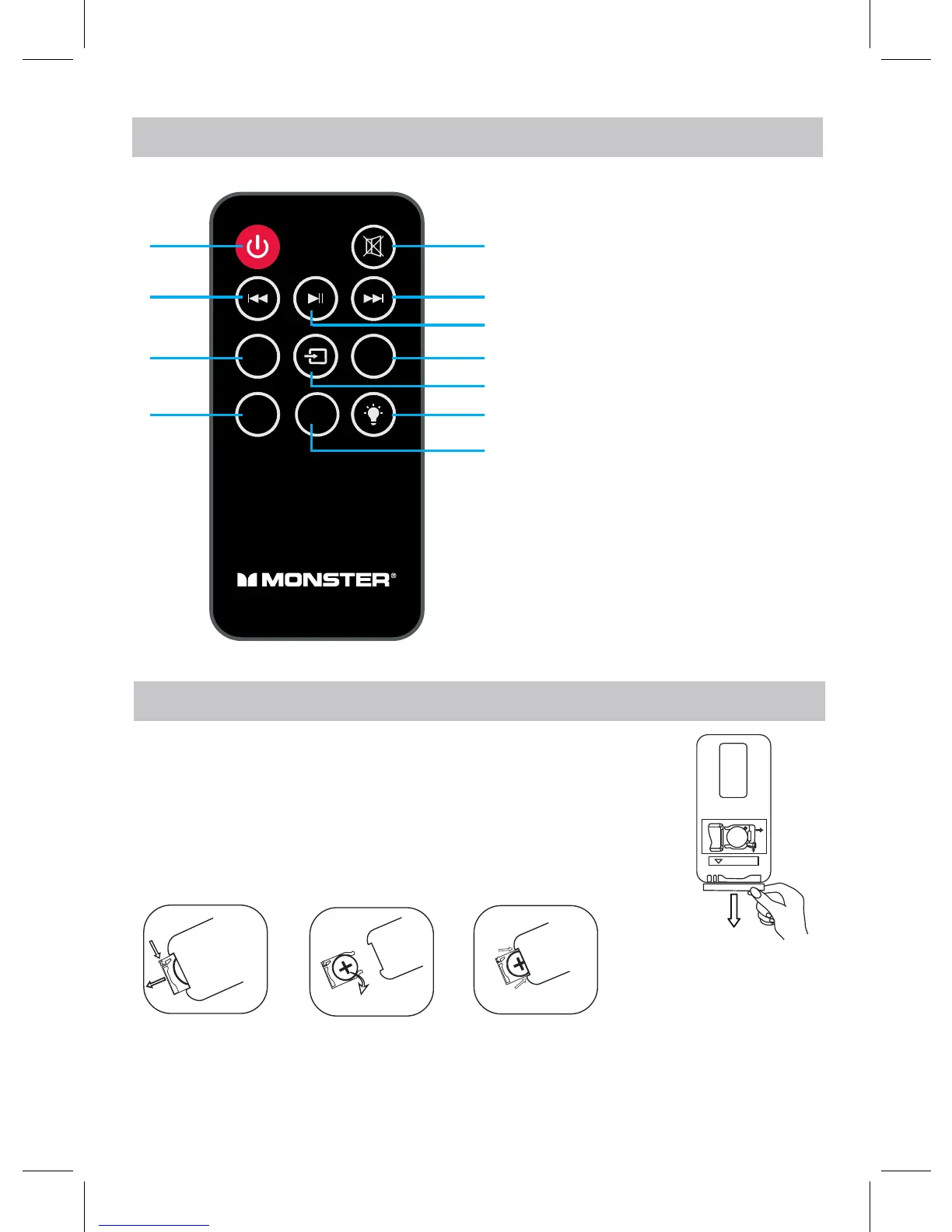
REMOTE CONTROL
8
VOL-
VOL+
PAIR
EQ
1
2
3
4
5
6
7
8
9
10
11
1. Power On/Off Button
2. Previous Button
3. Volume Down Button
4. PAIR Button
5. Mute Button
6. Next Button
7. Play/Pause Button
8. Volume Up Button
9. Mode Switch Button
10. LED Light Effect Button
11. EQ(equalizer) Button
BATTERY INSTALLATION OF REMOTE CONTROL
FIRST TIME USE
●Remove and discard the insulation tab as figure on the right.
●Replacing Batteries For Remote Control
1. Push and slide out the battery holder as Fig 1 below.
2. Replace the battery with a new CR2025 button cell as
the polarity markings on the rear of the Remote Control.
3. Close the battery holder.
RE L EAS E
PUS H
OPE N
R2 02 5
C
+
SN
Fig.1
Fig.2
Fig.3
.
Fig.2
Fig.3


 To Next Page