Volume Down: Push and hold to decrease volume. Release when
desired volume is reached.
Volume Up: Push
and hold to increase volume. Release when
desired volume is reached.
IMPORTANT: Make sure the “Shake to Shuffle” setting is turned off
on your iPod or iPhone. The bass of the speaker may activate it and
interfere with playback.
Connecting Other MP3 Devices
Connecting Devices Using 3.5mm (1/8-inch) Mini Jack Input
You can connect and listen to any music player that has a standard
3.5 mm headphone port using a mini to mini stereo cable (not included).
To connect, plug one end of the cable into the 3.5 mm headphone output
of your player and the other end into the 3.5 mm input on the back of the
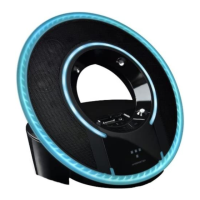
Tron Light Disc Audio Dock.
IMPORTANT: The iPod/iPhone dock will override and disable the 3.5mm
mini jack input when an iPod or iPhone is docked. Be sure to remove your
iPod/iPhone from the dock before using the 3.5mm input.
12
ENGLISH


 To Next Page
 Loading...