EasyManua.ls Logo

Mooer GROOVE LOOP Series - Connection Scenarios; Mono Connection; Stereo; Dual-Channel Connection

Mooer GROOVE LOOP Series
35 pages
Print Icon
To Next Page IconTo Next Page
To Previous Page IconTo Previous Page
Loading...
4
CONNECTION SCENARIOS
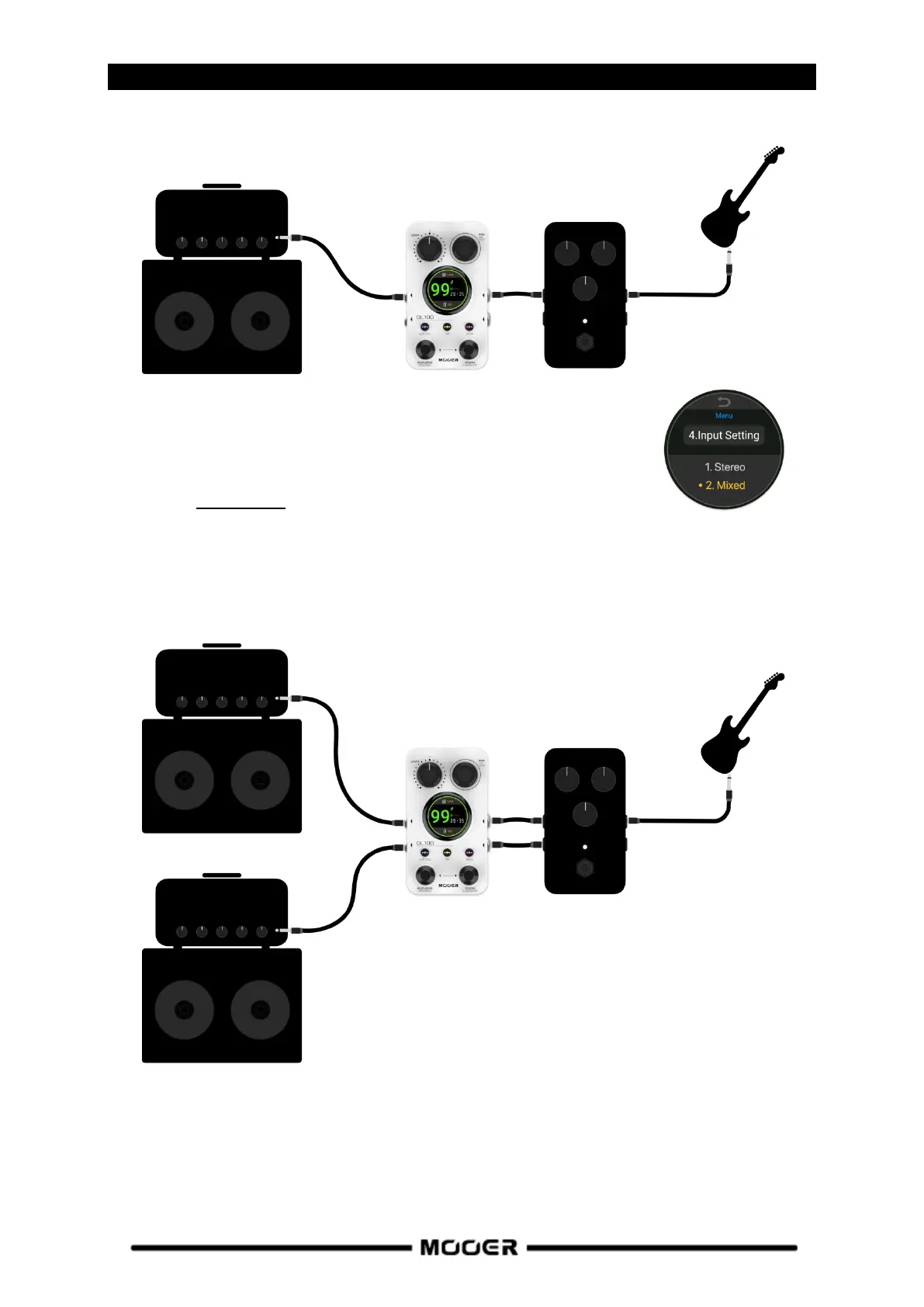
Mono connection
Note: In a single input scenario, if you want to avoid a situation where only
one output (or one side of the headphone) gets the pass-through signal from
the input, open the MENU screen and change "Input Setting" to "Mixed".
See chapter Input Setting.
Stereo / dual-channel connection

Effects
Amplifier
Left input
Left output
Instrument
Effects
Left amplifier
Left
input
Right
input
Left
output
Right
output
Instrument
Right amplifier