MOON 650 D Digital-to-Analog Converter / CD Transport
Remote Control Operation
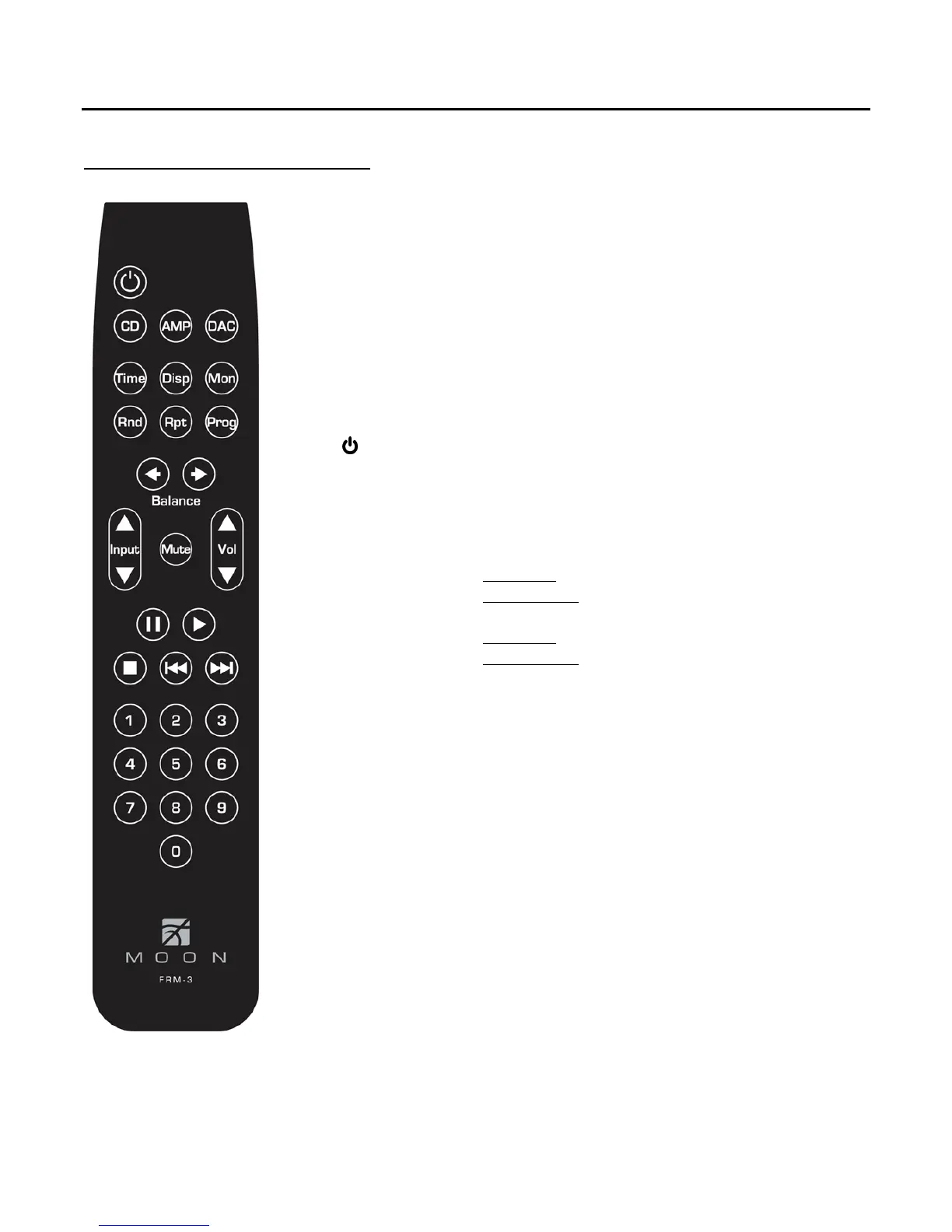
The MOON 650D D-to-A Converter uses the ‘FRM-3’ full function, all aluminum backlit
remote control (figure 3). It operates on the Philips RC-5 communication protocol and is
can be used with other MOON components such as CD Players, DAC’s, Integrated
Amplifiers, as well as other Preamplifiers.
The ‘FRM-3’ remote uses three AAA batteries (included). To install them, use a Phillips
head screwdriver #1 to remove the three screws located on the rear plate; insert the
batteries in the correct direction and then screw the rear plate back into place.
To operate the 650D with this remote control, you must first press the CD button
located on the second row from the top.
The
power button switches the 650D between ‘Standby’ and ‘On’ mode.
Pause the compact disc loaded into the transport
X Play the compact disc loaded into the transport
Stop playing the compact disc loaded into the transport
Press Once: Go back to the previous track on the disc
Press and hold: Scan backward through current track
Press Once: Skip forward to the next track on the disc
Press and hold: Scan forward through current track
0 thru 9 Direct access track number selection: Simply press the
number button(s) corresponding to the track you want
to play. This can be done either when another track is
already playing or when the disc is stopped.
The Input S and Input T buttons allow you to sequentially scroll, forward or
backward, through each of the 650D’s four (4) digital inputs - “D1”, “D2”, “D3” and “D4”
- and the internal CD transport (as opposed to the ‘Input’ button located on the 650D’s
front panel which only allows for forward scrolling).
The “Time”, “Disp” “Rnd”, “Rpt” and “Prog” buttons perform the identical functions
to their corresponding button located on the 650D’s front panel. Please refer to pages 7
and 8 for a more detailed description of each one.
Figure 3: FRM-3 Remote Control
____________________________________________________________________________________
Balanced Operation / Remote Control Operation 11


 To Next Page