15
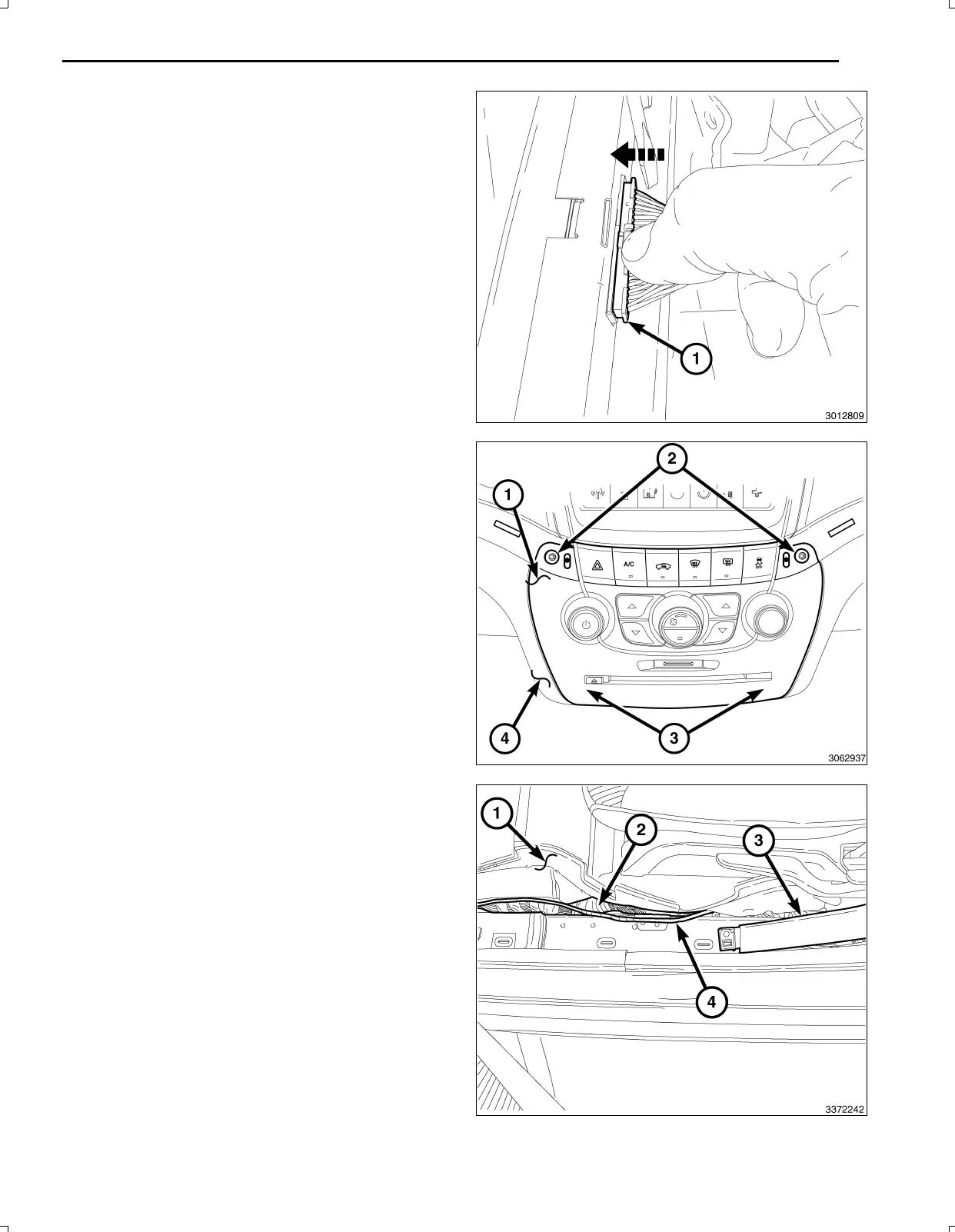
65.Carefullyconnectthe40wayconnector(1)ofthe
switchbankassembly.
66.PositiontheswitchbankintheI/Pandpressevenly
theengagethetwolowerclips(3).
67.Install,andtightenthetwoscrews(2)thatsecurethe
switchbank(1)totheI/P(4).
68.InstalltheI/Ptrimtotheleftandrightoftheswitch
bank.
NOTE:RoutingundertheI/Pshouldbeabovethe
brakepedalsledandsecuredtoeliminatepossible
interferencewithallpedalmovement.Routing
underthekickpanelshouldbesecuredtoeliminate
possibleinterferencewithallpedalmovement.
69.Routethebackupcamerawireharnessfromunderthe
LHsideoftheI/P(abovethebrakepedalsled)behind
theLFkickpanelandsecuretothevehicleharness
withtiestraps.
70.Routethebackupcamerawireharness(4)withthe
vehiclewiringharness(2)undertheedgeofthecarpet
(1)belowtheLFdoorscuffplateandbelowtheBpillar
lowertrim(3).Attachtothevehiclewiringharness(2)
withtiestrapswherenecessary.
Feb02,2011K6861161



 To Next Page