14
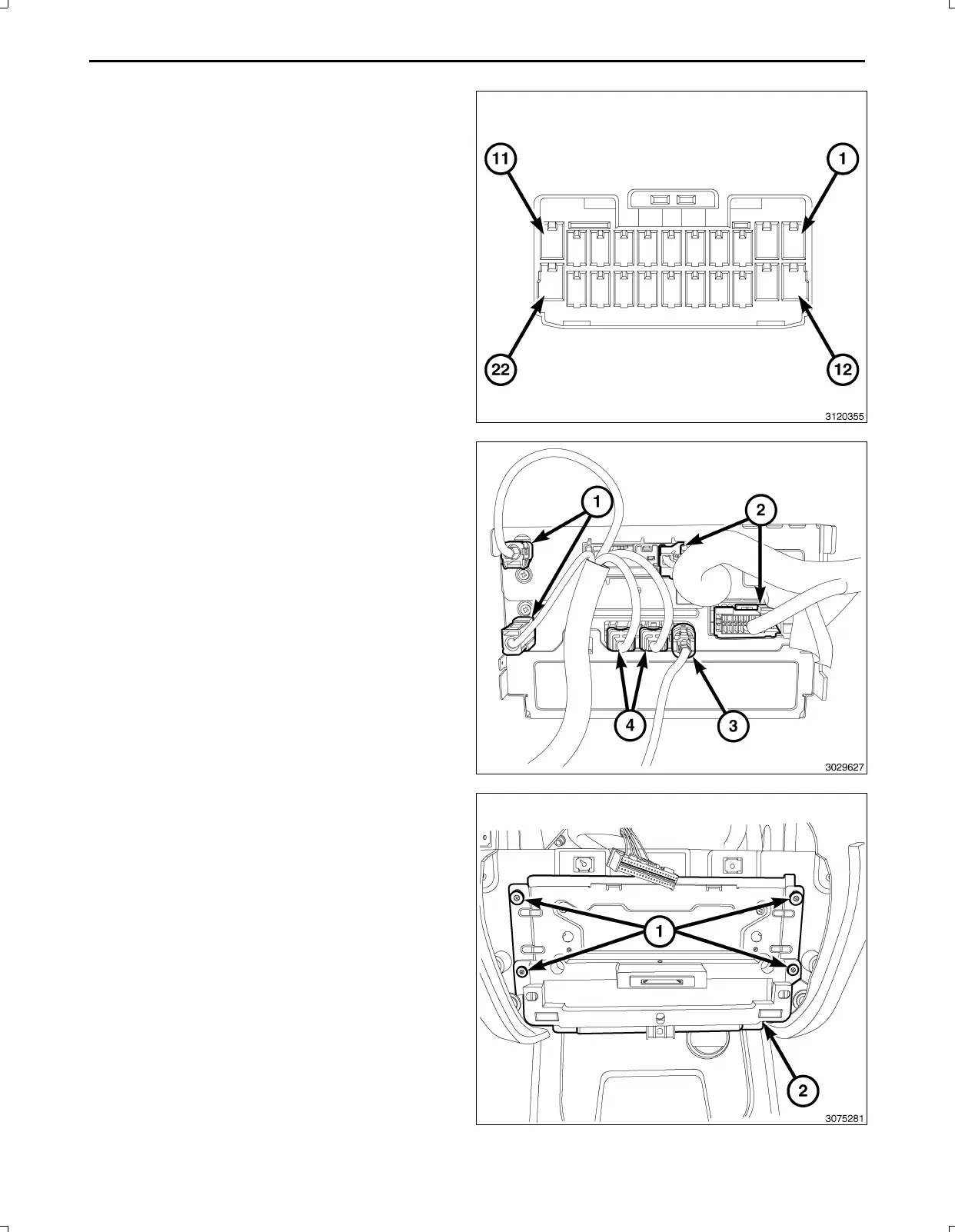
NOTE:Theremayalreadybea22pinconnectorcon
nectedtotheTGM.Usethatoneanddiscardtheone
suppliedinthekit.
61.BackouttheconnectorwirelockingtabfromtheTGM
harnessconnector3.
62.InsertthecameraharnesswiresintoTGMharness
connector3asfollows:
a.Signalwire(GY/LB)cavity15
b.Returnwire(GY/OR)cavity16
c.Shieldwire(Bare)cavity17
63.Connecttheantenna(s)(1),RFHUBandUCIcables
(4),videocable(3)andwiringconnectors(2)tothe
TGM.
NOTE:Makesurethe40wayconnector(1)ofthe
switchbankassemblyispositionedabovethe
TGMforaccesswhenconnectingtheswitchbank
assembly.
64.PositiontheTGM(2)andinstalltheretainingscrews
(1)totheTelematicsGatewayModule(TGM)(2).
Feb02,2011K6861161



 To Next Page