24
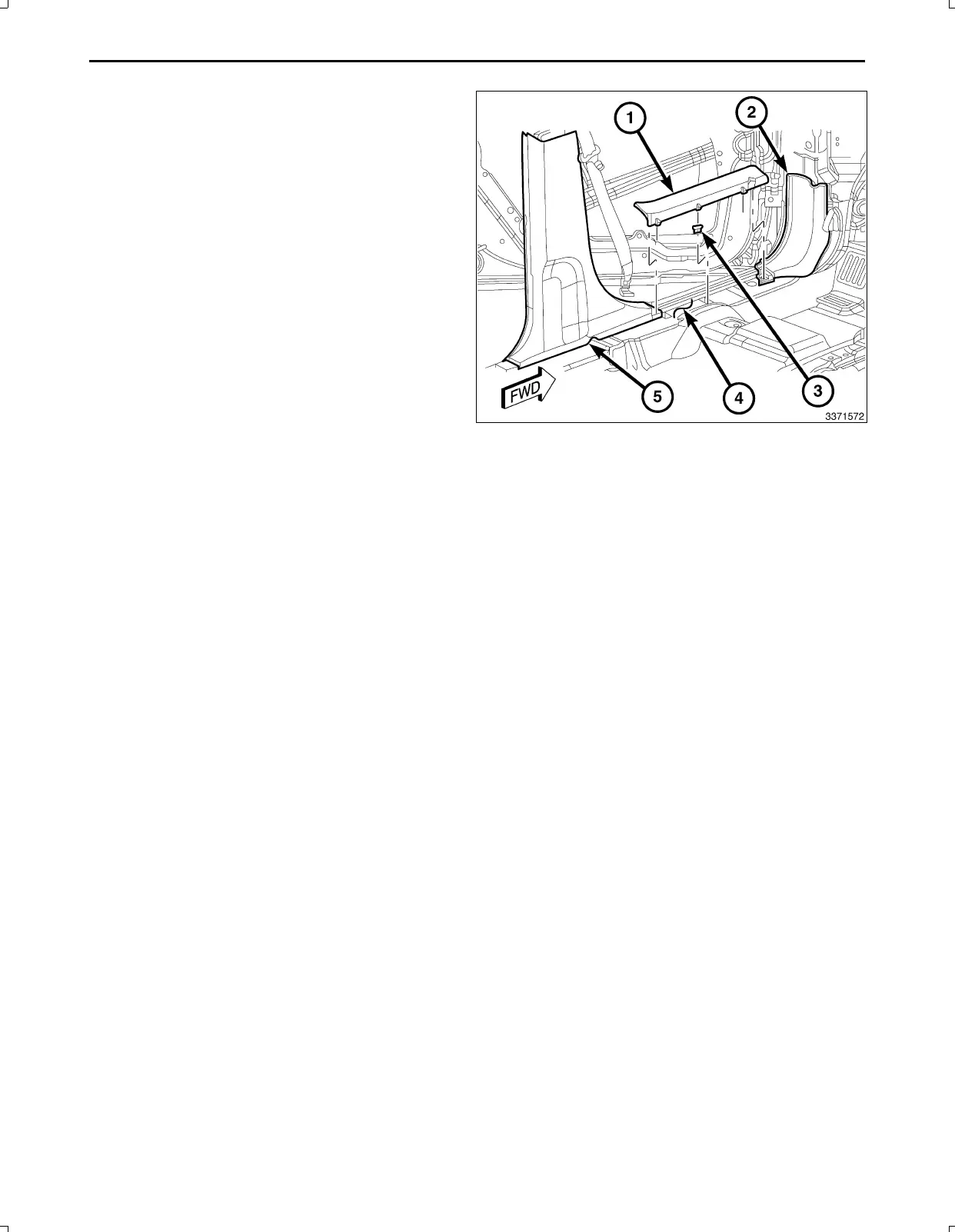
NOTE:Seatsremovedforclarity.
106.PositionthelowerportionoftheBpillartrim(5)and
handtaptosecuretheretainingclips.
107.PositiontheLHkickpanel(2)andhandtaptosecure
theretainingclips.
108.PositiontheLFdoorsillscuffplate(1)andhandtap
tosecuretheretainingclips.
109.PositiontheLRdoorsillscuffplate(notshown)and
handtaptosecuretheretainingclips.
110.Connectthebatterynegativecable.
PARKVIEWREARBACKUPCAMERAVEHICLECONFIGURATION
VehicleVINmustbeupdatedwiththesalescodeoftheaddedaccessoryinordertoenablesystemfunctionality.Using
theDealerCONNECTwebsiteandthescantool,completetheprocedurebelow:
1.Logontohttps://dealerconnect.chrysler.com
2.Inthe“VehicleOption”screenunderthe“GlobalClaimsSystem”categoryinthe“Service”tab,enterthevehicleVIN
andaddthesalescodeXAC(ParkViewRearBackUpCamera)asa“DealerInstalledOption”.
3.ConfirmthatthenewsalescodehasbeensuccessfullyaddedtotheVIN.
Withthescantoolconnectedtoboththeinternet(viaEthernetportorwirelessconnection)andthevehicle,followthe
stepsbelow:
4.UsingthescantoolselecttheVEHICLEPREPARATIONandthenselectRESTOREVEHICLECONFIGURATION.
5.FollowthestepbystepinstructionsonthescantooltocompletetheParkViewRearBackUpCameravehicle
configuration.
Feb02,2011K6861161



 To Next Page