Hogtalare Wireless Stereo Speaker
10
Hogtalare Wireless Stereo Speaker
11
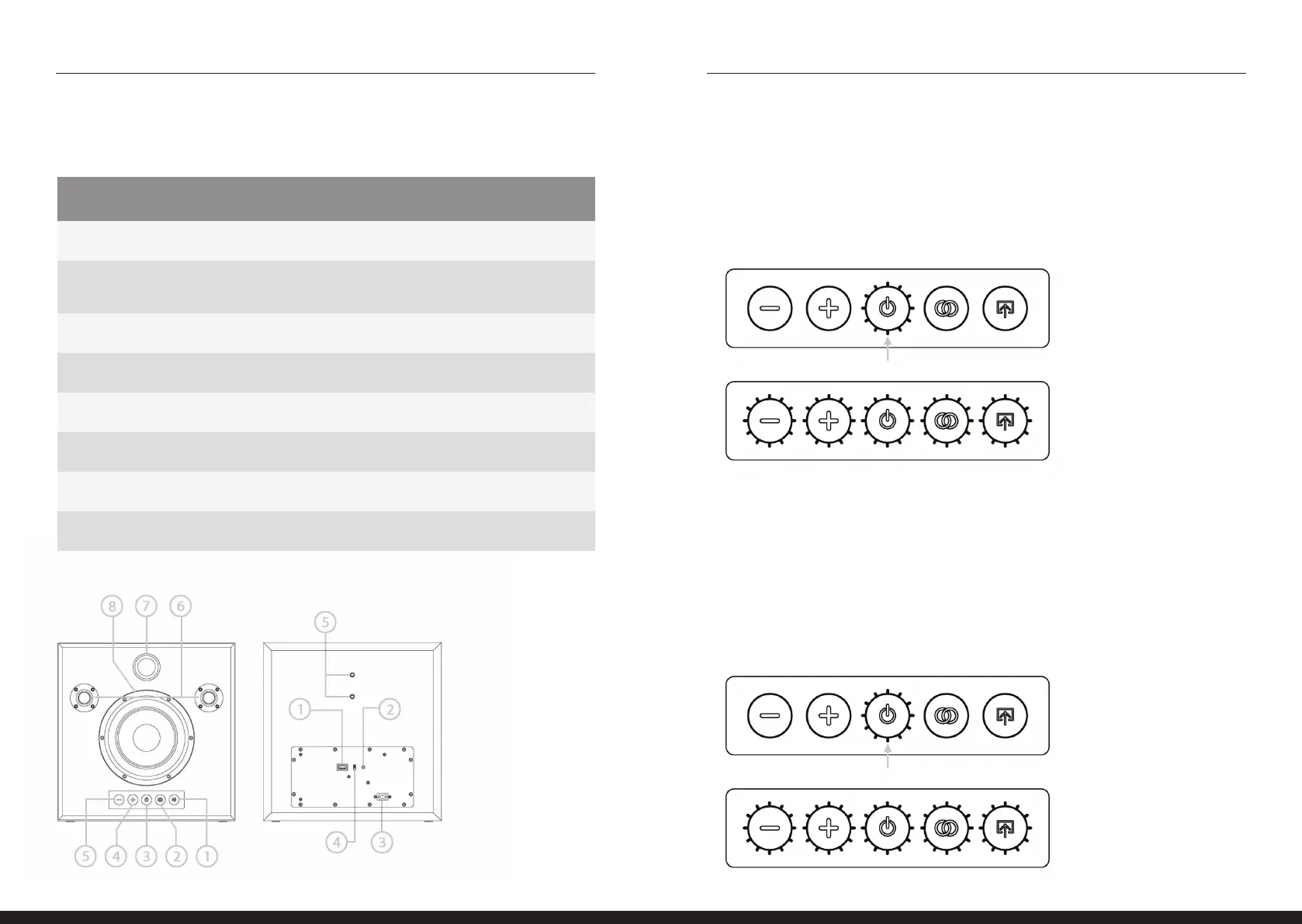
DEVICE LAYOUT
FRONT BACK
1. Input selection button / indicator 1. Usb port (5v output DC only)
2. Bt tws pairing button /
input indicator
2. Aux input for 3.5Mm stereo plug
3. Power button / / indicator 3. Ac power input
4. Sound level up button 4. Standby \ auto on selector
5. Sound level down button 5. Wall mount connections
6. Left \ right tweeters
7. Bass reex port
8. Woofer
FIRST POWER UP
1. Press the power button to turn on the speaker.
2. When the speaker is turned on, all lights will turn on
(excluding the bt \ tws pairing indicator).
1
2
TURNING THE DEVICE TO STANDBY:
1. Pess the power button to turn the device to standby.
2. Power led indicator will switch o.
3. Device will go back to standby mode automatically
after 40 minutes of inactivity
1
2


 To Next Page