EasyManua.ls Logo

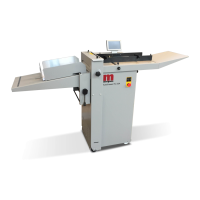
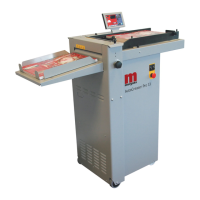
Morgana AutoCreaser Pro 33 - User Manual

Morgana AutoCreaser Pro 33
39 pages
Print Icon
To Next Page IconTo Next Page
Loading...
70-172 Issue 5 APRIL 2013
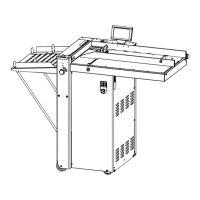
AutoCreaser Pro 33 (CB/UL)
SERVICE MANUAL
Document Creasing Machine
Morgana Systems Limited United Kingdom www.morgana.co.uk Telephone: ( 01908 ) 608888 Facsimile: ( 01908 ) 692399
Serial No. 740866 Onwards.

Questions and Answers

  • A
    Alex AllenAug 18, 2025
    What to do if my Morgana AutoCreaser Pro 33 has no touchscreen display?
    • S
      Sarah RiosAug 19, 2025
      If your Morgana Industrial Equipment has no touchscreen display and won't boot up, ensure the control system receives power and begins to boot-up when you release the E-stop switch. Check that there is V AC across the ATX PSU power cord. Inspect the 500mA fuse below the Mains Input connector and replace it if blown. If there is no V DC output from the ATX PSU, replace the ATX PSU. If the cooling fan doesn't run on the mini-ITX motherboard, replace the mini-ITX motherboard. Check for V DC power to the Touchscreen and repair the wiring connection or replace the Touchscreen Assembly if necessary.
  • G
    Gabriela PierceAug 22, 2025
    Why won't the pump operate on my Morgana AutoCreaser Pro 33 Industrial Equipment when the compressor switch is on?
    • H
      Heather WrightAug 22, 2025
      If the pump on your Morgana Industrial Equipment won't operate when the compressor switch is on, check the fuse on the PCB in the Pump Overload assembly. If the fuse is blown, replace it with a T315mA fuse, Morgana part number 681-011.
  • B
    bjohnsonAug 25, 2025
    What to do if my Morgana AutoCreaser Pro 33 has no power or display?
    • L
      Lisa FosterAug 26, 2025
      If your Morgana Industrial Equipment shows no power or display, start by replacing the blown fuse with the correct value. Check the power supply input, ensuring voltages read 240V or 110VAC. Inspect cables for continuity to the Emergency stop button and replace any faulty wires or connections. Check the power supply output: the black lead of the meter to the Black wire should read 5V dc on CN2, and the red lead of the meter to the Red wire should read 24V dc, and the red lead of the meter to the Yellow wire. If the supply has input but no output, replace the PSU. Check the voltage on the main PCB CN6; if there's no voltage, inspect the Brown and Blue wires or connection for damage and replace as needed.
  • J
    John MooreAug 28, 2025
    How to fix an erratic register of the Creaser on Morgana AutoCreaser Pro 33?
    • T
      Timothy WheelerAug 28, 2025
      If the Creaser on your Morgana Industrial Equipment is registering erratically, replace the damaged rubber rollers. Reset and tighten the gap setting to ensure the rollers are driving the card. If the issue persists, remove and replace the faulty drive motor assembly.
  • S
    Shannon SchroederSep 1, 2025
    What causes no drive or motors pulsing in Morgana AutoCreaser Pro 33 Industrial Equipment?
    • M
      Mr. Ryan CortezSep 1, 2025
      If your Morgana Industrial Equipment experiences no drive or the motors are pulsing, check that the green light is illuminated on both PSUs, indicating sufficient power to the motors. Also, check the 240/110VAC input to the Large PSUs by using a meter across the L& N terminals.
  • B
    Brenda MooreSep 4, 2025
    What to do if there is no LED on Stepper PCB of my Morgana Industrial Equipment?
    • T
      tsimmonsSep 4, 2025
      If there's no LED on the Stepper PCB of your Morgana Industrial Equipment, measure the voltage across V+ & V- of SP-150-24; it should read 24V dc. If there's no or a low reading, replace the PSU. Measure across V+ & V- of SP-150-48; it should read 48V dc. Measure across V+ of SP-150-48 & V- of SP-150-24; it should read 72V dc. If the voltage is correct but there's still no light on the stepper, check the cable integrity.
  • J
    joseph79Sep 7, 2025
    How to adjust edge and crunch sensors on Morgana AutoCreaser Pro 33 Industrial Equipment?
    • J
      Julie SilvaSep 7, 2025
      To address issues with the edge and crunch sensors on your Morgana Industrial Equipment, check the supply voltage. The black lead of the meter on tab IC8 (Main PCB) should read 1.3Vdc. To adjust these voltages, use VR4 for the Edge sensor and VR8 for the Crunch sensor.
  • A
    Amy GibsonSep 12, 2025
    What causes the 'Error Double Sheet' message on Morgana AutoCreaser Pro 33 Industrial Equipment?
    • E
      Erin HodgeSep 12, 2025
      If your Morgana Industrial Equipment displays an 'Error Double Sheet' message, check the link on CN13. Replace the link and refer to the wiring diagram.
  • M
    mchaseNov 14, 2025
    What to do if ‘NO SYNC’ appears on the touchscreen of my Morgana Industrial Equipment?
    • J
      James Ayers MDNov 14, 2025
      If the Morgana Industrial Equipment touchscreen displays ‘NO SYNC’ and the machine won't boot, begin by checking the ATX power supply. Disconnect the 20/24 way ATX power supply connector from the ITX Motherboard. Use a piece of tinned copper wire to short out the GREEN and BLACK wires of the connector. With the ATX power supply switched on, measure the voltage across the RED and BLACK wires of one of the 4 way connectors. Also, measure the voltage across the YELLOW and BLACK wires of one of the 4 way connectors. Check the ITX Mother Board: Remove the 3V lithium disc battery from the ITX mother board and check the voltage using a multi meter. If the voltage is less than 1.5V, replace the ITX mother board. If the voltage is more than 1.5V, refit the battery to the board. With the power to th...

Morgana AutoCreaser Pro 33 Specifications

General IconGeneral
ModelAutoCreaser Pro 33
TypeCreasing Machine
CategoryIndustrial Equipment
Paper Weight80 - 400gsm
Creases per SheetUp to 16
Max Sheet Size700mm x 330mm
SpeedUp to 8, 500 sheets per hour
Power Supply230V, 50/60Hz

Related product manuals